Wazuh vulnerability detection is a manager-side module. The Vulnerability Scanner takes the software inventory that Syscollector collects on each agent, matches it against vulnerability intelligence synchronised from Wazuh CTI through the indexer, and writes the result to the wazuh-states-vulnerabilities index. It is enabled by default, which means most of the work is verifying the three dependencies rather than switching anything on. There is no scan button: detection is driven by inventory updates.
What you need
- A Wazuh manager with a working indexer connection. The feed arrives through the indexer, so no indexer means no vulnerability data.
- At least one enrolled agent. See installing the agent on Linux or on Windows.
- Root on the manager to edit
/var/wazuh-manager/etc/wazuh-manager.conf. - Outbound access from the indexer to Wazuh CTI, since the indexer is what synchronises the content.
Enable vulnerability detection on the manager
The block is in /var/wazuh-manager/etc/wazuh-manager.conf, inside the <wazuh_config> root. Confirmed on a 5.0.0-beta5 stack, the shipped default is exactly this, with no other options present:
<vulnerability-detection>
  <enabled>yes</enabled>
  <feed-update-interval>60m</feed-update-interval>
</vulnerability-detection>
Two further options are documented in the reference. <pageSize> sets how many vulnerability records are fetched per page during a feed update, defaulting to 100 and accepting 1 to 10000. <numSlices> sets the parallelism of the first full content synchronisation, defaulting to 2 and accepting 1 to 32.
<vulnerability-detection>
  <enabled>yes</enabled>
  <feed-update-interval>60m</feed-update-interval>
  <pageSize>100</pageSize>
  <numSlices>2</numSlices>
</vulnerability-detection>
Restart the manager after editing:
systemctl restart wazuh-managerThe documentation warns against raising <numSlices> casually: more slices can increase memory use without a proportional reduction in time, and anything above 2 should be benchmarked first.
Confirm the manager can reach the indexer
The scanner cannot obtain intelligence or index results without the indexer, and the failure is quiet: the inventory simply never updates. Check the <indexer> block first.
<indexer>
  <hosts>
    <host>https://127.0.0.1:9200</host>
  </hosts>
  <ssl>
    <certificate_authorities>
      <ca>etc/certs/root-ca.pem</ca>
    </certificate_authorities>
    <certificate>etc/certs/indexer-connector.pem</certificate>
    <key>etc/certs/indexer-connector-key.pem</key>
  </ssl>
</indexer>
Then prove the connection with the same material the manager uses:
curl --cacert /var/wazuh-manager/etc/certs/root-ca.pem \
     --cert /var/wazuh-manager/etc/certs/indexer-connector.pem \
     --key /var/wazuh-manager/etc/certs/indexer-connector-key.pem \
     https://127.0.0.1:9200/_cluster/health
A successful response returns the indexer cluster health with a status of green or yellow. If the indexer is configured for username and password authentication instead, the credentials belong in the manager keystore rather than the configuration file:
wazuh-manager-keystore -f indexer -k username -v wazuh-managerwazuh-manager-keystore -f indexer -k password -v <PASSWORD>The manager reads them from the keystore at start.
Make sure Syscollector is collecting inventory
Vulnerability detection has exactly one input from the endpoint: the inventory that the Syscollector module gathers. It runs on the agent and is enabled by default. The documented requirement is that <disabled>, <os> and <packages> are set for vulnerability detection to work, and detection timing follows the module’s scan interval, which defaults to 1h.
<wodle name="syscollector">
  <disabled>no</disabled>
  <interval>1h</interval>
  <os>yes</os>
  <packages>yes</packages>
  <synchronization>
    <enabled>yes</enabled>
    <interval>5m</interval>
  </synchronization>
</wodle>
On Windows, add hotfix collection so the scanner can tell which vulnerabilities Microsoft updates have already resolved:
<wodle name="syscollector">
  <hotfixes>yes</hotfixes>
</wodle>
Put this in the group’s shared configuration rather than on individual endpoints. The documented pattern for testing is to create a group, drop the <wodle name="syscollector"> block into its agent.conf inside an <agent_config> element, and add the agent to the group. For a test run you can shorten <interval> and the synchronisation interval to 60s and set <scan_on_start>yes</scan_on_start> so restarting the agent triggers a scan immediately. Put the production values back afterwards.
Watch the first scan happen
There is no scan button, so the manager log is how you know the scanner ran. On the beta5 lab the first scan of both agents landed a few minutes after the feed finished downloading:
2026/09/23 02:52:27 wazuh-manager-modulesd:vulnerability-scanner: INFO: Agent '002' - Packages scan completed in 148 ms: 131 packages scanned, 0 skipped, 0 vulnerable packages
2026/09/23 02:52:27 wazuh-manager-modulesd:vulnerability-scanner: INFO: Agent '002' - First vulnerability scan completed: vulnerabilities indexed, no security alerts generated (alerts are suppressed on first scan)
2026/09/23 02:52:27 wazuh-manager-modulesd:vulnerability-scanner: INFO: Vulnerability scan completed: agent='002' type=full reason=first_scan option=VDFirst
2026/09/23 02:52:46 wazuh-manager-modulesd:vulnerability-scanner: INFO: Vulnerability scan start: agent='001' (v5.0.0) type=full reason=first_scan option=VDFirst
2026/09/23 02:52:47 wazuh-manager-modulesd:vulnerability-scanner: INFO: Agent '001' - Packages scan completed in 31 ms: 112 packages scanned, 0 skipped, 3 vulnerable packages
2026/09/23 02:52:47 wazuh-manager-modulesd:vulnerability-scanner: INFO: Agent '001' - Vulnerability scan completed: 4 new, 0 solved
2026/09/23 02:52:47 wazuh-manager-modulesd:vulnerability-scanner: INFO: Agent '001' - First vulnerability scan completed: vulnerabilities indexed, no security alerts generated (alerts are suppressed on first scan)
2026/09/23 02:52:47 wazuh-manager-modulesd:vulnerability-scanner: INFO: Vulnerability scan completed: agent='001' type=full reason=first_scan option=VDFirst
Read those lines closely, because they answer the three questions people raise tickets about.
reason=first_scan with alerts are suppressed on first scan is the documented no-findings behaviour, stated by the software itself. Four vulnerabilities were indexed and nothing appeared in the Findings tab, and that is correct.
131 packages scanned, 0 skipped, 0 vulnerable packages on agent 002 is a complete, successful scan that found nothing. An Ubuntu 24.04 image that is fully patched produces exactly this, and it is not a broken scanner. Agent 001, an Amazon Linux 2023 container, produced 3 vulnerable packages and 4 new: one CVE affected two packages.
Scan time was 148 ms and 31 ms. The scanner is not the slow part of this pipeline; the feed download and the inventory synchronisation are.
Afterwards the state indices carried the results: wazuh-states-vulnerabilities held 4 documents and wazuh-states-inventory-packages held 243, which is the two agents’ package lists added together.
Read the vulnerability inventory
Open the dashboard menu and go to Threat intelligence, then Vulnerability Detection. Three tabs:
- Dashboard summarises findings by severity, score, affected operating system, affected agent, package and publication year.
- Inventory is the current state of each endpoint: agent name, package name, package version, severity and CVE ID. Two filters split the view into Evaluated, where Wazuh has confirmed the package is affected from available CTI data, and Under evaluation, where the assessment is still pending and will update automatically.
- Findings holds the event records, each carrying a status of
vulnerability-detectedorvulnerability-resolved.
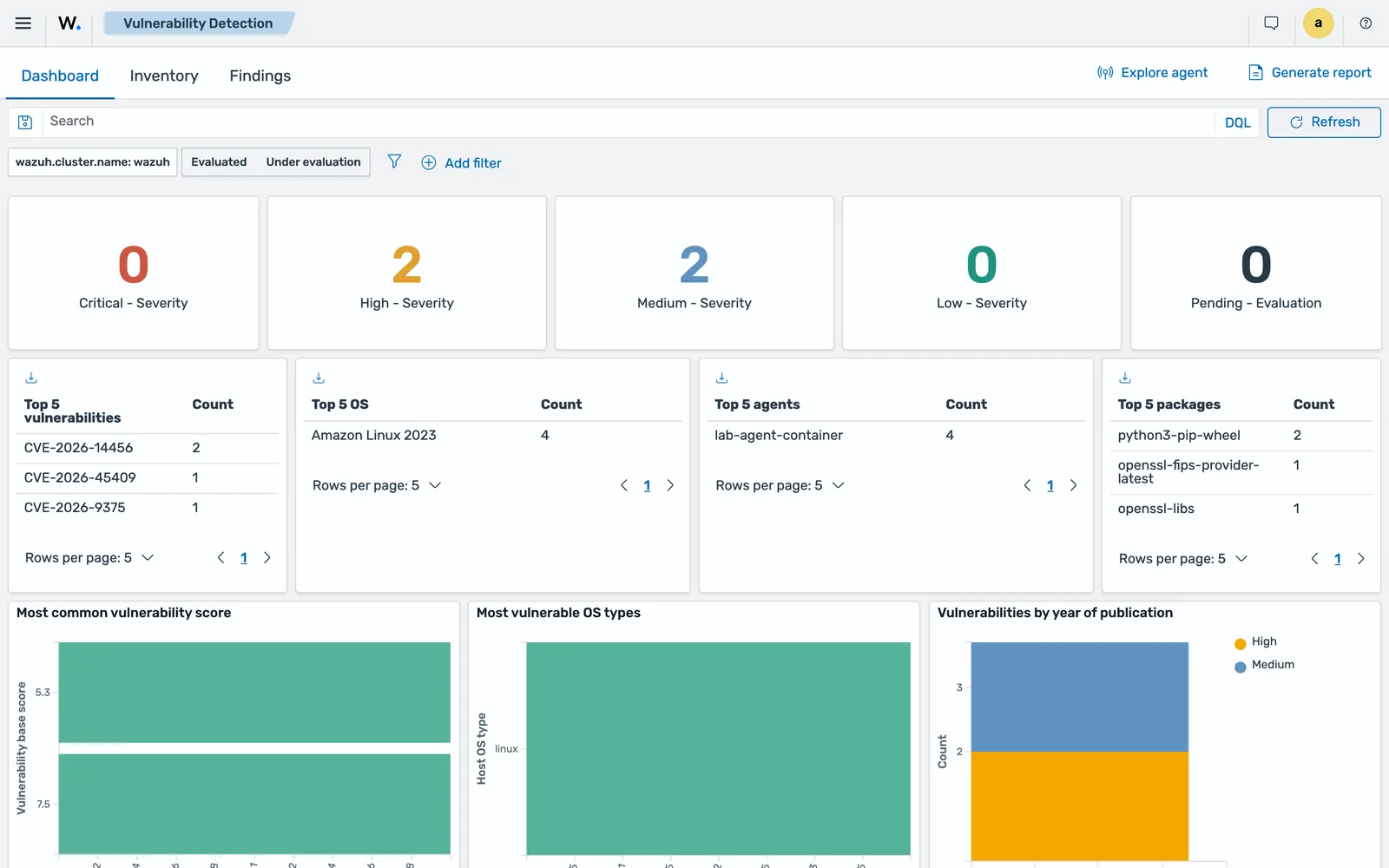
Click a row to inspect the document. Here is a real one from the lab, trimmed:
{
 "package": {
  "architecture": "aarch64",
  "description": "This package provides the latest build of the OpenSSL FIPS module.",
  "installed": "2026-08-12T03:09:03.000Z",
  "name": "openssl-fips-provider-latest",
  "path": null,
  "size": 1733738,
  "type": "rpm",
  "version": "1:3.5.7-2.amzn2023.0.1"
 },
 "state": {
  "document_version": 1
 },
 "vulnerability": {
  "category": "Packages",
  "detected_at": "2026-09-23T02:52:47.037Z",
  "id": "CVE-2026-14456",
  "published_at": "2026-08-13T15:19:31Z",
  "scanner": {
   "condition": "Package less than 1:3.5.7-2.amzn2023.0.2",
   "reference": "https://cti.wazuh.com/vulnerabilities/cves/CVE-2026-14456",
   "source": "Amazon Linux Security Center",
   "vendor": "Wazuh"
  },
  "score": {
   "base": 7.5,
   "version": "3.1"
  },
  "severity": "High",
  "under_evaluation": false
 },
 ...
}
That document is the whole argument, in one place: the installed version, the version that fixes it, the feed that said so, and a link to the CTI page. Package less than 1:3.5.7-2.amzn2023.0.2 against an installed 1:3.5.7-2.amzn2023.0.1 is a difference in the final digit, which is the kind of claim you want evidence for before you open a change request.
The fields you will filter and report on:
| Field | What it holds |
|---|---|
vulnerability.id |
The CVE identifier |
vulnerability.severity |
Severity of the detected vulnerability |
vulnerability.score.base |
Base CVSS score, with the version in vulnerability.score.version |
vulnerability.scanner.condition |
Why the package is considered vulnerable, for example a version threshold |
vulnerability.scanner.reference |
Link to the Wazuh CTI page for the CVE |
vulnerability.scanner.source |
Which feed made the claim, for example Amazon Linux Security Center |
vulnerability.detected_at |
When Wazuh detected it |
vulnerability.published_at |
When the CVE was published |
vulnerability.under_evaluation |
Whether assessment is still pending |
package.name, package.version |
The affected package |
wazuh.agent.id, wazuh.agent.name |
The endpoint |
vulnerability.scanner.condition is the field to reach for in any argument about a false positive. It states the rule that fired, for instance that the installed package is older than a fixed version, which turns “Wazuh says we are vulnerable” into something checkable.
When findings appear, and when they do not
This is the part that generates the most support questions, so it is worth stating plainly. Wazuh tracks two things: the inventory, which is the current vulnerability state and updates whenever inventory or CTI content changes, and findings, which are records of a vulnerability being newly detected or newly resolved. Not every inventory update produces a finding.
Documented cases that update the inventory but generate no findings:
- The first system inventory scan after an endpoint enrols. It builds the inventory only. Verified on the beta5 lab, where the manager said so in as many words:
First vulnerability scan completed: vulnerabilities indexed, no security alerts generated (alerts are suppressed on first scan). - A CTI content update. Wazuh re-evaluates existing inventory against the new intelligence without triggering a new endpoint scan.
- An agent reconnecting to a different node in a cluster. The new node has no prior state for that agent and treats it as an initial synchronisation.
Documented cases that do produce findings: a package installation, update or removal that adds or resolves a vulnerability, a hotfix change, and an operating system version or patch-state change picked up by a later inventory scan.
One more behaviour to know: if a package changes while the agent is stopped, Wazuh updates the vulnerability state at the next inventory synchronisation but does not generate a finding for the change it missed.
Wazuh vulnerability detection not working: the checklist
Work down this list rather than across it. Each step assumes the one above it passed.
- Is the agent Active? Go to Agents management, Summary, and confirm the status. A disconnected agent sends no inventory. If it is not, work through agent disconnected or never connected.
- Is the manager reaching the indexer? Run the
_cluster/healthcurl above. The scanner gets its feed through the indexer and indexes its results there. - Is the module enabled? Check
<enabled>yes</enabled>in the<vulnerability-detection>block, and that you restarted the manager after editing. - Has the feed synchronised? The default update interval is 60 minutes and the first full synchronisation is the slow one. A newly built manager will not have complete intelligence in the first few minutes. The manager log narrates it, so grep for
content-updater. On a beta5 lab the consumer took about three minutes to become ready:
2026/09/23 02:37:56 wazuh-manager-modulesd:content-updater: INFO: IndexerDownloader: Consumer 'cti:catalog:consumer:vulnerabilities' is still running in '.wazuh-cti-consumers'. Waiting 60s before retrying.
2026/09/23 02:38:23 wazuh-manager-analysisd: INFO: [CMSync] Event processing is now active
2026/09/23 02:38:56 wazuh-manager-modulesd:content-updater: INFO: IndexerDownloader: Consumer 'cti:catalog:consumer:vulnerabilities' is still running in '.wazuh-cti-consumers'. Waiting 60s before retrying.
2026/09/23 02:39:55 wazuh-manager-analysisd: INFO: [IOC::Sync] Changes detected for IOC type 'connection', updating...
2026/09/23 02:39:56 wazuh-manager-modulesd:content-updater: INFO: IndexerDownloader: Consumer 'cti:catalog:consumer:vulnerabilities' in index '.wazuh-cti-consumers' is ready. Starting feed download.
2026/09/23 02:40:04 wazuh-manager-analysisd: INFO: [IOC::Sync] Synchronized IOC type 'connection'
is ready. Starting feed download is the line that says the blocker cleared. Until you see it, an empty inventory means nothing.
5. Is Syscollector running with os and packages enabled? Check the agent’s <wodle name="syscollector"> block, or the group configuration that overrides it.
6. Has the first inventory scan completed? With the default 1h interval, that can be up to an hour after the agent connects. Grep the manager log for vulnerability-scanner and look for Packages scan completed. On the beta5 lab that line arrived about fifteen minutes after the stack started, held up by inventory synchronisation rather than by the scanner.
7. Are you expecting findings when only the inventory will update? Re-read the section above. On a fresh endpoint, the Inventory tab fills and the Findings tab stays empty. That is correct behaviour.
8. Is the operating system covered? Check the compatibility matrix below.
Which operating systems are covered
The scanner is fed by a defined set of sources: operating system vendors including AlmaLinux, Amazon Linux, Arch Linux, Canonical, Debian, Fedora, Oracle Linux, Red Hat, Rocky Linux and SUSE, plus the security databases Microsoft Security Updates, the National Vulnerability Database, Open Source Vulnerabilities and CISA. Package ecosystems NPM and PyPI are listed as providers too.
The officially supported operating systems include AlmaLinux 8 to 10, Amazon Linux 1, 2, 2022 and 2023, Arch Linux rolling, Ubuntu 14.04 through 24.04 LTS, Debian 10 through 14, Red Hat and CentOS 6 through 10, and SLES and SLED 12 and 15. Fedora, Oracle Linux and Rocky Linux follow whatever their feeds report. Windows and macOS coverage follows the NVD feed. Detection on anything outside the matrix depends on what CTI data exists and what inventory fields the agent collected.
Note what this means in practice. Coverage is per operating system, and it is driven by the vendor feed, so a distribution with a thin security feed produces thin results even when Wazuh is working perfectly. Check the matrix before you promise an estate-wide CVE report.
Common errors
The inventory is empty for one endpoint
Syscollector is not collecting, or its results are not reaching the manager. Confirm the agent is Active, then confirm <disabled>no</disabled> with <os> and <packages> set to yes in its Syscollector configuration. Remember the group’s shared configuration overrides the local file.
The inventory is empty for every endpoint
Look at the manager-to-indexer path, not at the agents. The scanner cannot retrieve intelligence or index results if the indexer is unreachable, and the documentation notes that vulnerability information may then be missing or stale in the dashboard. Run the _cluster/health check with the manager’s own certificates.
The inventory sync server answered HTTP 503 for 3 request(s) in the last 90 s; answering 503.
A beta5 observation rather than a documented error, and worth knowing because for a quarter of an hour it looks exactly like a broken agent. On a 5.0.0-beta5 lab the manager logged this from wazuh-manager-remoted:forwarder every two minutes after startup:
2026/09/23 02:40:47 wazuh-manager-remoted:forwarder: WARNING: The inventory sync server answered HTTP 503 for 3 request(s) in the last 90 s; answering 503.
2026/09/23 02:42:47 wazuh-manager-remoted:forwarder: WARNING: The inventory sync server answered HTTP 503 for 2 request(s) in the last 90 s; answering 503.
2026/09/23 02:44:44 wazuh-manager-remoted:forwarder: WARNING: The inventory sync server answered HTTP 503 for 2 request(s) in the last 90 s; answering 503.
The feed had loaded, both agents were active, and events and findings were flowing. But wazuh-states-vulnerabilities and wazuh-states-inventory-packages both held zero documents while the warning was repeating: the manager’s inventory sync path was refusing the agents’ state payloads, so nothing reached those indices.
This is a delay, not a failure. The warnings stopped, the inventory arrived, and roughly fifteen minutes after startup the scanner ran and indexed its results: 243 package documents and 4 vulnerabilities. Nothing was lost.
Fix: wait, and check the timestamps before you change anything. The reason it belongs in this lesson is the diagnosis. When the wazuh-states-* indices are empty on a newly built stack while events and findings are healthy, read the manager log for this warning and give it fifteen minutes before you start editing Syscollector configuration. If the warning is still repeating an hour later, that is a different problem.
Everything sits under “Under evaluation”
Those are entries Wazuh is still assessing against available CTI data, and the documentation says they update automatically when the relevant vulnerability data becomes available. Give the feed time to complete its synchronisation before concluding anything.
You changed feed-update-interval and nothing got faster
Values below 60m are not supported and are ignored. Sixty minutes is the floor.
You tried to configure an offline feed
<offline-url> was removed in Wazuh 5.0 and offline feed loading is not supported, because the feed content format changed. An air-gapped deployment has no documented path here in the beta; raise it as a requirement before you design one.
A CVE you patched is still listed
Check whether the inventory has refreshed. Removal or upgrade of a package produces a vulnerability-resolved finding and updates the inventory, but only after Syscollector reports the change, which follows its scan interval. On Windows, confirm <hotfixes>yes</hotfixes> is set, since the scanner uses installed Microsoft updates to decide what is already resolved.
Where to go next
The reference for every option is the official vulnerability-detection configuration page, and the detection behaviour, field list and compatibility matrix are on the how it works page.
Vulnerability data is most useful next to two other things. File integrity monitoring tells you when a binary changed; the vulnerability inventory tells you whether the version it changed to is exposed. And configuration assessment with SCA answers a different question entirely: SCA checks how a system is configured, while vulnerability detection checks what is installed. For evidence packs and framework mapping, see Wazuh compliance.
Next: Wazuh Agent Disconnected or Never Connected: Fix It.
Files for this lesson
Every file this lesson refers to, exactly as used. Open a file to read it in the browser, or download the set as a zip. Download wazuh-vulnerability-detection.zip. The full set for all lessons is at wazuh-tutorial-files.zip.
README.md1.7 KBagent.conf1.7 KBwazuh-manager.conf.fragment.xml1.8 KB
Frequently asked questions
How do I enable vulnerability detection in Wazuh?
It is enabled by default. The configuration lives in the vulnerability-detection section of /var/wazuh-manager/etc/wazuh-manager.conf, where enabled defaults to yes and feed-update-interval defaults to 60m. Restart the manager after any change.
Why is Wazuh vulnerability detection not working?
Work through four things in order. Is the manager reaching the indexer, since the vulnerability feed is synchronised through it. Is Syscollector enabled on the agent and collecting operating system and package inventory. Has the first inventory scan finished, because the initial scan builds the inventory without generating findings. And is the endpoint's operating system covered by the compatibility matrix.
Can Wazuh use an offline vulnerability feed?
No. Offline feed loading is not supported in Wazuh 5.0. The offline-url option from earlier versions was removed because the feed content format changed, and the Wazuh indexer is now the only source of vulnerability feed data for the scanner.
Where are Wazuh vulnerability results stored?
Detection results are indexed as documents in wazuh-states-vulnerabilities, keyed to the agent through wazuh.agent.id. That index is the inventory. Findings recording a newly detected or newly resolved vulnerability are separate records shown in the Findings tab.
Does the first Wazuh vulnerability scan generate alerts?
No. The first system inventory scan after an endpoint enrols builds the vulnerability inventory but does not generate findings. Findings appear on later inventory changes, such as a package install, update or removal, or a hotfix or operating system change.