Wazuh agent enrollment, spelled that way in the official documentation, is the one-time handshake that gives an agent an ID and a key on the manager. In Wazuh 5.0 it runs over HTTPS on port 1517, the same port the agent uses afterwards, and it is authenticated with a shared password by default. Two routes exist: the agent requests its own key at first start, or you request the key from the manager API and import it. The rule that catches everyone is the group. It must exist on the manager before the handshake, or the manager rejects the agent.
What you need
- A manager reachable on 1517/TCP, and on 55000/TCP if you enrol through the API.
- An agent installed on the endpoint. See Linux or Windows.
- The enrolment password, unless you have turned password authentication off.
- Every group you intend to declare, already created on the manager.
The Linux password route below was exercised on a 5.0.0-beta5 lab, including both rejection paths. The macOS section and the API route are from the documentation; neither was run, so treat their exact output as unconfirmed.
What the handshake actually does
In 4.x, enrolment was a separate conversation: the agent opened a TLS connection to authd on port 1515, got a key, then switched to the AES channel on 1514 for everything else. In 5.0 there is one channel. The agent posts to /enroll on 1517, which the manager bridges to authd over a local socket, and every later request goes to the same listener.
The credential stays what it always was. The 64-hex secret in client.keys is exactly the 32-byte key the new scheme needs, which is why a migrated client.keys authorises the same agents without re-enrolment. What changed is how the key is used. Instead of deriving a session cipher, the agent signs a JSON Web Token with it and sends that on every request:
Authorization: Bearer <header>.<claims>.<signature>
protocol-version: 1
The token is HS256, lives 60 seconds, and carries a fresh jti per request. The key itself is never transmitted. The manager accepts a token while now - iat is within 60 seconds plus 30 seconds of tolerated skew, and never accepts one issued more than 30 seconds in the future.
One more thing worth knowing before you read logs: every credential failure collapses to a generic 401. Unknown agent, key mismatch, address not allowed, bad signature, stale token: all the same response. The specific cause is in the manager log, deliberately not in the reply. Capacity problems are shed with 503, never 429, so a 429 means something between the agent and the manager produced it.
Turn on password authentication and read the password
Password authentication is on by default. Confirm the manager configuration at /var/wazuh-manager/etc/wazuh-manager.conf contains:
<auth>
  <use_password>yes</use_password>
</auth>
Then either set your own password:
echo "<CUSTOM_PASSWORD>" > /var/wazuh-manager/etc/authd.passchmod 640 /var/wazuh-manager/etc/authd.pass && chown root:wazuh-manager /var/wazuh-manager/etc/authd.passOr let the manager generate one at first start and read it:
cat /var/wazuh-manager/etc/authd.passThe output is one hex string on a line. On the beta5 lab it was 32 hexadecimal characters. Restart the manager after creating the file by hand.
You do not have to guess whether the generated password was used. The manager log says so at start, and again when remoted picks it up:
2026/09/23 02:33:50 wazuh-manager-authd: INFO: Started (pid: 201).
2026/09/23 02:33:50 wazuh-manager-authd: INFO: A new enrollment password was generated and written to 'etc/authd.pass'
2026/09/23 02:33:50 wazuh-manager-authd: INFO: Accepting connections on port 1515. Shared-password enrollment is required.
2026/09/23 02:33:55 wazuh-manager-remoted:passwordKeySource: INFO: Enrollment password loaded from 'etc/authd.pass'.
Shared-password enrollment is required is the line that tells you use_password is in force. And a successful enrolment writes one line per agent:
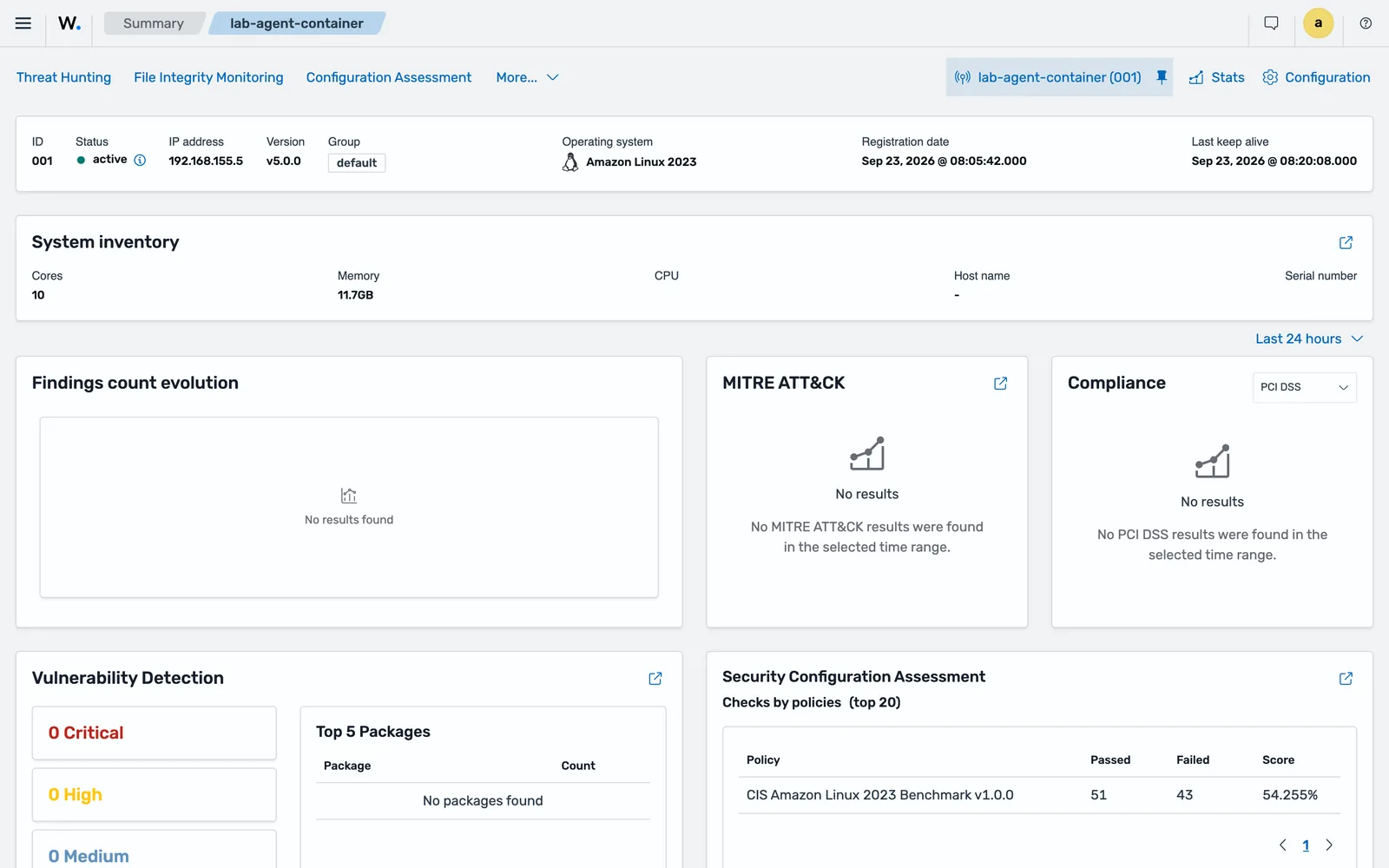
2026/09/23 02:35:42 wazuh-manager-authd: INFO: Agent key generated for agent 'lab-agent-container' (requested locally)
2026/09/23 02:38:50 wazuh-manager-authd: INFO: Agent key generated for agent 'lab-agent-ubuntu' (requested locally)
Note (requested locally), which is what the agent-initiated route looks like from the manager side. Grep the manager log for Agent key generated when you want to know whether a rollout is landing.
In a manager cluster, enable password authentication on every node and use the same password on all of them. A node without it is an unauthenticated enrolment path into your deployment.
On the endpoint, put the same password in authd.pass in the agent’s etc directory:
| Platform | Password file |
|---|---|
| Linux/Unix | /var/ossec/etc/authd.pass |
| macOS | /Library/Ossec/etc/authd.pass |
| Windows 64-bit | C:\Program Files (x86)\ossec-agent\authd.pass |
Set it to 640 owned by root:wazuh on Linux and macOS. If you keep it somewhere else, point at it with <enrollment><authorization_pass_path>.
Route one: enrol from the agent configuration
This is the route to automate. The agent asks for its own key at first start, and you never handle a key by hand.
Edit the agent configuration file (/var/ossec/etc/ossec.conf on Linux, /Library/Ossec/etc/ossec.conf on macOS, C:\Program Files (x86)\ossec-agent\ossec.conf on 64-bit Windows):
<ossec_config>
  <agent>
    <manager>
      <endpoint>10.0.0.2</endpoint>
    </manager>
    <enrollment>
      <enabled>yes</enabled>
      <agent_name>mac-design-04</agent_name>
      <groups>macos-laptops</groups>
    </enrollment>
  </agent>
</ossec_config>
Restart the agent, and it enrols on the next start. The 5.0 <enrollment> block runs over the same HTTPS channel and the same TLS material as everything else, so there is no separate address, port or certificate configuration for it any more. The 4.x manager_address, port, server_ca_path, agent_certificate_path and agent_key_path options inside <enrollment> are read and ignored with an INFO log line.
The options that still matter:
| Option | Default | Why you would change it |
|---|---|---|
agent_name |
System hostname | Cloned hosts share a hostname; a duplicate name is rejected |
groups |
default |
Comma-separated; every group must already exist |
authorization_pass_path |
None | Password file kept outside the agent’s etc directory |
agent_address |
Auto-detected | The auto-detected address is wrong behind certain NAT layouts |
delay_after_enrollment |
20 | Seconds before normal operation starts |
use_source_ip |
no | Record the source address rather than the configured one |
Groups must exist before enrolment
This is the single biggest behaviour change for anyone coming from 4.x, and it is worth stating plainly.
The agent declares its groups in the enrolment handshake. wazuh-manager-authd validates them and writes the assignment into global.db. If a declared group does not exist on the manager, the enrolment is rejected and the agent cannot connect. There is no fallback to default for a bad group name, and no checksum-based guessing.
Verified on the beta5 lab by pointing an agent at a group called does-not-exist. Agent log:
2026/09/23 02:41:26 wazuh-agentd: ERROR: Enrollment rejected by the manager: invalid request. Invalid Group(s) Name(s)Manager log, at the same second:
2026/09/23 02:41:26 wazuh-manager-authd: ERROR: Invalid group: does-not-existThe manager names the offending group and the agent does not, so the manager log is where you look when a rollout declares several groups. The agent retries on a backoff and its state file stays at status='pending', not never_connected, because no key was ever issued.
Create groups first:
/var/wazuh-manager/bin/agent_groups -a -g macos-laptops -qConfirm what exists:
/var/wazuh-manager/bin/agent_groups -lBoth commands on the beta5 lab:
$ /var/wazuh-manager/bin/agent_groups -a -g lab-linux -q
Group 'lab-linux' created.
$ /var/wazuh-manager/bin/agent_groups -l
Groups (2):
  default (0)
  lab-linux (0)
Unassigned agents: 0.
The count in brackets is the number of agents in the group, so this is also the quickest confirmation that an enrolment landed where you intended. After both lab agents enrolled the same command returned default (1) and lab-linux (1).
Or create them through the API, which is what a provisioning pipeline should do:
curl -k -X POST "https://<WAZUH_MANAGER_IP>:55000/groups?pretty=true" -H "Content-Type: application/json" -d '{"group_id": "macos-laptops"}' -H "Authorization: Bearer $TOKEN"Group names accept upper and lower case letters, numbers, dots, underscores and hyphens.
Route two: enrol through the manager API
Use this when you want the key before the endpoint exists, or when the endpoint cannot be trusted with the enrolment password.
Get a token. Default manager API credentials are wazuh:wazuh:
TOKEN=$(curl -u <USER>:<PASSWORD> -k -X POST "https://<WAZUH_MANAGER_IP_ADDRESS>:55000/security/user/authenticate?raw=true")Request the key:
curl -k -X POST -d '{"name":"<WAZUH_AGENT_NAME>"}' "https://<WAZUH_MANAGER_IP>:55000/agents?pretty=true" -H "Content-Type:application/json" -H "Authorization: Bearer $TOKEN"The documented response carries the ID and key:
{
   "data": {
      "id": "001",
      "key": "MDA0IFRUZXN0IGFueSA2MTJiYzkyZjExNDc3NzgxMWQxODRmNTlkOTNmMDM5N2UyYjFiNjkxYWM3YzNhYmQyYTA5Y2VlODE1NTFhMDM5"
   },
   "error": 0
}
Import it on the endpoint:
/var/ossec/bin/manage_agents -i <KEY>On Windows that is "C:\Program Files (x86)\ossec-agent\manage_agents.exe" -i <KEY>, and on macOS /Library/Ossec/bin/manage_agents -i <KEY>. Then set the manager endpoint in ossec.conf and restart the agent. You can also retrieve a key later with GET /agents/{agent_id}/key, and run both calls from Server management > Dev Tools in the dashboard rather than from a shell.
Worked example: a macOS endpoint
macOS makes a good worked example because every path is different and the service manager is not systemd.
Install, replacing the manager address and password:
curl -O https://packages-staging.xdrsiem.wazuh.info/pre-release/5.x/macos/wazuh-agent-5.0.0-beta5.arm64.pkgecho "WAZUH_MANAGER='10.0.0.2'" WAZUH_REGISTRATION_PASSWORD='XXXXXXXXXXXX' > /tmp/wazuh_envs && sudo installer -pkg wazuh-agent-5.0.0-beta5.arm64.pkg -target /Use the intel64 package on Intel Macs. The Intel build is documented for macOS Sierra and later, the Apple silicon build for Big Sur and later, while the enrolment requirements page lists macOS 14 or later as supported. Take the requirements page as the operative statement and treat anything older as untested.
Files land in /Library/Ossec/. Set the agent name and group in /Library/Ossec/etc/ossec.conf, then start the agent:
launchctl bootstrap system /Library/LaunchDaemons/com.wazuh.agent.plistCheck it locally:
sudo grep ^status /Library/Ossec/var/run/wazuh-agentd.stateRestart after a configuration change with /Library/Ossec/bin/wazuh-control restart.
Re-enrolment, duplicate names and removal
Re-enrolment does not restore a group. Once an agent belongs to a group, re-enrolling under another name or ID puts it back in default unless the group is declared in its <enrollment><groups>. The 4.x remoted.guess_agent_group mechanism that matched merged.mg checksums is gone.
Duplicate names are rejected. Each agent needs a unique name. Without <agent_name>, the agent uses the hostname, so two endpoints with the same hostname produce one working agent and one that fails. The manager also enforces the ip column of client.keys exactly as the legacy listener did, accepting any, a single address, a CIDR, a dotted mask or an IPv6 prefix. The peer address is deliberately not part of the token, so NAT between agent and manager does not invalidate it.
Removal is two jobs. Uninstalling the package removes the software; the manager keeps the record, the name and the key. Remove the record in the dashboard under Agents management > Endpoints, or through the API:
curl -k -X DELETE "https://<WAZUH_MANAGER_IP>:55000/agents?pretty=true&older_than=21d&agents_list=all&status=never_connected,disconnected" -H "Authorization: Bearer $TOKEN"That example clears agents inactive for more than 21 days. Run something like it on a schedule. Stale records inflate your endpoint count, hold names that a rebuilt host wants back, and make the Disconnected tile meaningless.
Common errors
ERROR: Invalid agent name: localhost.localdomain (from manager)
In the agent log, alongside ERROR: Unable to add agent (from manager). The name is already taken, or two endpoints share a hostname.
Fix: set a unique <enrollment><agent_name> and restart. Delete the stale record on the manager if it holds the name.
WARNING: (1404): Authentication error. Wrong key or corrupt payload. Message received from agent '001' at 'any'.
In /var/wazuh-manager/logs/wazuh-manager.log. The agent’s client.keys does not match the manager’s.
Fix: compare the agent’s client.keys with /var/wazuh-manager/etc/client.keys and re-enrol if they differ. Duplicate keys also arise from copying client.keys between endpoints or from deleting agents with the highest IDs and recreating them.
ERROR: Unable to read CA certificate file "/var/wazuh-manager/etc/rootCA.pem"
In the manager log, followed by ERROR: SSL error. Exiting. from wazuh-manager-authd. The CA file named in <ssl_agent_ca> is not there.
Fix: place the CA bundle at the configured path in wazuh-manager.conf. The agent-side twin of this error is ERROR: Unable to read CA certificate file "/var/ossec/etc/rootCA.pem" followed by ERROR: Could not set up SSL connection! Check certification configuration., which points at the agent’s <agent><ssl> block instead.
ERROR: Unable to read private key file: /var/ossec/etc/sslagent.key
Agent identity verification is configured but the private key is missing. The certificate twin is ERROR: Unable to read certificate file (not found): /var/ossec/etc/sslagent.cert. Both are followed by ERROR: Could not set up SSL connection! Check certification configuration.
Fix: put the key and certificate where the agent configuration says they are, or turn agent identity verification off until you have the material in place.
ERROR: Enrollment rejected by the manager: invalid or missing authentication. Invalid client authentication
In the agent log, repeating on a backoff. The password in the agent’s authd.pass does not match the manager’s, or the file is missing while use_password is yes. Verified on the beta5 lab, the agent retried at roughly 5 and 10 second intervals and its state file stayed at status='pending' throughout. The manager log shows nothing for this case, which is itself a useful signal: a rejection with no matching manager line is an authentication rejection.
Fix: copy the current value of /var/wazuh-manager/etc/authd.pass into the agent’s authd.pass, check the file is not empty and has no trailing characters, and restart the agent.
ERROR: Enrollment rejected by the manager: invalid request. Invalid Group(s) Name(s)
One of the groups in <enrollment><groups> does not exist on the manager. The manager log names it: wazuh-manager-authd: ERROR: Invalid group: <name>.
Fix: create the group with agent_groups -a -g <name> -q or POST /groups, then restart the agent. Do not fix this by removing the group from the agent configuration unless you genuinely want the endpoint in default.
401 Invalid client authentication
Generic by design. Unknown agent, key mismatch, address not allowed, bad signature or a stale token all produce it.
Fix: read the manager log for the real cause, then check three things in order: clock skew on the endpoint, the key pair matching, and the ip column in client.keys.
Connectivity that looks fine but is not
Test first:
nc -zv <WAZUH_MANAGER_IP_ADDRESS> 1517 55000The documented success message is Connection to <WAZUH_MANAGER_IP_ADDRESS> port 1517 [tcp] succeeded!. If that passes and enrolment still fails, do not go looking at the listener binding: verified on the 5.0.0-beta5 lab, <remote><https><bind_addr> and <remote><legacy><local_ip> both ship as 0.0.0.0, and the beta enrolment requirements page claiming 127.0.0.1 does not match the package.
Probe the service properly instead, remembering the /wazuh-manager/ prefix:
curl -k https://<WAZUH_MANAGER_IP>:1517/wazuh-manager/On a healthy manager that returns {"status":"ok","module":"remoted"}. The same probe against / returns {"error":"not_found"}, which looks like a broken service and is not.
Where to go next
The official material is the agent enrolment section of the 5.0-beta user manual, and the protocol itself is documented in the Wazuh agent-manager protocol migration guide. The group rules come from the agent groups migration guide.
Once agents are enrolling reliably, the next decision is how you group them, because in 5.0 a group is both the configuration unit and the enrolment gate: see agent groups and centralised configuration. When one refuses to connect, work through agent disconnected or never connected. And if you are bringing a 4.x fleet across, the client.keys import path is covered in the 4.x to 5 migration runbook.
Next: Wazuh Dashboard Tour: Reading Your First Findings.
Files for this lesson
Every file this lesson refers to, exactly as used. Open a file to read it in the browser, or download the set as a zip. Download wazuh-agent-enrollment.zip. The full set for all lessons is at wazuh-tutorial-files.zip.
README.md3.0 KBagent-enrollment.fragment.xml2.8 KBenroll-via-api.sh4.8 KB
Frequently asked questions
What port does Wazuh agent enrollment use?
A Wazuh 5.0 agent enrols on 1517/TCP over HTTPS, the same port it then uses for everything else. Port 1515, the old authd TLS enrolment port, is opt-in and only serves Wazuh 4.x agents. Enrolling through the manager API instead uses 55000/TCP.
Where is the Wazuh enrollment password stored?
On the manager at /var/wazuh-manager/etc/authd.pass, and on the endpoint at /var/ossec/etc/authd.pass on Linux, /Library/Ossec/etc/authd.pass on macOS, or in the agent folder on Windows. The manager generates a random one at first start if you do not create the file yourself.
Why is my Wazuh agent enrollment rejected?
The three usual causes are a group that does not exist on the manager, a duplicate agent name, and a wrong or missing enrolment password. Group validation happens during the handshake in 5.0 and there is no fallback to the default group, so a typo in the group name stops the agent connecting at all.
Do I need to re-enrol agents when migrating from Wazuh 4.x to 5.0?
No, not for the key itself. The 64-hex secret in client.keys is exactly the 32-byte key the new scheme needs, so an imported client.keys authorises the same agents. You do need to recreate the groups on the 5.0 manager first and repoint each agent at the new manager endpoint.
How do I remove a Wazuh agent from the manager?
Through the dashboard under Agents management > Endpoints, choose the agent and select Remove, or with DELETE /agents on the manager API. Uninstalling the package on the endpoint does not remove the record, so a stale entry keeps the name and can block a later enrolment.