Sigma is the native rule language in Wazuh 5.0, which sounds like it should make community rules portable and mostly does not. A Wazuh rule is Sigma plus Wazuh extensions: a metadata block, structured mitre and compliance objects, and strict validation of every field name in detection against the Wazuh Common Schema. Porting a rule from SigmaHQ means rewriting its field names and its logsource, keeping its sigma_id, and adding what Wazuh expects. The condition grammar and almost all the modifiers transfer unchanged.
What you need
- A custom integration to attach rules to, and the decoders that produce the fields you will detect on. Writing a custom Wazuh decoder in YAML covers that side.
- The basics of rule authoring from writing custom Wazuh detection rules.
- Access to Security Analytics on the dashboard, or the Content Manager API on port 9200. If you are also matching your own indicators, Wazuh threat intelligence with CTI, MISP and KVDB lists covers the KVDB side of the same content model.
- Python 3 and PyYAML if you want to run the coverage export from rule files.
Port a community Sigma rule
Work through an upstream rule in four passes. Take an SSH brute-force or a PowerShell encoded-command rule from SigmaHQ and change these things.
1. Move the descriptive fields into metadata
Upstream Sigma keeps title, description, author, date, references and falsepositives at the top level. Wazuh moves the first five into a required metadata object and keeps falsepositives at the top level.
metadata:
  title: Suspicious SSH Login from IPv6
  author: Security Operations <secops@example.com>
  date: "2026-09-22"
  description: Detects SSH login attempts from blocklisted IPv6 ranges.
  references:
    - https://example.com/advisory/2026-001
  documentation: https://internal.wiki/wazuh/rules/ssh-ipv6
title is the only required field in metadata, and it is what appears on every finding. The documentation field is a Wazuh addition: free text or a URL giving the analyst triage context. Use it. A runbook link on the rule is worth more than any amount of dashboard design.
2. Keep the upstream identifier, add your own
sigma_id preserves the original Sigma rule UUID when importing from an upstream repository, which is how you keep provenance and track upstream changes later. id is the Wazuh identifier.
The finished document settles the practical half of that question. Verified on the 5.0.0-beta5 lab, a finding carries both fields, wazuh.rule.id and wazuh.rule.sigma_id, so anything downstream can key on either. On the shipped content the two held the same UUID, because Wazuh authored the rule and had no upstream identifier to preserve. On a ported rule they will differ, and that difference is the provenance: sigma_id says where the logic came from, id says which of your rules produced this finding. Key your automation on wazuh.rule.id and keep sigma_id for tracking upstream changes.
3. Rewrite logsource and the field names
logsource.product is required and has a hard constraint that the documentation states twice: it must hold the same value as metadata.title of the integration the rule belongs to. This is not the upstream Sigma meaning of product. An upstream product: windows, service: security becomes your integration’s title, with the upstream classification preserved in category and service.
logsource:
  product: custom-integration
  category: authentication
  service: sshd
  definition: Ensure sshd authentication logs are collected via the Linux integration.
logsource does not affect matching. detection decides that. The block ties the rule to an integration and organises the catalogue.
Then rewrite every field name in detection to its WCS equivalent: source.ip, user.name, process.name, process.command_line, event.code, event.action, file.path. This is the slow part of a port and there is no shortcut. Validation is strict and helpful about it: all fields in detection are checked against the schema, and a rule naming a field the schema does not define is rejected with a structured error identifying the offending field. That check exists specifically to stop rules that look active but can never match.
Verify each field on a real event before you write the rule against it. Security Analytics > Log test shows the normalised document for a pasted log line, and the field paths in that document are the ones to use.
4. Set level, status and the mappings
level is a string: informational, low, medium, high or critical. status is experimental, test or stable, and it is a lifecycle marker rather than anything the engine acts on.
mitre:
  tactic:
    - TA0006
  technique:
    - T1110
  subtechnique:
    - T1110.001
compliance:
  pci_dss:
    - "10.2"
  nist_800_53:
    - AU-6
All three mitre fields are arrays of identifier strings. Use an empty array for subtechnique when none applies, as the documentation’s own example does. The upstream Sigma tags field survives separately and holds values like attack.initial-access; the structured mitre block is what the dashboard and the coverage export read.
What the Wazuh Sigma fork supports
The modifier set is broad. Modifiers append to a field name with a pipe and chain left to right.
| Modifier | Behaviour |
|---|---|
contains, startswith, endswith |
Substring matching with wildcards inserted |
base64, base64offset |
Encode the value before comparison; base64offset generates all three offsets and is usually chained with contains |
wide |
UTF-16 byte sequence; must be chained with an encoding modifier, never final |
windash |
Expands to all Windows dash variants, including en dash, em dash and horizontal bar |
re |
PCRE regular expression, with i, m and s submodifiers |
cidr |
IPv4 or IPv6 subnet match |
exists |
Field presence, value true or false |
all |
Turns a list from OR into AND; cannot be used on a single-item list |
lt, lte, gt, gte |
Numeric comparison |
windash is the one people miss when porting Windows rules and then wonder why an evasive command line slips past. base64offset|contains is the correct form for finding an encoded substring inside a larger blob.
Conditions use and, or, not and brackets, exactly as Sigma specifies. The selection and not filter shape is the documented way to reduce false positives inside a rule.
Reading a shipped rule is the fastest way to see the conventions in one place. Pulled from the rules index on the beta5 lab stack and trimmed:
{
 "document": {
...
  "detection": {
   "condition": "selection_source and (selection_vssadmin or selection_wmic or selection_wbadmin or selection_powershell)",
   "selection_powershell": {
    "process.command_line|contains": "delete",
    "process.command_line|contains|all": [
     "get-wmiobject",
     "shadowcopy"
    ]
   },
   "selection_source": {
    "event.code": [
     "1",
     "4688"
    ]
   },
...
  },
  "enabled": true,
  "falsepositives": [
   "Storage administrators pruning old shadow copies as part of scheduled maintenance"
  ],
  "id": "59eeea0e-7f0c-5c30-abc6-f31b004daf87",
  "level": "critical",
  "logsource": {
   "category": "process_creation",
   "product": "windows"
  },
...
Four things in that fragment are worth copying. Named selections rather than one large block, so the condition reads as a sentence. |contains|all chained on a single field. A falsepositives entry written as a sentence an analyst can act on rather than the word “legitimate”. And logsource.product set to windows, which is the title of the integration the rule belongs to, not a free-form platform label.
What is not supported matters as much. There is no correlation in a 5.0 rule: no if_sid chaining, no frequency or timeframe counting, no same_source_ip style grouping. A rule matches one document. Multi-event logic has three homes instead:
- A decoder, when the relationship is parent and child within one event’s decoding path.
- An alerting workflow, which combines several monitors and evaluates their combined results using chained alert triggers, for staged detection where one event alone is not enough.
- A bucket-level monitor, which evaluates aggregation buckets and can alert per host, per user or per service on a threshold, which is what
frequencyused to do.
Rebuilding a counting rule as a bucket-level monitor is the standard answer, and it is worth doing deliberately rather than discovering it during a migration.
Detector constraints that shape the catalogue
A rule does nothing until a detector runs it. The Security Analytics module documents three limits that decide how you organise content.
| Constraint | Value |
|---|---|
| Rules per detector | 100 |
| Rule space per detector | Standard or Custom, never both |
| User-created detectors | plugins.security_analytics.max_detectors, default 10 |
Violations of the first two are rejected with 400 Bad Request, on creation and on update. Content Manager detectors do not count towards the detector limit, which the lab bears out: a stock beta5 install runs 22 alerting monitors from shipped content while the Security Analytics detectors endpoint lists only three of them, so the ten-detector budget is yours to spend.
The practical consequence: one detector per integration and category, not one per rule family. A detector is created with a name, the indices or aliases to watch, a space, an integration and a rule selection, and a schedule. The documented worked example uses wazuh-events-v5-system-activity as the data source and a two-minute interval, with the note that the index must match the integration category you configured.
Rule changes take effect at the detector’s next evaluation of matching events, and existing findings are not rewritten when a rule changes. Fixing a rule does not fix yesterday’s findings.
The lifecycle: Draft, Test, Custom
The space model is the change-control mechanism for detection content, and treating it as one is what makes an audit conversation short.
Draft is writable working space, and content there is not active in the engine. Test loads content into the engine for validation with the Log test tool. Custom is production. Standard is read-only CTI content.
Promotion is draft to test, then test to custom, and it moves an integration together with its decoders and rules. Each promotion deploys the content to the engine, validates it, triggers a configuration reload and updates the target space. Preview a promotion with GET /_plugins/_content_manager/promote?space=draft, which returns the add, update and remove operations it would perform, then POST to execute. A failed promotion rolls back in reverse order, restoring each mutated document to its pre-promotion version.
What the spaces are not is version control. Keep your rules in git, generate the API calls from there, and treat the promotion chain as deployment. That also gives you the input for the coverage export below.
Measure ATT&CK coverage honestly
Two numbers exist and they are not the same.
Claimed coverage is which techniques your rules say they detect, read from the mitre block of your rule files. It is cheap to inflate.
Observed coverage is which techniques have actually produced findings, read from wazuh.rule.mitre.technique.id on documents in wazuh-findings-v5-*.
Mind the shape of that field. On beta5, mitre is an object on the finding, not a flat list of identifiers, and a real finding from the shipped file integrity content carried:
  "mitre": {
   "technique": {
    "name": [
     "Data Manipulation",
     "Masquerading"
    ],
    "id": [
     "T1565",
     "T1036"
    ]
   },
   "tactic": {
    "name": [
     "Stealth",
     "Impact"
    ],
    "id": [
     "TA0005",
     "TA0040"
    ]
   }
  },
So an aggregation has to name the .id sub-field, wazuh.rule.mitre.technique.id, which is also what the MITRE ATT&CK dashboard filters on. There was no subtechnique key on the findings the shipped content produced, so treat an empty subtechnique aggregation as normal rather than as missing data. The names come through alongside the identifiers, which saves a lookup when you are building a report for someone who does not read technique numbers.
The companion files for this lesson include export-attack-layer.py, which produces an ATT&CK Navigator layer in format v4.5 from either source.
python3 export-attack-layer.py --from-rules ./rules -o claimed.jsonpython3 export-attack-layer.py --from-findings --url https://127.0.0.1:9200 --since now-30d --insecure -o observed.jsonLoad both layers in the Navigator and compare them. Techniques in claimed.json and absent from observed.json are rules that have never fired, which is either good news about your environment or a broken rule, and you cannot tell which from the layer alone. Techniques with a very high observed score are usually a noisy rule rather than good coverage, which is where cutting Wazuh false positives picks up.
Two things about the script are worth knowing before you run it. It reads rules from files rather than from the API, because the 5.0-beta Content Manager specification defines POST, PUT and DELETE on the rules endpoint but no GET or list operation, so there is no documented way to fetch the catalogue. Collection endpoints on the Content Manager are POST-only on beta5, and a GET answers 405 with the allowed method, which is a quick way to confirm the same thing on your own cluster. And the findings mode runs a terms aggregation, which needs an aggregatable field mapping; if the request returns 400, retry with --field-suffix .keyword before concluding you have no coverage.
The Wazuh dashboard has its own view at Threat intelligence > MITRE ATT&CK, which maps findings to the framework. That is the right place for day-to-day investigation. The Navigator export is for the coverage conversation, where you need to hand someone a file.
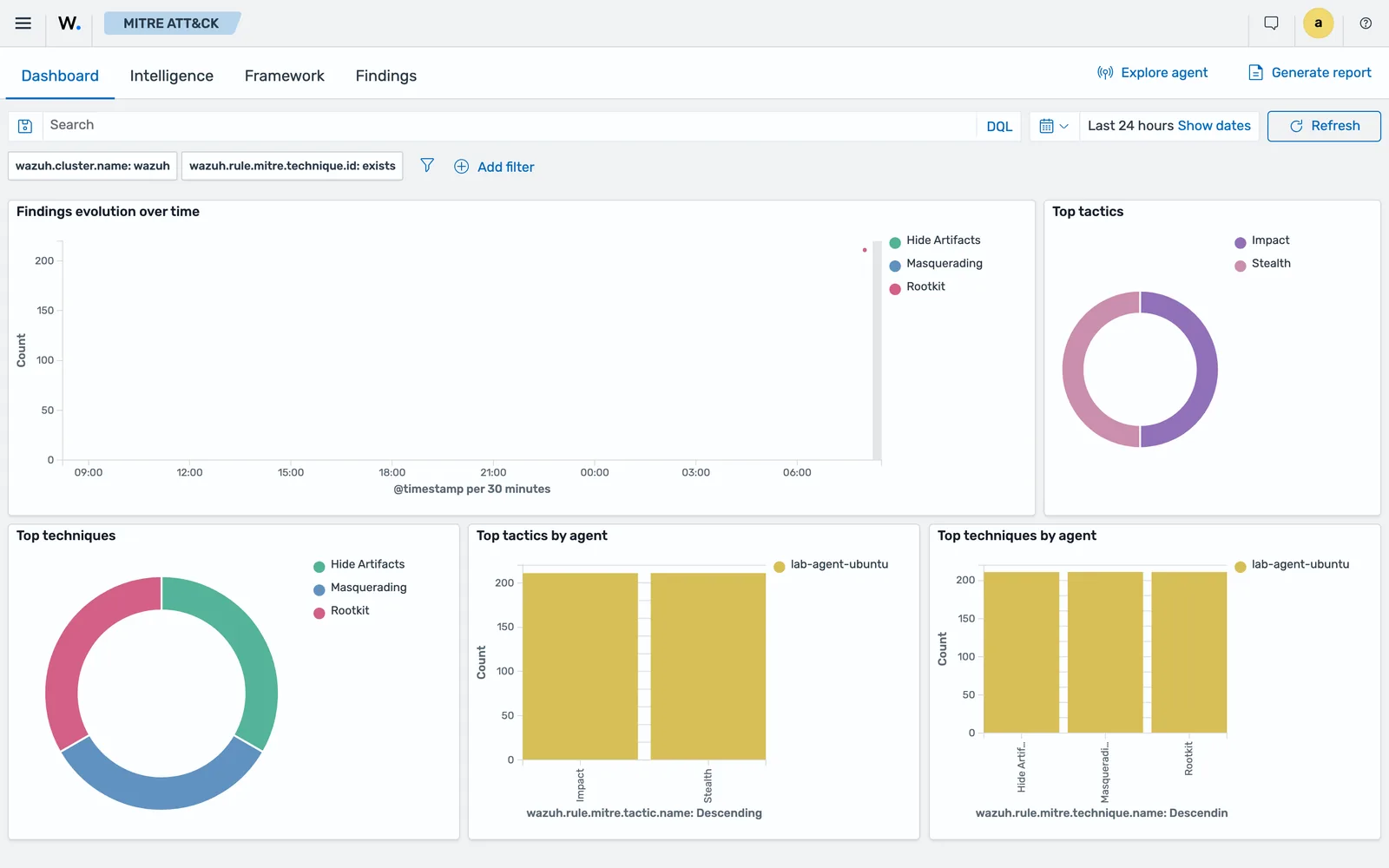
wazuh.rule.mitre.technique.id: exists, with Dashboard, Intelligence, Framework and Findings tabs.Read that view for what it is. It shows the techniques your findings carry, per agent and over time, which is observed coverage with a time picker on it. It cannot show you a technique nothing has matched, and the empty cells are the interesting ones, which is why the Navigator layer is still worth exporting.
What a coverage layer is not
It is not a percentage. Counting techniques rewards writing many shallow rules against easy telemetry and penalises nothing. A technique you cannot see at all because the log source is not collected looks identical to a technique you chose not to detect.
Use the layer for three questions. Which techniques relevant to your threat model have no rule at all. Which have a rule that has never fired and has never been tested. And which produce so much volume that the rule is a tuning problem rather than a detection. Answering those three beats any coverage score.
Common errors
The rule is rejected and the error names a field
Cause: the field does not exist in the Wazuh Common Schema. Every field in detection is validated at creation.
Fix: run a representative log line through Security Analytics > Log test, read the normalised document, and use the field paths it shows.
400 Bad Request when creating or updating a detector
Cause: more than 100 rules selected, or a rule selection that spans both the Standard and Custom spaces. Both constraints apply to creation and to update.
Fix: split into more detectors, staying inside plugins.security_analytics.max_detectors, and keep Standard and Custom rules in separate detectors.
The rule saves but never matches anything
Cause: most often logsource.product does not equal the parent integration’s metadata.title, which the API documentation flags as a validation requirement. Second most often, the detector is watching an index that does not match the integration’s category, so the events never reach it.
Fix: check the integration title first, then confirm the detector’s data source matches the category, for example wazuh-events-v5-system-activity for a system-activity integration.
Changing a rule did not change existing findings
Cause: documented behaviour. Rule changes take effect at the next detector evaluation of matching events, and existing findings are not modified when a rule is updated.
Fix: nothing to fix. Filter your dashboards by time so a re-tuned rule is judged on what it produced after the change.
A ported rule’s counting logic silently disappeared
Cause: frequency and timeframe have no equivalent in a 5.0 rule, and there is no warning because the surviving fields are valid on their own. The rule now fires on a single event.
Fix: rebuild the counting part as a bucket-level alerting monitor, which alerts per aggregation bucket, and keep the rule for the single-event condition.
Next: Hardening Wazuh Itself: Certificates, Exposure and Access.
Files for this lesson
Every file this lesson refers to, exactly as used. Open a file to read it in the browser, or download the set as a zip. Download wazuh-sigma-rules-mitre-attack.zip. The full set for all lessons is at wazuh-tutorial-files.zip.
README.md4.8 KBexport-attack-layer.py11 KB
Frequently asked questions
Can you use community Sigma rules directly in Wazuh 5.0?
Not unchanged. Wazuh 5.0 rules are Sigma with Wazuh extensions, and every field named in the detection block is validated against the Wazuh Common Schema at creation time. An upstream rule written against Windows event log field names is rejected until those field names are rewritten to their WCS equivalents. The condition syntax and the modifiers mostly transfer as they are.
Which Sigma modifiers does Wazuh support?
The documented set is contains, startswith, endswith, base64, base64offset, wide, windash, re with i, m and s submodifiers, cidr, exists, all, lt, lte, gt and gte. Modifiers chain with the pipe character. Sigma correlation rules are not supported, so multi-event logic has to be built with alerting workflows instead.
How many Sigma rules can a Wazuh detector run?
One hundred. A detector can also reference either Standard rules or Custom rules, never both at once. Requests that break either constraint are rejected with 400 Bad Request, on creation and on update. The number of user-created detectors is capped separately by plugins.security_analytics.max_detectors, which defaults to 10.
How do you measure MITRE ATT&CK coverage in Wazuh?
Two ways, and they answer different questions. Aggregate wazuh.rule.mitre.technique.id over the findings data streams to see what has actually fired, or parse the mitre block of your rule files to see what the catalogue claims. Export either as an ATT&CK Navigator layer and compare them; the gap between claimed and observed is the useful output.
What is the Draft, Test and Custom flow for rules?
Content is created in the Draft space, promoted to Test where the Log test tool validates it against sample events, then promoted to Custom where the engine applies it to live traffic. Standard is read-only content from Wazuh CTI. Promotion moves an integration together with its decoders and rules, and a failed promotion rolls back in reverse order.