In Wazuh 5.0 a log becomes a finding in two places, not one. The manager runs the normalization engine, where YAML decoders parse the raw log and map it onto the Wazuh Common Schema. The indexer runs the detection engine, where Sigma-format rules are evaluated by scheduled jobs called detectors, and a match produces a finding. Severity is a string now: informational, low, medium, high or critical. That split is the single most useful thing to hold in your head when you read anything else about Wazuh rules.
This lesson explains the model. It does not author anything; the writing happens in the intermediate lessons on custom decoders and custom detection rules.
What you need
- A running deployment, or at least the dashboard tour so the menu names mean something.
- No configuration changes. Everything here is read-only understanding.
How an event becomes a finding
The path has five stops:
- Collection. The agent reads a log and sends it to the manager, adding agent and cluster metadata. What arrives at the manager already carries
wazuh.agent.id,wazuh.agent.name,wazuh.agent.groupsandwazuh.cluster.node, with the untouched log line inevent.original. - Decoding. The normalization engine runs the event through the decoder tree and maps values onto Wazuh Common Schema fields.
- Enrichment. Optional. Geo and ASN lookups on address fields, plus indicator-of-compromise matching.
- Output. The indexer connector ships the normalised event to the indexer, where it lands in a data stream chosen by the integration category.
- Detection. A detector runs on a schedule, evaluates the indexed events against its rules, and writes a finding for each match.
The order matters for troubleshooting. If a field is missing, that is a decoder problem on the manager. If the field is present but nothing fires, that is a rule or detector problem on the indexer.
What a decoder does in Wazuh 5.0
A decoder is a YAML asset with a small set of stages. The official decoders page describes three: check decides whether this decoder applies, parse| runs a parsing helper on a field, and normalize contains one or more blocks that populate schema fields through a map operation.
name: decoder/custom-mylog/0
enabled: true
stages:
  check:
    - $event.original: contains("MyProduct")
  parse|:
    - $event.original: parse_json()
  normalize:
    - check:
        - $some.field: exists()
      map:
        event.category: "network"
        source.ip: $src_ip
Three properties of this model are worth internalising.
Decoders form a tree. Every event enters through the root decoder and descends into child decoders, each one more specialised. If a decoder’s conditions do not match, the engine tries the next sibling at the same level. An event that only ever touched the root decoder is unclassified: the engine tracks this by counting the entries in wazuh.integration.decoders, and one entry means nothing else accepted it.
Parsing is helper-driven, not regex-first. The documented helpers include parse_json(), parse_key_value(), parse_csv(), parse_dsv() and regex_extract(). You pick the helper that matches the log shape rather than writing a regular expression for the whole line.
Temporary fields are swept away. Fields whose names begin with an underscore, such as _json or _kv, are scratch space shared between decoders. A mandatory cleanup step at the end of pre-enrichment removes all of them, so only schema-compliant fields reach the indexer.
Enrichment: geo, ASN and threat intelligence
After decoding, the engine can add context. Geo enrichment adds location and autonomous-system data for address fields, producing source.geo and source.as structures. Indicator matching compares observed values, including connection keys built from IP and port, against known indicators and attaches the match to the event.
The beta documentation is not internally consistent about where that match lands. The findings page names wazuh.threat; the normalization engine reference shows a worked example with a top-level threat.enrichments array. The lab produced no indicator matches, so this one is still unsettled: look at a real document in Discover before you write a query or a rule against it.
What the lab did settle is which enrichments exist. Security Analytics > Overview lists them for the space, and on beta5 the set is Geolocation, Connection, URL full, URL domain, Hash MD5, Hash SHA1 and Hash SHA256. The same page names the root decoder, decoder/core-wazuh-message/0, and shows two toggles that ship off: Index discarded events and Index unclassified events.
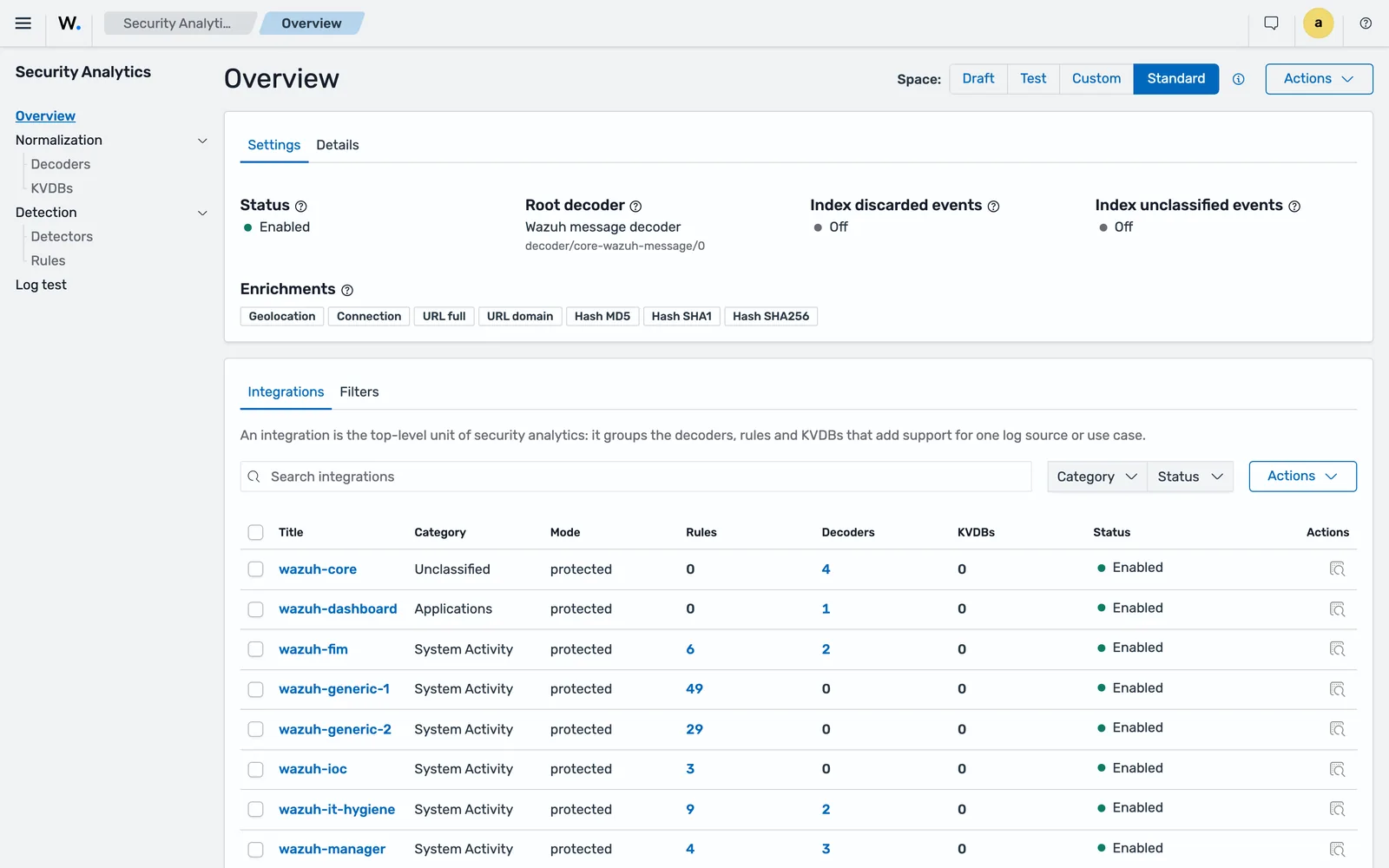
Both enrichments are schema-driven: the engine generates definition files at install time that list which Wazuh Common Schema fields are inspected, so the field set is fixed in advance rather than guessed per event.
Where events go: integrations, categories and data streams
Detection content is packaged into integrations, which group the decoders, rules and KVDBs for one log source. Each integration declares a category, and the category decides which data stream the event and any resulting finding land in.
These are the eight categories a beta5 install creates, with the exact data stream names:
| Integration category | Event data stream | Findings data stream |
|---|---|---|
security |
wazuh-events-v5-security |
wazuh-findings-v5-security |
system-activity |
wazuh-events-v5-system-activity |
wazuh-findings-v5-system-activity |
access-management |
wazuh-events-v5-access-management |
wazuh-findings-v5-access-management |
applications |
wazuh-events-v5-applications |
wazuh-findings-v5-applications |
network-activity |
wazuh-events-v5-network-activity |
wazuh-findings-v5-network-activity |
cloud-services |
wazuh-events-v5-cloud-services |
wazuh-findings-v5-cloud-services |
other |
wazuh-events-v5-other |
wazuh-findings-v5-other |
unclassified |
wazuh-events-v5-unclassified |
wazuh-findings-v5-unclassified |
One correction to anything you may have read about per-provider cloud streams: on beta5 there is a single cloud-services stream, not separate -aws, -azure and -gcp ones. These are data streams, so the physical indices behind them are named .ds-wazuh-events-v5-security-000001 and so on, which matters when you query _cat/indices.
Raw events also go to wazuh-events-raw-v5 before processing. Retention differs sharply between these streams, and it catches people out: the documented defaults are 10 minutes for wazuh-events-raw-v5, 1 hour for wazuh-events-v5-* and 90 days for wazuh-findings-v5-*.
Unclassified events are not stored by default. Indexing them is a per-space toggle in the Security Analytics dashboard, and it is the switch you want on while you are building a new decoder.
What a rule looks like now
Rules are Sigma with Wazuh extensions. A valid rule needs id, status, level, detection, logsource and metadata. Optional blocks add sigma_id, enabled, tags, falsepositives, mitre and compliance.
id: 9c1c1e3f-21ad-4db0-9bb4-5cf2e9c1b901
status: stable
level: medium
logsource:
  product: linux
  category: authentication
  service: sshd
detection:
  selection:
    event.action: account-locked
    event.category|contains: authentication
  condition: selection
metadata:
  title: Account locked
The detection block is standard Sigma: named selections combined by a condition expression using and, or, not and brackets. Modifiers hang off the field name with a pipe, and the documented set includes contains, startswith, endswith, re, cidr, exists, all, base64, base64offset, wide, windash and the numeric comparisons lt, lte, gt and gte.
One rule of the new engine deserves its own paragraph. Every field named in a detection block is validated against the Wazuh Common Schema when the rule is created. If the field does not exist in the schema, the rule is rejected with a structured error naming the offending field. In 4.x a typo in a field name produced a rule that loaded cleanly and never fired. That failure mode is gone.
logsource does not affect matching. It ties the rule to an integration and organises the library, and product must hold the same value as the integration’s metadata.title.
Here is a real shipped rule, read back from the indexer on the beta5 lab and trimmed to the detection logic:
{
 "document": {
  "detection": {
   "condition": "selection_source and (selection_vssadmin or selection_wmic or selection_wbadmin or selection_powershell)",
   "selection_source": {
    "event.code": [
     "1",
     "4688"
    ]
   },
   "selection_vssadmin": {
    "process.command_line|contains|all": [
     "vssadmin",
     "delete shadows"
    ]
   },
   "selection_wmic": {
    "process.command_line|contains|all": [
     "wmic",
     "shadowcopy delete"
    ]
   },
   "selection_wbadmin": {
    "process.command_line|contains": [
     "wbadmin delete catalog",
     "wbadmin delete systemstatebackup"
    ]
   }
  },
  "enabled": true,
  "falsepositives": [
   "Storage administrators pruning old shadow copies as part of scheduled maintenance"
  ],
  "id": "59eeea0e-7f0c-5c30-abc6-f31b004daf87",
  "level": "critical",
  "logsource": {
   "category": "process_creation",
   "product": "windows"
  },
  ...
 }
}
Note the shape of it. Field names are schema names (event.code, process.command_line), the modifiers stack (contains|all means every listed string must appear), and falsepositives is written as plain prose for whoever triages the finding at 2am. Copy that habit.
Findings carry both identifiers. A finding produced on the lab held wazuh.rule.id and wazuh.rule.sigma_id with the same UUID value, alongside a string level, a title with the matched values interpolated, and full compliance and mitre blocks. If you have been wondering which of the two to filter on, the answer for now is that either works.
Wazuh severity levels: from 0 to 16 to five words
Wazuh 4.x graded alerts on a numeric scale. Wazuh 5.0 uses five keywords. The migration guide publishes the mapping, and it is the right starting point for any rule you carry forward.
| 4.x level | Meaning in 4.x | 5.0 level |
|---|---|---|
| 0 | Ignored, no alert | set enabled: false, or drop the rule |
| 1 to 3 | None, low priority notification, successful event | informational |
| 4 to 6 | System low priority error, user error, low relevance attack | low |
| 7 to 9 | Word matching, first-time event, error from invalid source | medium |
| 10 to 13 | Multiple user errors, integrity warning, high importance, unusual error | high |
| 14 to 16 | High importance security event, severe attack | critical |
Five buckets instead of sixteen is a real loss of resolution, and you feel it when you write notification thresholds. Plan your routing around the five words rather than trying to recreate the old scale with tags.
Detectors: the thing that actually runs your rules
A rule sitting in the indexer does nothing on its own. A detector is the scheduled job that applies a chosen set of rules to a chosen set of indices and writes findings. Wazuh ships built-in detectors so a fresh install detects something immediately, and you create your own for custom content.
Verified on the beta5 lab: a fresh single-node install ships 22 detectors, one per integration, running on one, two or five minute periods. wazuh-fim, wazuh-ioc, wazuh-rootcheck, wazuh-manager and apache-http run every minute; most of the rest, including windows, auditd, linux, suricata, aws, azure, gcp, o365, docker, github, cloud-detection, wazuh-sca, wazuh-vd and the two wazuh-generic detectors, run every two minutes; wazuh-it-hygiene runs every five. Some ship inactive, which is deliberate: on the lab, gcp and github were Inactive while auditd, windows and cloud-detection were Active.
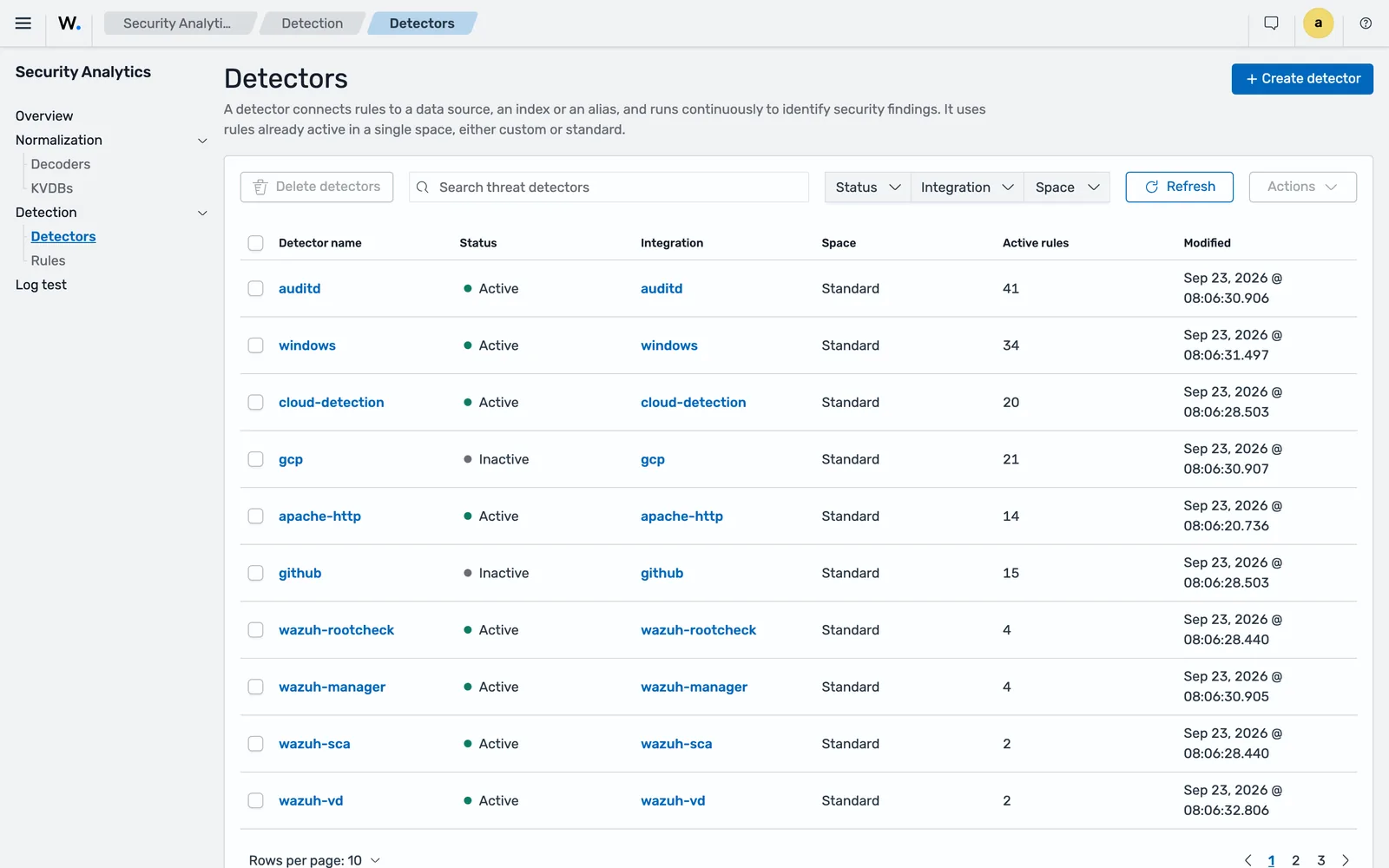
When you create one you pick the indices to monitor, the space, the integration, the rules to include or exclude, and the schedule. Detectors sit outside the promotion flow: they exist only in the custom or standard space.
The Rules page is the other half of the same picture, and it is worth filtering by integration to see what a given piece of content actually contains before you write your own.
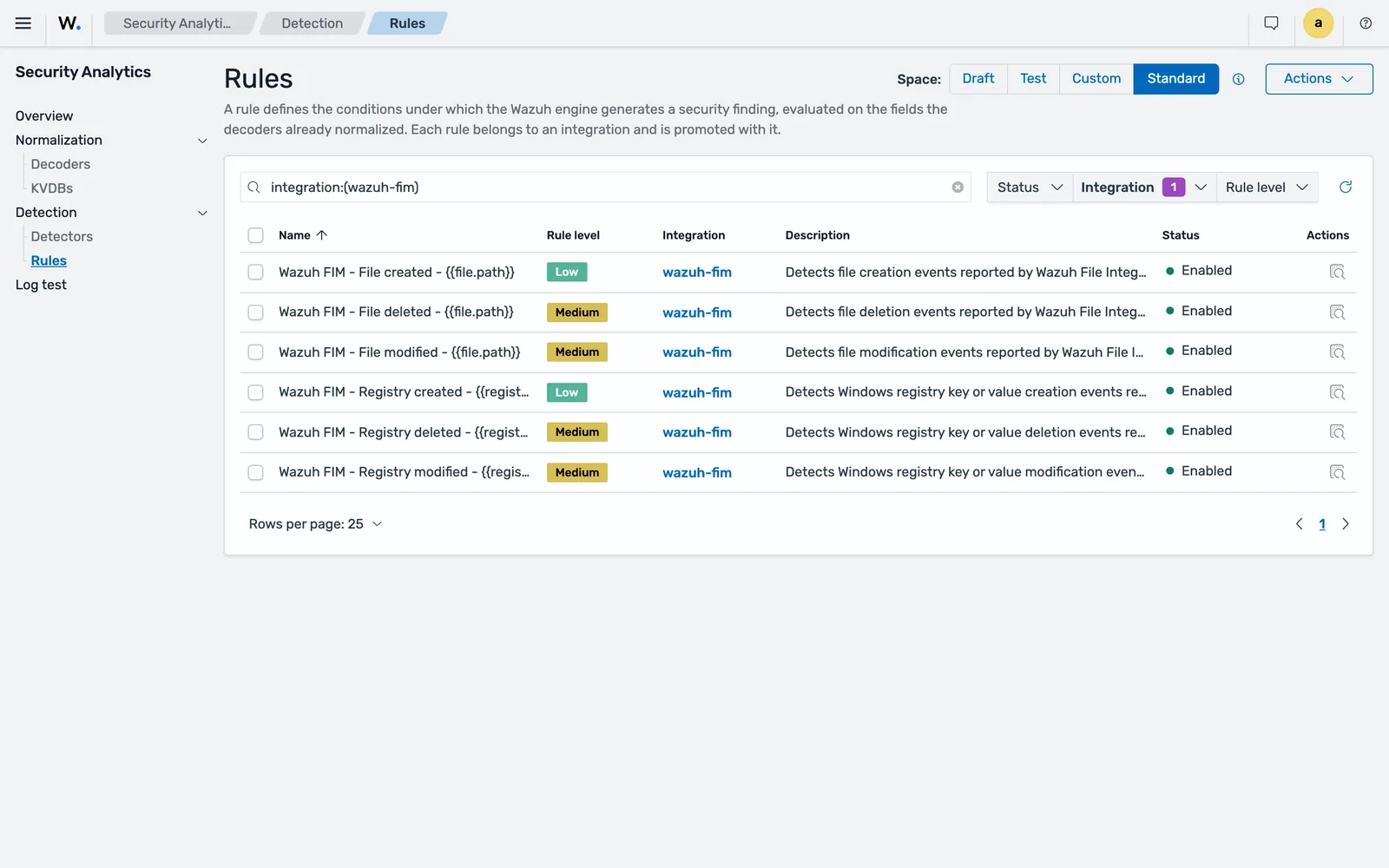
The practical consequence is latency. Detection is near real time, not real time, and the floor is your detector interval. One minute for file integrity, two for most things, five for IT hygiene. If you promise a SOC a sub-minute mean time to alert, the detector schedule is the first number to look at.
Spaces: draft, test, custom and standard
All detection content lives in a space, and the space decides what the content can do.
| Space | What it is for |
|---|---|
| Draft | Writable workspace. Content here is not evaluated. |
| Test | Loaded into the engine so the log test tool can validate it. Not yet live. |
| Custom | Production user content. Rules here can be attached to detectors. |
| Standard | Read-only content synchronised from Wazuh CTI. Items can be disabled, not edited. |
Promotion runs draft to test to custom. On each promotion the content manager deploys the content to the engine, validates the configuration, triggers a reload and updates the target space. Standard and custom are kept as separate processing pipelines, so Wazuh’s content and yours cannot interfere with each other.
The standard content arrives through the content manager plugin in the indexer, which synchronises from the Wazuh CTI API and pushes changes down to the manager. The manager’s engine never talks to CTI directly; it pulls from the indexer, comparing a content hash per space and downloading only when the hash differs.
What 4.x rule features no longer exist
This is the part that decides how much work a migration is. The following have no equivalent in the 5.0 rule format:
- Rule chaining:
if_sid,if_group,if_level,if_matched_sid,if_matched_group. - Correlation:
frequency,timeframe,same_*,different_*,if_fts,global_frequency. - Time conditions:
<time>and<weekday>. - CDB lookups with
<list>. KVDBs replace them, but they operate during decoding, not at rule evaluation. check_diff,maxsize, and theignoreflood control.
Everything in that list has to move somewhere else: to the decoder, to an OpenSearch Alerting monitor, or to whatever automation sits downstream. Budget for it before you commit to a date.
Common errors
A rule is rejected when you save it, naming a field
The detection block referenced a field that is not in the Wazuh Common Schema. The engine validates field names at creation and returns a structured error identifying the offending field, rather than accepting a rule that could never match. Fix the field name against a real normalised document, not against memory of the 4.x field.
The rule exists but no findings appear
Three usual causes, in the order worth checking. The rule is still in the draft space, where content is not evaluated. Or it was promoted but no detector includes it, because detectors are created separately. Or the detector is watching the wrong index: the index you select has to match the integration category, so a rule in a system-activity integration needs a detector on wazuh-events-v5-system-activity.
Events arrive but land in the unclassified stream
Only the root decoder accepted the event, which means no integration claims that log format. Enable unclassified event indexing for the space so you can see the raw documents, then write a decoder. This is the normal starting state for any log source Wazuh does not ship content for.
You cannot edit a standard rule
Standard space content is read-only by design. Disable the item and create your own version in the custom space instead. Tuning noisy shipped content this way is covered in cutting false positives.
Where to go next
The reference pages behind this lesson are the official Wazuh rules documentation for the Sigma format and the normalization engine reference for the pipeline. The severity mapping and the list of unsupported features come from the Wazuh rules migration guide.
When you are ready to write content, start with a custom decoder in YAML and then a Sigma detection rule on top of it. The vocabulary used here is collected in the Wazuh glossary, and the full inventory of what changed between versions is in Wazuh 5: what changes and why it matters.
Next: Wazuh File Integrity Monitoring Setup.
Frequently asked questions
What is the difference between a Wazuh decoder and a Wazuh rule?
A decoder turns a raw log line into structured fields that follow the Wazuh Common Schema. A rule inspects those fields and decides whether the event is worth reporting. In Wazuh 5.0 decoders run on the manager in the normalization engine, and rules run on the indexer as Sigma detection content, so the two live in different components.
What are the Wazuh rule levels in 5.0?
Severity is a string, not a number. The allowed values are informational, low, medium, high and critical. The numeric levels 0 to 16 from Wazuh 4.x no longer exist in the rule format, and the migration guide gives a mapping table for converting old rules.
What is the difference between a Wazuh alert and a finding?
They are the same idea under a new name. Wazuh 4.x produced alerts when a rule matched. Wazuh 5.0 produces findings, generated by a detector on the indexer and written to a wazuh-findings-v5 data stream. The word alert is still used for OpenSearch Alerting monitors, which are a separate notification mechanism.
Can I convert my Wazuh 4.x XML rules to 5.0 automatically?
No. The official migration guide states plainly that there is no automatic conversion tool and that rules must be rewritten by hand. The rule model changed too much for a mechanical translation: field names are validated against a closed schema, rule chaining and frequency correlation are gone, and severity is a keyword.
Where does Wazuh get its out-of-the-box rules?
From the Wazuh Cyber Threat Intelligence platform. The content manager plugin in the indexer synchronises decoders, rules, integrations and indicators from the CTI API into the read-only standard space, and pushes them down to the manager's normalization engine. You cannot edit standard content, but you can disable individual items.