A Wazuh 5.0 detection rule is a Sigma-YAML document with Wazuh extensions. It needs an id, a status, a keyword level, a logsource, a detection block and a metadata block, and it may carry structured mitre and compliance mappings. Every field you reference under detection is validated against the Wazuh Common Schema when you create the rule, so a rule that saves is a rule that queries real fields. This lesson writes one against the decoder built in the previous lesson, then puts it behind a detector.
What you need
- The
portal-auditintegration and its decoders from writing a custom decoder. This rule matches the fields those decoders produce. - The integration’s UUID, returned when you created it.
- Dashboard access with permission to manage Security Analytics content.
The finished rule and both Log test bodies are in the companion files for this lesson (listed at the end of the page).
The detection block is the only part that matches
Start with the part that does the work:
detection:
  condition: "selection and not filter_corporate_ranges"
  selection:
    event.dataset: "portal-audit"
    event.action: "authentication-failure"
    user.roles|contains: "admin"
  filter_corporate_ranges:
    source.ip|cidr:
      - "10.0.0.0/8"
      - "172.16.0.0/12"
      - "192.168.0.0/16"
A selection is a named object. Several fields inside one selection are ANDed: all must hold. A list of values under one field is ORed: any one matches. condition wires the named selections together with and, or, not and brackets, and also supports 1 of selection_* and all of selection_*. The selection and not filter shape is the standard idiom for exclusions, and it is how you carve out known-good traffic without weakening the main condition.
keywords is the other form. It searches every field of the event for a value, with no field targeting, and it is the closest thing to the old <match>. Reach for it only when no schema field carries the value you need, because it is slower and much easier to make noisy.
Modifiers
Modifiers are appended with a pipe and can be chained. The documented set:
| Modifier | Effect |
|---|---|
contains |
Substring match, wildcards added both sides |
startswith / endswith |
Anchored at one end |
re |
PCRE match, with `re |
cidr |
IPv4 or IPv6 address inside a subnet |
exists |
Field present (true) or absent (false) |
all |
Turn a list from OR into AND; not valid on a single-item list |
base64, base64offset, wide |
Encoded-value matching, wide must be chained further |
windash |
Expand -, /, en dash, em dash and horizontal bar |
lt, lte, gt, gte |
Numeric comparison |
windash and wide|base64offset|contains exist because attackers swap dash characters and UTF-16 encode command lines to dodge signatures. Use them on Windows command-line detections, not everywhere.
Field names are validated
This is the change with the largest practical effect. In 4.x, a rule referencing a field the decoder never set simply never fired, silently, forever. In 5.0 the engine rejects the rule at creation with an error naming the field. A rule that exists is a rule that queries fields that exist.
The corollary is that you cannot carry 4.x field names across. Run your sample through Log test, read normalization.output, and copy the paths from there. That workflow is in the decoder lesson and is the only authoritative way to answer “what is this field called now”.
Level, status and the rest of the envelope
id: "e22a8304-0cfe-48a2-b8e0-2f2585a89317"
enabled: true
status: "experimental"
level: "high"
logsource:
  product: "portal-audit"
  category: "authentication"
  service: "portal"
level is a string, one of informational, low, medium, high, critical. status is experimental, test or stable, and new content starts at experimental. enabled takes the place of noalert.
logsource needs product, and product must equal the title of the integration the rule belongs to. category, service and definition are optional. Note carefully that logsource takes no part in matching. It ties the rule to an integration and organises the catalogue; the detection block alone decides whether the rule fires. Use definition for the onboarding prerequisites, the audit policy or the agent configuration a reader would otherwise have to go and find.
metadata carries title (required), plus author, date, modified, description, references, documentation and supports. Keep title short and drop the “Detects when” prefix, because the title is what an analyst reads in the findings table at three in the morning. Put the triage steps in documentation.
MITRE and compliance are structured now
mitre:
  tactic:
    - "TA0001"
    - "TA0006"
  technique:
    - "T1078"
    - "T1110"
  subtechnique:
    - "T1078.003"
compliance:
  pci_dss:
    - "8.3.1"
    - "10.2.4"
  iso_27001:
    - "A.8.5"
  nist_800_53:
    - "AC-7"
    - "AU-6"
Each mitre key is a plain array of ID strings, with no name fields, and you now supply the tactic as well as the technique. Use subtechnique: [] when none applies. The compliance keys are gdpr, pci_dss, cmmc, nist_800_53, nist_800_171, hipaa, iso_27001, nis2, tsc and fedramp. In 4.x these were CSV strings smuggled into <group>; making them first-class is what turns the compliance dashboards into something an auditor can read.
Interpolate event values into the title
Wazuh extends Sigma with {{ field.path }} placeholders that resolve against the triggering event when the finding is written:
metadata:
  title: "Portal administrative sign-in failed from {{ source.ip }}"
Interpolation applies to title, tags, the mitre arrays and every compliance sub-array. It never applies inside detection. A missing or null field resolves to an empty string rather than failing, and a value that is entirely one empty placeholder drops the field from the output.
Used well, this removes whole families of near-duplicate rules. Used badly, it puts high-cardinality values into tags and makes the findings table unreadable. Keep it in the title.
What the rule format cannot do
Three gaps are worth stating plainly, because people spend a day looking for each.
No correlation. There is no frequency, timeframe, same_*, different_* or if_matched_sid. “Five failures in sixty seconds” is not expressible in a rule. It belongs in an OpenSearch Alerting monitor over wazuh-findings-v5-*, or in a Security Analytics correlation rule, which the indexer API describes as linking findings across indices and categories inside a shared time window. Write the per-event rule at a low severity, then let the monitor raise the aggregate.
No chaining. Rules are self-contained documents. A 4.x chain collapses into one rule, and the pattern that replaces sibling rules sharing a parent is condition: "1 of selection_*" with several named selections.
No CDB lookups at rule time. Key-value databases replaced CDB lists, but they are queried by decoders during normalisation, not by rules during evaluation. If a rule needs to know whether an address is on a list, the decoder has to stamp that onto the event first, using kvdb_match or kvdb_get.
Time-of-day conditions, check_diff and flood-control ignore also have no equivalent.
Create, promote, test
With the space selector on Draft, go to Security Analytics > Detection > Rules > Create, choose YAML Editor, select the portal-audit integration, and paste the rule. Through the API the envelope needs integration and resource, and the response returns the assigned UUID:
curl -sk -u admin:admin -X POST \
  "https://localhost:9200/_plugins/_content_manager/rules" \
  -H 'Content-Type: application/json' \
  -d @rule-portal-admin-auth-failure.request.json
On the beta5 lab stack that returns the assigned identifier:
{"message":"38f90df3-ec85-4ee4-8d45-69bdc57b422d","status":201}message is the id, not a sentence. Keep it: the Content Manager collection endpoints are POST-only, a GET on /_plugins/_content_manager/rules answers 405 with allowed: [POST], and there is no way to list your own content back through the API.
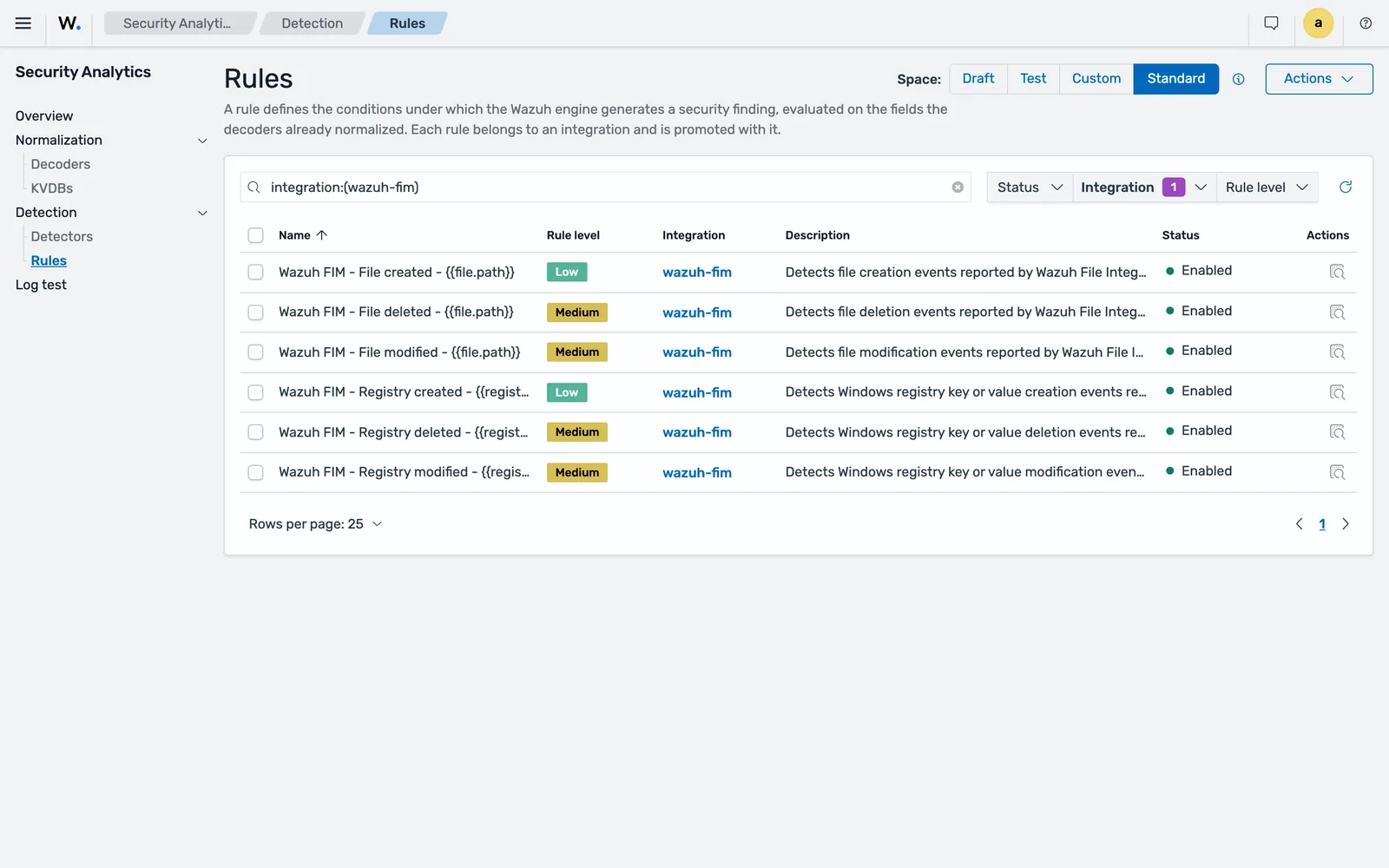
integration:(wazuh-fim). Rule level is a keyword, Low or Medium here, and the title carries {{ file.path }} placeholders that resolve when the finding is written.Promote draft to test from Security Analytics > Overview > Actions > Promote, then validate. Log test only accepts the test, custom and standard spaces, so promoting is not optional: on the beta5 lab a draft-space body returned Logtest is only supported for the 'test', 'custom' and 'standard' spaces., and a test-space body before the first promote returned The 'test' environment does not exist. Through the API, the promote body needs a changes object naming what to move, or you get Changes object is required.
Log test with an integration supplied runs both halves, normalisation and detection:
curl -sk -u admin:admin -X POST \
  "https://localhost:9200/_plugins/_content_manager/logtest" \
  -H 'Content-Type: application/json' -d @logtest-detection.json
The response splits into normalization and detection. The detection section reports rules_evaluated, rules_matched and a matches array carrying the rule id, title, level, tags and matched_conditions. If you omit integration, detection comes back with status: "skipped" and only the decoder is exercised.
Always run a negative case as well. The companion folder has one: a failed sign-in by a finance account from 10.20.4.51, which should be excluded twice over, by the role selection and by the CIDR filter. A rule you have only tested against events that should match is a rule you have not tested.
When both behave, promote test to custom.
Put it behind a detector
Rules do not run on their own. A detector is the scheduled job that applies them. Go to Security Analytics > Detection > Detectors > Create detector and set:
- a name
- the indices to monitor, matching your integration’s category, so
wazuh-events-v5-access-managementhere - the space, Custom
- the integration
- the rules to include or exclude
- the schedule
Copy the schedule from the content Wazuh ships rather than picking a number. The 5.0.0-beta5 lab came up with 22 detectors already running, on three periods:
monitors: 22
 - apache-http | None | {"period": {"interval": 1, "unit": "MINUTES"}}
 - wazuh-rootcheck | None | {"period": {"interval": 1, "unit": "MINUTES"}}
 - cloud-detection | None | {"period": {"interval": 2, "unit": "MINUTES"}}
 - wazuh-sca | None | {"period": {"interval": 2, "unit": "MINUTES"}}
...
 - wazuh-it-hygiene | None | {"period": {"interval": 5, "unit": "MINUTES"}}
...
 - wazuh-fim | None | {"period": {"interval": 1, "unit": "MINUTES"}}
...
 - wazuh-ioc | None | {"period": {"interval": 1, "unit": "MINUTES"}}
...
One minute for the things that matter within a minute (FIM, IoC matching, rootcheck, the manager’s own health), two minutes for the bulk of log-source content, five minutes for inventory-shaped work such as IT hygiene. Follow that pattern. It is a reasonable default and it keeps your content’s query load in proportion to everyone else’s.
Two limits are documented and both shape how you organise content. A detector can reference standard rules or custom rules, never both in the same detector. And a detector supports at most 100 Sigma rules. Plan detectors by log source and severity rather than one detector per rule.
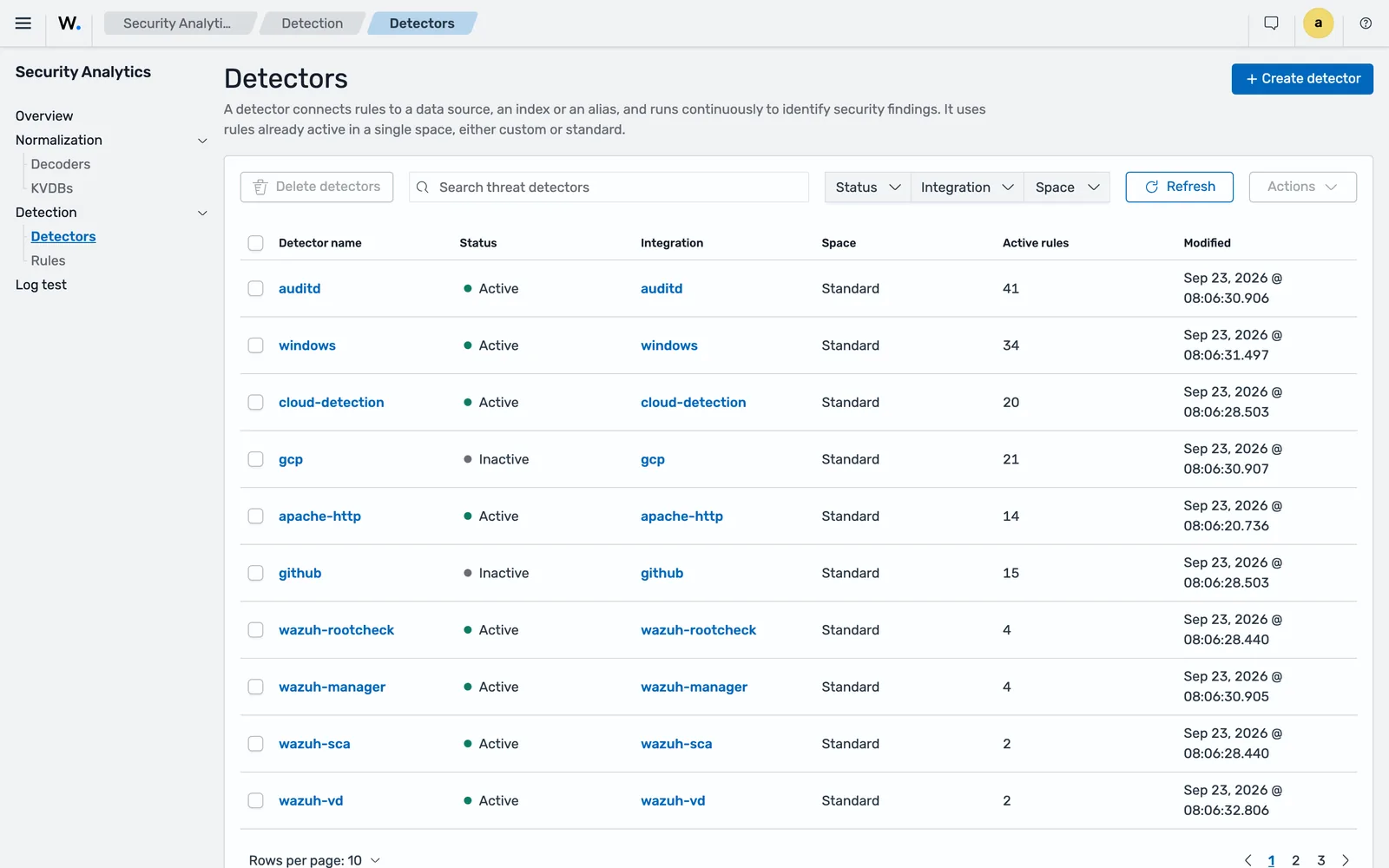
gcp and github, ship Inactive.How to quieten a noisy standard rule
You cannot edit standard-space content: it is read-only, synchronised from Wazuh CTI. What you can do, in increasing order of bluntness:
- Exclude it from the detector. Detectors let you include or exclude specific rules. The rule stays available for another detector, and nothing about the content changes. This is the reversible option and the one to reach for first.
- Disable it.
enabled: falseis the one field you may change on user-managed content in the standard space. A disabled rule stays in the catalogue for editing but is not evaluated. - Write a narrower replacement. Disable the broad standard rule and add your own in the custom space with the exclusions built in as
not filter_*selections. More work, and more to maintain, but it keeps the detection rather than deleting it.
Whichever you pick, record why and when to revisit it. An undocumented exclusion is indistinguishable from a gap six months later. The measurement method behind all of this is in cutting false positives.
Common errors
Rule rejected with a structured error naming a field
The field is not in the Wazuh Common Schema. detection field names are validated at creation. Check the name against the Common Schema reference, or better, run the log through Log test and copy the path out of normalization.output.
Missing [<field_name>] field.
The request body is wrong, not the rule. POST /_plugins/_content_manager/rules expects integration and resource at the top level, with the rule inside resource.
Integration with ID '<uuid>' is not in draft space.
Only draft content is writable. Edit in draft and promote. If you are trying to change Wazuh core content, integrations with mode: protected cannot be modified in any space.
Invalid request body
Usually a stray top-level key. The create and update schemas set additionalProperties: false, so anything outside integration and resource is refused. id and mode in particular must not be sent.
Logtest is only supported for the 'test', 'custom' and 'standard' spaces.
You tested against the draft space. Draft is writable but not runnable. Promote to test first.
The 'test' environment does not exist.
Nothing has been promoted into the test space yet, so the engine has no policy to build. Promote the integration and its rule, then retry.
Changes object is required
A promote call with no changes object in the body. The API will not infer which assets to move.
Resource creation limit reached
The Content Manager caps each resource type, default 100, configurable with the plugins.content_manager.max_<type> settings. It surfaces as a 400.
The rule validates and promotes but no findings appear
Work backwards. Are the events in the index the detector watches? Query wazuh-events-v5-<category>* for one. Does the detector include this rule, and is it in the Custom space? Has a full interval elapsed? Is enabled true? And confirm the detection against a real indexed document rather than the sample you tested with, because the sample went through the test-space policy and live traffic goes through the custom one.
Where to go next
The full field table, the modifier list and the interpolation rules are in the official rules reference, and the upstream grammar is the Sigma specification. For the shape of a detection programme rather than a single rule, detection engineering with Sigma and ATT&CK coverage covers importing community rules and measuring what you cover. To get an actual notification out of a finding, see notifications.
Next: Wazuh Log Collection: Syslog, Journald, Windows Events.
Files for this lesson
Every file this lesson refers to, exactly as used. Open a file to read it in the browser, or download the set as a zip. Download wazuh-custom-rules.zip. The full set for all lessons is at wazuh-tutorial-files.zip.
Frequently asked questions
What replaced rule levels 0 to 15 in Wazuh 5.0?
Five keyword severities: informational, low, medium, high and critical. The official migration table maps 4.x levels 1 to 3 to informational, 4 to 6 to low, 7 to 9 to medium, 10 to 13 to high, and 14 to 16 to critical. A 4.x level 0 rule becomes enabled false, or is dropped entirely if it only existed as a chaining parent.
Does Wazuh 5.0 support if_sid and frequency rules?
No. Rule chaining through if_sid, if_group and if_level is not supported, and neither is frequency, timeframe, the same and different field comparisons, or if_matched_sid. Every rule is self-contained. Counting and correlation move to an OpenSearch Alerting monitor or a Security Analytics correlation rule on the indexer.
How do I silence a noisy standard Wazuh rule?
Three documented options, in increasing bluntness. Exclude the rule when you define the detector, which leaves it available elsewhere. Set enabled to false on it, which is the one field you may change on standard-space content. Or leave it on and add your own narrower rule alongside it. You cannot edit the detection logic of a standard rule, because the standard space is read-only.
How long does a Wazuh 5.0 rule take to fire?
As long as the detector's schedule. Detectors are scheduled jobs on the indexer. The 22 detectors shipped on the 5.0.0-beta5 lab ran on 1, 2 and 5 minute periods, with 2 minutes the most common. A finding therefore appears up to one interval after the event was indexed, not instantly. Build that latency into any promise you make about response times.
Why was my rule rejected when I created it?
Most often because a field in the detection block is not in the Wazuh Common Schema. The detection engine validates every field name at creation and rejects the rule with a structured error naming the offending field. Run your sample log through Log test and copy the field paths from the normalisation output rather than guessing them.