Log collection in Wazuh 5.0 is configured on the agent, in <localfile> blocks, exactly as it was in 4.x. What changed is where the manager’s half of it went: the manager no longer accepts syslog on port 514, so network devices need a relay host running an agent. This lesson covers the five collection modes that carry almost all real traffic, plain files, journald, Windows event channels, command output and multi-line records, plus the relay pattern that replaces the removed listener.
What you need
- An enrolled agent. See installing the agent on Linux or on Windows.
- Root or administrator on the endpoint, or write access to the group’s shared configuration on the manager.
- A clear idea of what the log is worth. Every line you collect is indexed, stored and paid for in disk.
The example blocks are in the companion files for this lesson (listed at the end of the page). The Windows event channel section was run on a beta5 lab endpoint and says so; the Linux and relay sections are from the documentation and have not been exercised end to end.
Decide where the configuration lives before you write it
There are two places, and the choice matters more than the syntax.
Local configuration is the agent’s own file: /var/ossec/etc/ossec.conf on Linux, /Library/Ossec/etc/ossec.conf on macOS, C:\Program Files (x86)\ossec-agent\ossec.conf on Windows. Root element <ossec_config>. Use it for something genuinely unique to one endpoint.
Centralised configuration is the group’s shared file on the manager, at /var/wazuh-manager/etc/shared/<GROUP_NAME>/agent.conf, with <agent_config> as the root element. It reaches every agent in the group, and it wins over the local file when both define the same setting. If an agent belongs to several groups the configurations merge, and the group that sorts first alphabetically takes a conflict.
Use the group file for everything that describes a role. Edit it as agent.conf.tmp, validate, then rename it into place:
/var/wazuh-manager/bin/verify-agent-conf /var/wazuh-manager/etc/shared/webservers/agent.conf.tmpThe documented output on success is verify-agent-conf: OK. The manager picks the renamed file up and distributes it without a restart.
<agent_config> accepts name, os and profile attributes, each a regular expression, and an agent must satisfy all attributes present on a block. That is how one group file covers mixed Linux and Windows members. The group model itself is in agent groups and centralised configuration.
Collect a log file
The minimum is a location and a format:
<localfile>
  <log_format>syslog</log_format>
  <location>/var/log/syslog</location>
</localfile>
syslog is the right choice for any plain text file with one entry per line, whatever wrote it. The other formats worth knowing are json for single-line JSON, audit for auditd (it chains consecutive records sharing an ID into one event), eventchannel for Windows, journald for systemd, command and full_command for command output, and multi-line and multi-line-regex for records that span lines. There are also format names for Apache, IIS, MySQL, PostgreSQL, MSSQL, Snort, Squid and nmap output.
Wildcards work on Linux and Windows; on Windows only * is supported. A file that does not exist at start-up is rescanned later. strftime patterns work too, for applications that rotate by date, but you cannot combine a strftime pattern and a wildcard in the same entry.
Four options earn their place on a wildcard block:
<localfile>
  <log_format>syslog</log_format>
  <location>/var/log/myapp/*.log</location>
  <exclude>/var/log/myapp/debug*.log</exclude>
  <ignore_binaries>yes</ignore_binaries>
  <age>1d</age>
</localfile>
exclude removes a sub-pattern, ignore_binaries skips anything that is not UTF-8 or ASCII, and age skips files untouched for longer than the interval. The ceiling is 1000 files monitored at once across all blocks, so a careless pattern can quietly starve every other source.
ignore and restrict filter content rather than files. Several ignore expressions are ORed, several restrict expressions are ANDed, and ignore takes precedence when a line matches both. Both default to PCRE2 and accept a type attribute of osregex, osmatch or PCRE2.
One more option is easy to miss: only-future-events, which defaults to yes. On that default the agent starts at the end of the file and never reads what was written while it was stopped. Set it to no when you need continuity across restarts, and know that the file will be re-read from the beginning if it rotated while the agent was down.
Collect journald with filters
Both location and log_format must be journald:
<localfile>
  <location>journald</location>
  <log_format>journald</log_format>
  <filter field="_SYSTEMD_UNIT">^ssh.service$</filter>
</localfile>
filter takes a PCRE2 expression and a field attribute naming the journald field. The combination logic is worth reading twice. Filters inside one block are ANDed: a log must match all of them. Separate blocks are ORed. And if at least one journald block has filters, blocks without filters are ignored entirely, so adding a single filtered block silently turns off collect-everything.
ignore_if_missing="yes" on a filter accepts logs that lack the field. That is how you catch high-severity messages plus the malformed entries that have no PRIORITY at all:
<localfile>
  <location>journald</location>
  <log_format>journald</log_format>
  <filter field="_SYSTEMD_UNIT">^cron.service$</filter>
  <filter field="PRIORITY" ignore_if_missing="yes">[0-3]</filter>
</localfile>Collect Windows event channels
This section was exercised on a Windows 11 endpoint running the beta5 agent. The rest of the page is from the documentation.
Start by knowing what you already have. A stock beta5 Windows install ships four <localfile> blocks, and they are not the bare three you may remember:
<localfile>
    <location>Application</location>
    <log_format>eventchannel</log_format>
  </localfile>
<localfile>
    <location>Security</location>
    <log_format>eventchannel</log_format>
    <query>Event/System[EventID != 5145 and EventID != 5156 and EventID != 5447 and
      EventID != 4656 and EventID != 4658 and EventID != 4663 and EventID != 4660 and
      EventID != 4670 and EventID != 4690 and EventID != 4703 and EventID != 4907 and
      EventID != 5152 and EventID != 5157]</query>
  </localfile>
<localfile>
    <location>System</location>
    <log_format>eventchannel</log_format>
  </localfile>
<localfile>
    <location>active-response\active-responses.log</location>
    <log_format>syslog</log_format>
  </localfile>
Two things follow from that. The Security channel already ships with a thirteen-ID exclusion query, so the tuning most people write by hand has been done for them. And the active response results file is collected by default on Windows, which it is not on Linux, so active response output reaches the indexer without any extra configuration.
To add a channel, set location to its name and the format to eventchannel:
<localfile>
  <location>Security</location>
  <log_format>eventchannel</log_format>
  <only-future-events>yes</only-future-events>
  <query>Event/System[EventID != 5145 and EventID != 5156]</query>
  <reconnect_time>10s</reconnect_time>
</localfile>
The channels documented as supported include Microsoft-Windows-Sysmon/Operational, Microsoft-Windows-Windows Defender/Operational, Microsoft-Windows-PowerShell/Operational, Microsoft-Windows-Windows Firewall With Advanced Security/Firewall and Microsoft-Windows-TerminalServices-RemoteConnectionManager.
ignore and restrict do not apply to this format. Filtering is done with <query>, in XPath against the Windows event schema, and it can reach into EventData:
<query>Event[System/EventID = 4624 and (EventData/Data[@Name='LogonType'] = 2 or EventData/Data[@Name='LogonType'] = 10)]</query>That one keeps interactive and RDP logons and drops the service and network logons that make 4624 unmanageable. Excluding 5145 and 5156 is the other standard move on a file server: detailed share access and filtering-platform connection events will dominate the index otherwise.
reconnect_time sets the retry interval when the Event Log service is down, and only applies to eventchannel.
Two limits to know before you plan a Windows rollout. The Windows agent does not monitor log files on UNC paths or mapped network drives, and will silently ignore a <localfile> pointing at one. And eventchannel is Vista-era and later; the old eventlog format covers the classic log.
What a Windows event looks like once it is indexed
Write your queries and your dashboards against the fields that actually exist, not the ones a 4.x search result shows you. A real Security event from the beta5 lab, event ID 4798, indexed into wazuh-events-v5-system-activity:
event.code = "4798"
event.dataset = "security"
event.action = "accessed"
event.category = ["iam"]
event.outcome = "success"
event.kind = "event"
event.type = ["user", "info"]
event.start = "2026-09-23T02:27:05.9937614Z"
log.level = "information"
host.name = "WIN11-LAB"
message = "A user's local group membership was enumerated."
user.name = "WIN11-LAB$"
user.domain = "WORKGROUP"
user.id = "S-1-5-18"
user.target.name = "WDAGUtilityAccount"
related.user = ["WIN11-LAB$", "WDAGUtilityAccount"]
wazuh.protocol.location = "EventChannel"
wazuh.integration.name = "windows"
wazuh.integration.category = "system-activity"
wazuh.integration.decoders = ["decoder/core-wazuh-message/0", "decoder/windows-event/0", "decoder/windows-security/0"]
wazuh.space.name = "standard"
There are no winlog.* fields. The channel is not a field either: event.dataset carries security, system or application, and wazuh.protocol.location is the constant EventChannel. The event ID is event.code, as a string. event.start is the Windows TimeCreated, which is the timestamp to use when the difference between when something happened and when it was indexed matters, and on a skewed endpoint that difference is large.
The raw XML survives intact in event.original, so anything the decoders did not lift out is still queryable, just not efficiently. Three decoders ran on that event, chained: the transport decoder, the generic Windows event decoder and the Security-channel decoder.
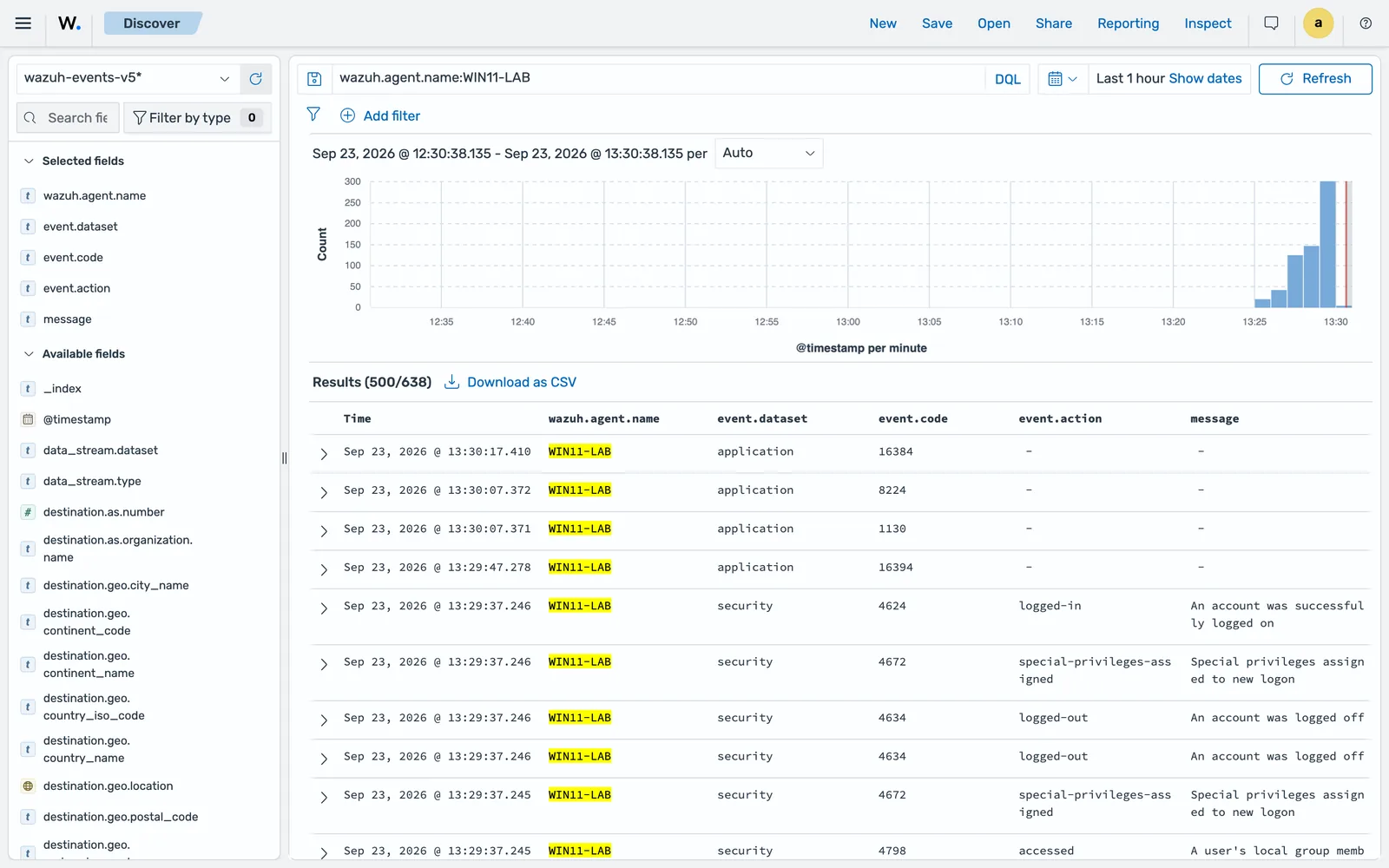
Build your column set from those four fields plus message and you have a working Windows triage view. That is also the quickest way to confirm a new channel is arriving: filter on wazuh.agent.name and watch event.dataset for the new value.
See per-channel throughput before you tune
The Windows agent writes a JSON state file, wazuh-logcollector.state, in the agent folder, with a counter per <localfile> location. It is the fastest way to find out which channel is producing your volume:
location                             events bytes
--------                             ------ -----
active-response\active-responses.log      0     0
System                                    2  2064
Security                                 69 80911
Application                               7  6937
That is one idle Windows 11 endpoint over a short window, and Security is already an order of magnitude above everything else. Multiply by a fleet before you decide the default exclusion query is enough. The file also carries a global block with the start and end of the interval and a drops counter per target, which is where you look if you suspect the agent is shedding events rather than sending them.
Monitor command output
There are two mechanisms, they are different, and confusing them wastes an afternoon.
The Logcollector route uses <localfile> with log_format of command (one log entry per output line) or full_command (the whole output as one entry):
<localfile>
  <log_format>full_command</log_format>
  <command>netstat -tulpn</command>
  <alias>listening-sockets</alias>
  <frequency>600</frequency>
</localfile>
frequency is the interval in seconds, default 360. alias renames the command in the event so a decoder can match a stable name instead of the command string, which changes the day someone adds a flag.
The Command module route is <wodle name="command">, and it adds things Logcollector does not have: hash verification of the executed file, and scheduling by day, wday or time:
<wodle name="command">
  <disabled>no</disabled>
  <tag>sudoers-review</tag>
  <command>/usr/local/bin/report-sudoers.sh</command>
  <interval>1d</interval>
  <time>03:30</time>
  <timeout>30</timeout>
  <skip_verification>no</skip_verification>
  <verify_sha256>REPLACE_WITH_SHA256_OF_THE_SCRIPT</verify_sha256>
</wodle>
Use the Command module for anything that points at a script, and set verify_sha256. Verification covers only the first argument of <command>, so the script must be that first argument; otherwise you are checking the hash of the interpreter.
Keep monitored commands read-only, keep the command string fixed rather than built from anything the endpoint supplies, filter the output at the source, and remember that everything the command prints ends up in the indexer. A command that prints a token has published that token.
Group multi-line events
A Java stack trace or a Python traceback split across twenty lines becomes twenty useless events unless you group it:
<localfile>
  <log_format>multi-line-regex</log_format>
  <location>/var/log/myapp/service.log</location>
  <multiline_regex match="start" replace="wspace" timeout="10">^\d{4}-\d{2}-\d{2}T</multiline_regex>
</localfile>
match is start, end or all, default start. start groups the content between two matching lines and excludes the last matching line, which is why the expression should anchor on whatever begins a record, usually the timestamp. end groups until a matching line. all groups until the whole event matches. Both start and end match against a single line.
replace controls the end-of-line characters: no-replace (default), wspace, tab or none. timeout is how long to wait for the next line, 1 to 120 seconds, default 5, and it must not exceed the age value on the same block.
When the record count is genuinely fixed, multi-line:<NUMBER> is simpler and cheaper. And note that for grouped formats, ignore and restrict evaluate against the whole group as one log.
Bring in syslog from network devices
Wazuh 5.0 removed the manager’s syslog listener. remoted handles agent connections only, so the 4.x <remote><connection>syslog</connection> block has no 5.0 equivalent. Firewalls, switches and appliances now go through a relay: a Linux host running rsyslog with a Wazuh agent on it.
On the relay, write the incoming messages to a file:
module(load="imudp")
module(load="imtcp")

template(name="TraditionalSyslogFormat" type="string"
         string="%timegenerated% %HOSTNAME% %syslogtag%%msg:::sp-if-no-1st-sp%%msg%\n")

ruleset(name="remote") {
    action(type="omfile" file="/var/log/remote.log" template="TraditionalSyslogFormat")
    stop
}

input(type="imudp" port="514" ruleset="remote")
input(type="imtcp" port="514" ruleset="remote")
Create the destination file owned by syslog:adm, validate with rsyslogd -N1, restart rsyslog, and confirm it is listening with ss -lun | grep 514. Then point the agent at it:
<localfile>
  <location>/var/log/remote.log</location>
  <log_format>syslog</log_format>
</localfile>
Two details decide whether this works or wastes a week.
The template must start with an RFC3164 timestamp. The standard syslog decoders need it as the first field. A custom template without %timereported:::date-rfc3164% or an equivalent produces events that land in wazuh-events-v5-unclassified-* with only event.original populated and nothing decoded.
The device’s source address is not preserved automatically. In 4.x the manager received the connection and knew it. Now the agent reads a local file, so the address only survives if rsyslog records it: either in the file path, with a dynaFile template on %FROMHOST-IP% giving each device its own file, or inside the message with %fromhost-ip%.
The alternative is to have rsyslog write to the systemd journal with omjournal, which the agent reads with no extra configuration. It is less work, and journald handles retention for you, but the journal’s _HOSTNAME is a trusted field that always reflects the relay, not the sending device, so per-device attribution has to come from the message body.
Existing decoders and rules for device syslog keep working under either option, because the body rsyslog forwards is the body remoted used to receive. Port 514 has to be open at every hop, and the 4.x <allowed-ips> and <denied-ips> controls become rsyslog’s $AllowedSender or host firewall rules.
What happens to events nobody decodes
An event is unclassified when its wazuh.integration.category is unclassified, which means no integration’s decoder claimed it. Those events go to wazuh-events-v5-unclassified-* if the policy has unclassified indexing enabled, and are not indexed at all if it does not.
Check that index after onboarding any new source. A pile of events there is either a source that needs a decoder or a source that was not worth collecting. Both are useful answers, and both are better than assuming the data arrived intact.
Everything the agent collects goes to the manager whether a decoder matches it or not, so unclassified volume is real volume. This is one of the reasons 5.0 sizing runs higher than 4.x, as covered in system requirements and sizing.
Common errors
wazuh-logcollector: INFO: (1950): Analyzing file: '<log_file_configured>'.
Not an error. This is the line that confirms Logcollector opened the file. Its absence after a restart is the signal: the path is wrong, the pattern matched nothing, or the agent cannot read the file.
A command in agent.conf produces nothing and logs nothing
The remote-command gate is not set on that endpoint. Check local_internal_options.conf for logcollector.remote_commands=1 if it is a <localfile> command, or wazuh_command.remote_commands=1 if it is a <wodle name="command">, and restart the agent. The agent ignores the source rather than reporting an error, which is the security control working as designed.
Events arrive with no decoded fields
They are in wazuh-events-v5-unclassified-* with only event.original. For relayed syslog the usual cause is an rsyslog template with no leading RFC3164 timestamp. For an application log it means no decoder claimed the format.
Journald collection stopped after adding a filter
Expected behaviour. Once any journald block has filters, journald blocks without filters are ignored. Add the filters you need to every block, or accept that the filtered set is now the whole set.
A block appended to the Windows ossec.conf by script never takes effect
The shipped Windows configuration file ends with a comment after the final </ossec_config>, so a script that anchors its insertion on the end of the file finds no match and writes nothing, usually without reporting an error. Insert before the last </ossec_config> instead, and have the script fail loudly when it matches nothing.
Windows queries return nothing because the field does not exist
There are no winlog.* fields on Wazuh 5.0. The event ID is event.code as a string, the channel is event.dataset with values security, system and application, and the raw XML is in event.original. A saved search or detection rule carried over from a 4.x or Elastic deployment matches nothing and reports no error.
A Windows <localfile> on a network path is ignored
The Windows agent supports local file systems only. UNC paths such as \\server\share\file.log and mapped drives such as Z:\logs\file.log are ignored with no alert. Run an agent on the host that owns the file.
The agent is missing events written while it was stopped
only-future-events defaults to yes, so the agent resumes at the end of the file. Set it to no to resume from the last recorded position, and note the max-size attribute, default 10MB, which skips the backlog when it exceeds that size.
Only some files under a wildcard are collected
Check the 1000-file ceiling across every <localfile> block, then check age and exclude on the block. A file older than age is skipped even if it matches the pattern.
Where to go next
The complete option list, including target, out_format, label and the socket integration, is in the official localfile reference, and the per-platform source tables are in collecting logs from operating systems. The syslog change has its own migration guide with both relay options worked through.
Collection is the first half of onboarding a source. The second half is a decoder and a rule, which is writing a custom decoder followed by writing custom detection rules. Cloud sources use their own modules rather than <localfile>, and are covered in cloud logs. Paths and ports referenced here are collected in the ports, paths and log files reference.
Next: Sysmon with Wazuh for Windows Telemetry.
Files for this lesson
Every file this lesson refers to, exactly as used. Open a file to read it in the browser, or download the set as a zip. Download wazuh-log-collection.zip. The full set for all lessons is at wazuh-tutorial-files.zip.
README.md2.4 KBagent.conf2.2 KBlocalfile-command.xml1.3 KBlocalfile-journald.xml1.2 KBlocalfile-linux-files.xml1.9 KBlocalfile-multiline.xml1.5 KBlocalfile-windows-eventchannel.xml2.9 KBrsyslog-10-remote.conf1.5 KBwodle-command.xml1.6 KB
Frequently asked questions
Can the Wazuh manager still receive syslog on port 514?
No. Wazuh 5.0 removed the syslog listener from the manager, and remoted now handles only agent connections. Network devices that cannot run an agent send syslog to a Linux host running rsyslog, and a Wazuh agent on that host reads the file rsyslog writes, or the systemd journal if rsyslog forwards there instead.
Where is the Wazuh agent configuration file in 5.0?
It is unchanged. Linux is /var/ossec/etc/ossec.conf, macOS is /Library/Ossec/etc/ossec.conf, and Windows is C:\Program Files (x86)\ossec-agent\ossec.conf, all with ossec_config as the root element. Only the manager moved, to /var/wazuh-manager/etc/wazuh-manager.conf with wazuh_config as its root.
Why does my command in agent.conf not run?
The agent ignores command sources that arrive through the centralised configuration unless the corresponding gate is set in local_internal_options.conf on that endpoint. A localfile with log_format command or full_command needs logcollector.remote_commands=1, and a wodle name command needs wazuh_command.remote_commands=1. Neither gate applies to a command written directly into that agent's own ossec.conf.
How many log files can one Wazuh agent monitor?
The documented ceiling is 1000 files monitored at the same time, counted across every localfile block including wildcard expansions. A wildcard that spans every subdirectory under /var/log can consume that budget on a busy host, so scope the patterns and use exclude and age to keep them tight.
What is the difference between ignore and restrict?
ignore drops lines matching the expression and restrict keeps only lines matching it. Several ignore entries are ORed, several restrict entries are ANDed, and ignore wins when a line matches both. Neither applies to the eventchannel format, which filters with an XPath query instead.