Installing the Wazuh agent on Linux is three moves: add the repository, install the wazuh-agent package with the manager address and the enrolment password in the environment, then enable the service. In Wazuh 5.0 the agent reaches the manager over HTTPS on port 1517, and the agent still lives under /var/ossec, even though the manager moved to /var/wazuh-manager. The step people skip is the group. It has to exist on the manager before the agent enrols, or the manager rejects the handshake.
What you need
- A running Wazuh manager you can reach on 1517/TCP. If you have not built one, start with installing Wazuh on Ubuntu or the Docker deployment.
- Root on the endpoint.
- The enrolment password from the manager, if password authentication is enabled (it is, by default).
- Any non-default agent group already created on the manager.
Read the enrolment password on the manager:
cat /var/wazuh-manager/etc/authd.passThe output is a single line. On the beta5 lab it was 32 hexadecimal characters, generated by wazuh-manager-authd at first start:
2026/09/23 02:33:50 wazuh-manager-authd: INFO: A new enrollment password was generated and written to 'etc/authd.pass'
2026/09/23 02:33:50 wazuh-manager-authd: INFO: Accepting connections on port 1515. Shared-password enrollment is required.Add the Wazuh repository
On Debian and Ubuntu:
apt-get install gnupg apt-transport-httpscurl -s https://packages-staging.xdrsiem.wazuh.info/key/GPG-KEY-WAZUH | gpg --no-default-keyring --keyring gnupg-ring:/usr/share/keyrings/wazuh.gpg --import && chmod 644 /usr/share/keyrings/wazuh.gpgecho "deb [signed-by=/usr/share/keyrings/wazuh.gpg] https://packages-staging.xdrsiem.wazuh.info/pre-release/5.x/apt/ unstable main" | tee -a /etc/apt/sources.list.d/wazuh.listapt-get updateOn RHEL-compatible systems version 9 and later:
rpm --import https://packages-staging.xdrsiem.wazuh.info/key/GPG-KEY-WAZUHcat > /etc/yum.repos.d/wazuh.repo << EOF
[wazuh]
gpgcheck=1
gpgkey=https://packages-staging.xdrsiem.wazuh.info/key/GPG-KEY-WAZUH
enabled=1
name=EL-\$releasever - Wazuh
baseurl=https://packages-staging.xdrsiem.wazuh.info/pre-release/5.x/yum/
priority=1
EOFInstall the agent and enrol it in one step
The package install reads two deployment variables from the environment and writes them into the agent configuration for you. Replace the manager address and the password.
WAZUH_MANAGER="10.0.0.2" WAZUH_REGISTRATION_PASSWORD='XXXXXXXXXXXX' apt-get install wazuh-agentOn yum, dnf or zypper, swap the package manager and keep the variables in front of it:
WAZUH_MANAGER="10.0.0.2" WAZUH_REGISTRATION_PASSWORD='XXXXXXXXXXXX' dnf install wazuh-agentOn the beta5 lab, installing the arm64 package on Ubuntu 24.04 returns:
The following NEW packages will be installed:
  wazuh-agent
0 upgraded, 1 newly installed, 0 to remove and 1 not upgraded.
Need to get 7817 kB of archives.
After this operation, 58.6 MB of additional disk space will be used.
Get:1 https://packages-staging.xdrsiem.wazuh.info/pre-release/5.x/apt unstable/main arm64 wazuh-agent arm64 5.0.0-1 [7817 kB]
...
Setting up wazuh-agent (5.0.0-1) ...
Processing triggers for libc-bin (2.39-0ubuntu8.9) ...
About 58 MB installed, and the package version is 5.0.0-1 rather than anything carrying a beta suffix, which is worth knowing when you write inventory checks.
WAZUH_MANAGER and WAZUH_REGISTRATION_PASSWORD are the only deployment variables the 5.0 beta installation guide documents for the Linux package. The agent name and the group are not among them, so if you need either, set them in the configuration file before the first start. That is the next section.
Omit both variables if you want the package on disk without enrolling, which is what you want when you are baking an image.
Point the agent at the manager and name it
The agent configuration file is /var/ossec/etc/ossec.conf. Its root element is still <ossec_config>. The block that matters in 5.0 is <agent>, which replaces the 4.x <client>.
Look at what the package wrote before you edit anything. On the beta5 lab, immediately after the install above:
sed -n "/<agent>/,/<\/agent>/p" /var/ossec/etc/ossec.conf <agent>
<enrollment>
<enabled>yes</enabled>
<authorization_pass_path>etc/authd.pass</authorization_pass_path>
</enrollment>
<manager>
<endpoint>wazuh.manager</endpoint>
</manager>
<config-profile>ubuntu, ubuntu24, ubuntu24.04</config-profile>
</agent>Three useful facts in that. WAZUH_MANAGER became <manager><endpoint> with no port, WAZUH_REGISTRATION_PASSWORD was written to /var/ossec/etc/authd.pass and referenced by a relative <authorization_pass_path>, and the package set a <config-profile> from the detected release. Here is the shape you edit:
<ossec_config>
  <agent>
    <manager>
      <endpoint>10.0.0.2</endpoint>
    </manager>
  </agent>
</ossec_config>
<endpoint> folds the old address and port tags into one value. The host is the only mandatory part and the port defaults to 1517, so 10.0.0.2, manager.example.com:8443/gateway and [2001:db8::1]:1517 are all valid. A 4.x <client><server><address> block is read for agents upgraded in place, but on a fresh install use <agent><manager><endpoint>.
Add the enrolment parameters you want the manager to record:
<ossec_config>
  <agent>
    <manager>
      <endpoint>10.0.0.2</endpoint>
    </manager>
    <enrollment>
      <enabled>yes</enabled>
      <agent_name>web-prod-01</agent_name>
      <groups>linux-servers</groups>
    </enrollment>
  </agent>
</ossec_config>
<agent_name> defaults to the endpoint hostname. <groups> takes a comma-separated list and defaults to default. Both are optional, and both are worth setting deliberately.
Start and enable the service
systemctl daemon-reloadsystemctl enable wazuh-agentsystemctl start wazuh-agentOn SysV init systems, use chkconfig --add wazuh-agent then service wazuh-agent start on RPM-based distributions, or update-rc.d wazuh-agent defaults 95 10 then service wazuh-agent start on Debian-based ones. Where there is no service manager at all, the documented fallback is /var/ossec/bin/wazuh-control start.
The lab endpoint was a container with no systemd, so the capture below uses that fallback. On a real host use the systemctl commands above; the agent behaves identically either way.
/var/ossec/bin/wazuh-control start2026/09/23 02:38:49 wazuh-agentd: INFO: No port in <agent><manager><endpoint>. Using the default port 1517.
Starting Wazuh v5.0.0...
Started wazuh-execd...
2026/09/23 02:38:49 wazuh-agentd: INFO: No port in <agent><manager><endpoint>. Using the default port 1517.
Started wazuh-agentd...
Started wazuh-syscheckd...
Started wazuh-logcollector...
Started wazuh-modulesd...
Completed.Five agent daemons, and the No port in <agent><manager><endpoint> line is informational: it is the agent telling you it filled in 1517 because the endpoint carried a host only.
Verify the agent three ways
Check the local state file first, because it answers the question without leaving the endpoint:
sudo grep ^status /var/ossec/var/run/wazuh-agentd.stateThe documented values are pending, disconnected and connected. On the beta5 lab the file read status='pending' in the seconds between the daemons starting and the key arriving, then settled:
2026/09/23 02:38:49 wazuh-agentd: INFO: Started (pid: 4207).
2026/09/23 02:38:49 wazuh-agentd: INFO: Using password specified on file: etc/authd.pass
2026/09/23 02:38:49 wazuh-agentd:https-client: INFO: TLS verification is DISABLED (verify_mode=none).
2026/09/23 02:38:50 wazuh-agentd: INFO: Valid key received
2026/09/23 02:38:52 wazuh-modulesd: INFO: Started (pid: 4240).
Valid key received one second after start is the whole enrolment. If you see pending and no such line, the enrolment was refused and the agent is retrying; the log carries the reason.
Then confirm the manager agrees. From the manager or any authorised host:
curl -k -X GET "https://<WAZUH_MANAGER_IP>:55000/agents?pretty=true&sort=-ip,name" -H "Authorization: Bearer $TOKEN"The response carries status, lastKeepAlive, group and group_config_status for each agent, which is enough to tell a connected agent from one that enrolled and went quiet. On the beta5 lab, with two agents in two groups and the second one caught moments after enrolment:
{
   "data": {
      "affected_items": [
         {
            "os": {
               "name": "Amazon Linux"
            },
            "status": "active",
            "name": "lab-agent-container",
            "id": "001",
            "version": "v5.0.0",
            "ip": "192.168.155.5",
            "group": [
               "default"
            ]
         },
         {
            "status": "never_connected",
            "name": "lab-agent-ubuntu",
            "id": "002",
            "ip": "any",
            "group": [
               "lab-linux"
            ]
         }
      ],
      "total_affected_items": 2,
      "total_failed_items": 0,
      "failed_items": []
   },
   "message": "All selected agents information was returned",
   "error": 0
}
Read agent 002 carefully, because that snapshot is the one people misread. It has a key and a group, and ip is any with no os or version block, because the manager has not had a connection from it yet. That is what never_connected looks like from the API side. A minute later it was active with its Ubuntu version filled in.
Finally, look at the dashboard: Agents management > Summary lists every enrolled agent with its connection status, and the same page summarises counts per state.
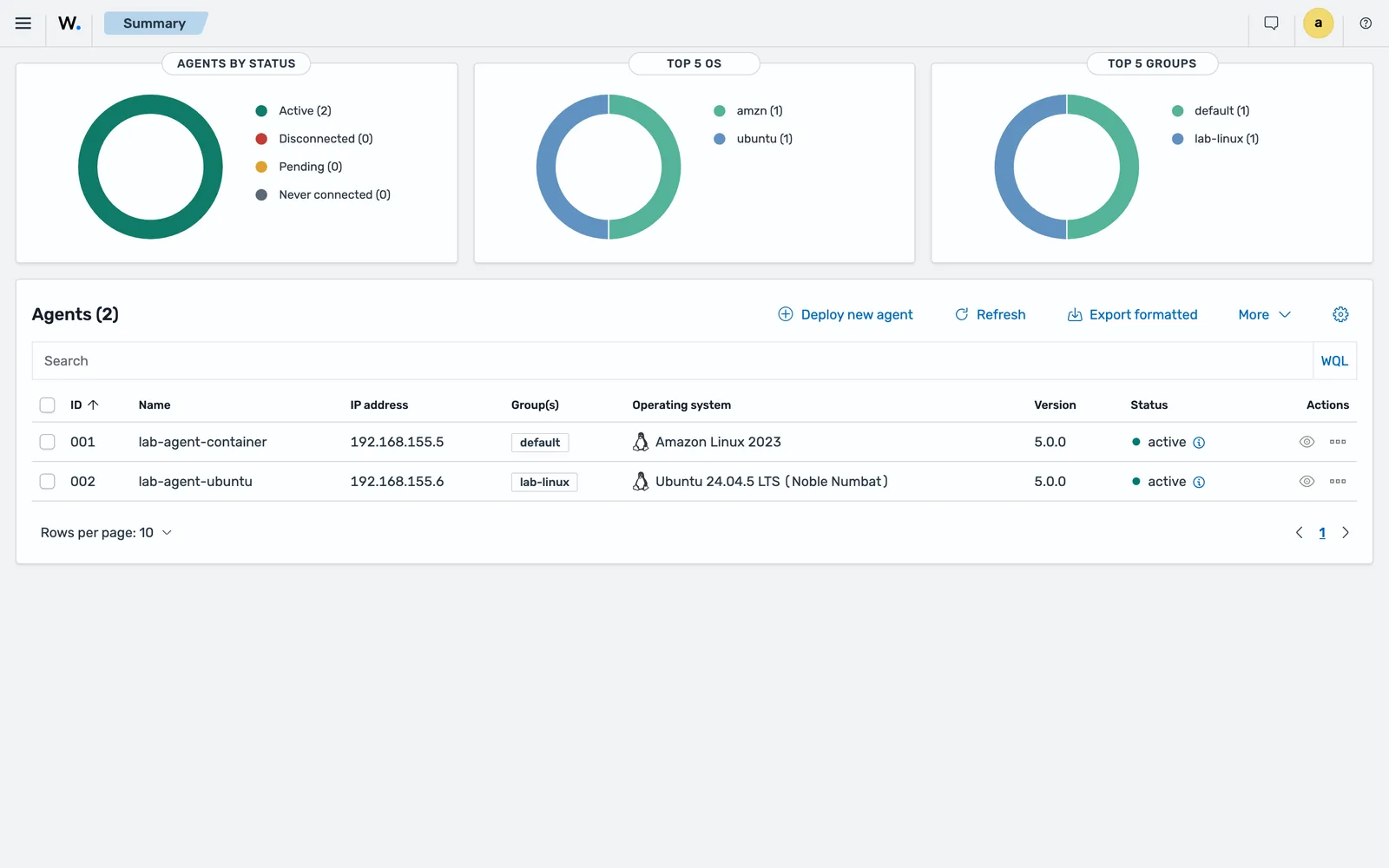
The four states are worth learning properly, because they mean different things. Never connected means enrolment succeeded but the agent has not talked since. Pending means the manager saw the first connection but authentication has not completed; every agent passes through this once per start. Active is what you want. Disconnected means no keepalive arrived inside agents_disconnection_time, which defaults to 15m. If an agent sits in Pending, work through the disconnected-agent decision tree.
Stop the agent upgrading itself
The manager version must be equal to or later than the agent version. An unattended OS update that pulls a newer agent than your manager breaks that rule quietly. Disable the repository after installing:
sed -i "s/^deb /#deb /" /etc/apt/sources.list.d/wazuh.list && apt-get updateOr hold the package instead, which still allows a deliberate apt-get install:
echo "wazuh-agent hold" | dpkg --set-selectionsOn yum, dnf and zypper the equivalent is sed -i "s/^enabled=1/enabled=0/" /etc/yum.repos.d/wazuh.repo, adjusting the path to /etc/zypp/repos.d/wazuh.repo on SUSE.
Remove the agent cleanly
Disable the service, then remove the package:
systemctl disable wazuh-agent && systemctl daemon-reloadapt-get remove --purge wazuh-agentWithout --purge, the package manager keeps the files it marks as configuration. On RPM-based systems, yum remove wazuh-agent leaves the same files and the documented cleanup is to delete /var/ossec/.
Two things this does not do. It does not remove the agent record from the manager: that stays until you delete it through the dashboard or with DELETE /agents. And it does not work at all if anti-tampering is on.
Anti-tampering is a 5.0 feature, Linux only, that makes the endpoint validate an uninstall request with the manager before the package manager removes anything. Enable it per group:
<agent_config os="linux">
  <anti_tampering>
    <package_uninstallation>yes</package_uninstallation>
  </anti_tampering>
</agent_config>
With it on, you create /var/ossec/etc/uninstall_validation.env on the endpoint holding either a temporary API token or stored API credentials before the removal will be authorised. The token route keeps manager API credentials off the endpoint, and one token covers several agents.
Common errors
ERROR: Invalid agent name: localhost.localdomain (from manager)
Two endpoints presented the same name, or the name is already taken by an existing agent record. The agent log shows it alongside ERROR: Unable to add agent (from manager).
Fix: give the agent an explicit unique name in <enrollment><agent_name> and restart. If a stale record is holding the name, delete that record on the manager first.
WARNING: (1404): Authentication error. Wrong key or corrupt payload. Message received from agent '001' at 'any'.
This one appears in the manager log at /var/wazuh-manager/logs/wazuh-manager.log. The key in the agent’s /var/ossec/etc/client.keys does not match the entry in the manager’s /var/wazuh-manager/etc/client.keys.
Fix: compare the two, and re-enrol the agent if they differ. The usual cause is a client.keys copied between hosts, or an agent record deleted and recreated on the manager while the agent kept its old key.
ERROR: Unable to read CA certificate file "/var/ossec/etc/rootCA.pem"
Followed by ERROR: Could not set up SSL connection! Check certification configuration. in the agent log. You turned on manager identity verification but the CA bundle is not where the configuration says it is.
Fix: put the CA bundle at the configured path, or correct the path. In 5.0 the agent’s TLS material lives under <agent><ssl>; the 4.x server_ca_path, agent_certificate_path and agent_key_path options inside <enrollment> are ignored with an INFO log line.
ERROR: Validation host not provided. Uninstallation cannot be continued.
Anti-tampering is enabled and /var/ossec/etc/uninstall_validation.env is missing.
Fix: create it with VALIDATION_HOST and either VALIDATION_TOKEN or VALIDATION_LOGIN set, then retry the removal.
ERROR: (5362): Unexpected status code in Wazuh agent package uninstallation request: 401
Anti-tampering rejected the removal because the API credentials in the validation file are wrong or the token expired.
Fix: regenerate the token or correct the credentials in /var/ossec/etc/uninstall_validation.env.
The agent starts but never reaches Pending
Check reachability before anything else:
nc -zv <WAZUH_MANAGER_IP_ADDRESS> 1517 55000Verified on the 5.0.0-beta5 lab, <remote><https><bind_addr> and <remote><legacy><local_ip> both ship as 0.0.0.0, so the listener is not the usual cause. The beta enrolment requirements page claiming a 127.0.0.1 default does not match the package. Check the value on your own manager, then move on to the two things that actually stop enrolment: the password in /var/ossec/etc/authd.pass, and whether the group you declared exists. Both produce a specific error string, and the disconnected-agent lesson has them.
Note also that a probe against https://<manager>:1517/ returns {"error":"not_found"} even on a healthy manager, because the listener is mounted under /wazuh-manager/.
Where to go next
The full option list for the <agent> section, including <ssl>, <notify_time> and <batch>, is in the official Linux agent deployment guide and the agent configuration reference beside it. The protocol change itself is documented in the Wazuh agent-manager protocol migration guide.
Once the agent is Active, the work moves to configuration. Nearly all of it belongs in agent groups and centralised configuration rather than in the local file, because a group is the only thing that scales past a handful of endpoints. The ports and paths you will keep looking up are collected in the ports, paths and log files reference, and the mechanics behind the handshake are in agent enrolment explained.
Next: Install the Wazuh Agent on Windows.
Files for this lesson
Every file this lesson refers to, exactly as used. Open a file to read it in the browser, or download the set as a zip. Download wazuh-agent-linux.zip. The full set for all lessons is at wazuh-tutorial-files.zip.
README.md1.7 KBinstall-wazuh-agent.sh4.2 KBossec.conf.fragment.xml2.9 KB
Frequently asked questions
Where is the Wazuh agent configuration file on Linux?
It is /var/ossec/etc/ossec.conf, with the root element ossec_config. Only the manager moved to /var/wazuh-manager in Wazuh 5.0. The agent keeps the /var/ossec prefix on Linux, /Library/Ossec on macOS and C:\Program Files (x86)\ossec-agent on 64-bit Windows.
Which port does the Wazuh agent use in 5.0?
A Wazuh 5.0 agent uses 1517/TCP over HTTPS for both enrolment and ongoing communication. Ports 1514 and 1515 remain only as an opt-in legacy channel for Wazuh 4.x agents, and 55000/TCP is the manager API, used when you enrol through the API instead.
Why does agent enrolment fail when I set a group?
The group has to exist on the manager before the agent enrols. Wazuh 5.0 validates the group declared in the enrollment groups tag during the handshake and rejects the enrolment if it does not exist. Create the group first with agent_groups or the manager API.
How do I stop the Wazuh agent from upgrading itself with the OS?
Disable the Wazuh repository after installing, or hold the package. On APT, comment out the entry in /etc/apt/sources.list.d/wazuh.list and run apt-get update, or set the package to hold with dpkg --set-selections. On yum, dnf or zypper, set enabled=0 in the wazuh.repo file.
Does uninstalling the Wazuh agent remove it from the manager?
No. Removing the package on the endpoint leaves the agent record and its key on the manager, where it shows as disconnected. Delete the record separately through the dashboard or the DELETE /agents endpoint on the manager API.