A Wazuh 5.0 custom decoder is a YAML document that turns one log format into Wazuh Common Schema fields. It lives in the indexer, not on disk, and it has three stages: check decides whether the decoder claims the event, parse|<field> pulls values out, and normalize maps them into schema fields. XML decoders and <regex> are gone, there is no converter, and wazuh-logtest has been replaced by a Log test page and an indexer API. This lesson builds one decoder end to end from a real application log line.
What you need
- A running Wazuh 5.0 deployment with dashboard access. If you have not built one, start with installing Wazuh on Ubuntu.
- An agent shipping the log you want to decode. The log collection lesson covers the
<localfile>side. - A read of rules, decoders and severity levels explained if the words integration, space and finding are new.
- One sample log line you can paste into Log test. Not a line you remember, a line you copied.
The worked example is an internal portal that writes a JSON audit line per authentication event:
{"ts":"2026-09-18T09:14:07.412Z","app":"portal-audit","event":"login.failed","reason":"bad_password","user":"j.okafor","role":"admin","src_ip":"203.0.113.44","src_port":51544,"method":"POST","path":"/session","status":401,"session":"c6f0f0b1"}Everything in this lesson is in the companion files for this lesson (listed at the end of the page), and the rule that consumes these fields is the next lesson.
How decoding works before you write anything
Events enter a single decoder tree through a root decoder. If a decoder accepts an event, the engine passes it down to that decoder’s children. If a decoder rejects it, the engine tries the next sibling. Siblings behave as a logical OR: the first one that accepts wins, and the rest are skipped. A decoder has accepted an event when all of its conditional stages, meaning check and any top-level parse|<field>, have succeeded. A failed map inside normalize does not reject the event.
Two consequences matter in practice.
The first is that ordering is real. Sibling evaluation order is decided by the integration’s position in the policy, then by the decoder’s position inside that integration’s decoder list. If two of your decoders could both match a line, the one listed first takes it.
The second is that the tree needs a root. Every decoder belongs to exactly one integration, and an integration needs a root decoder attached before any of its child decoders can run. This is the single most common reason a new decoder appears to do nothing.
Before writing anything, read a few shipped decoders. The Standard space is read-only and full of worked examples for the formats you are about to meet.
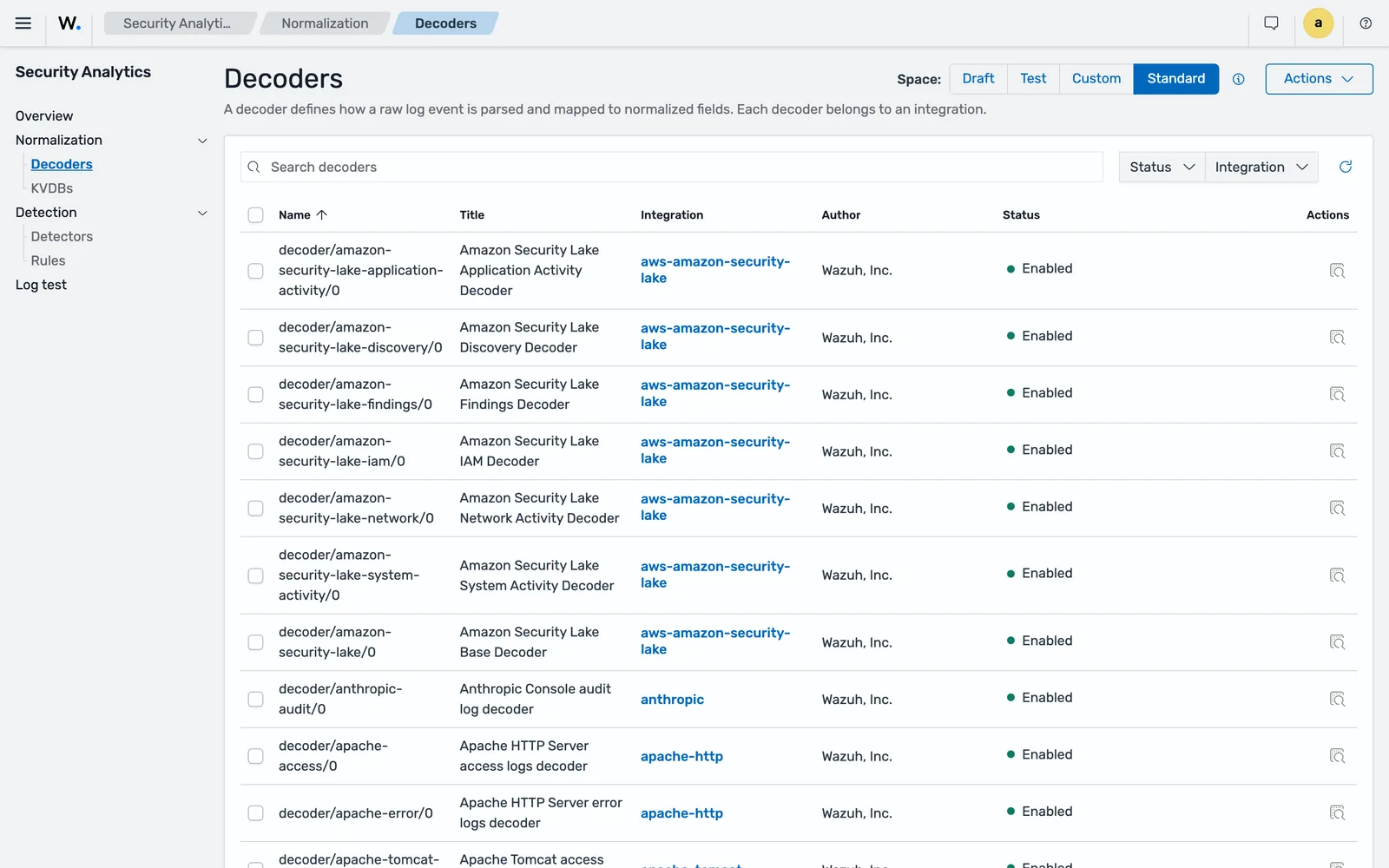
decoder/<name>/<version>, and each one belongs to exactly one integration.Create the integration first
An integration is the packaging unit: decoders, rules and key-value databases for one log source. It also carries the category, and the category decides which data stream the decoded events land in. The categories are access-management, applications, cloud-services, network-activity, security, system-activity and other, and the value is written to wazuh.integration.category on every event the integration decodes.
Authentication events belong in access-management, so they will land in wazuh-events-v5-access-management. Pick the category deliberately: it determines which index a detector has to watch later, and changing it after the fact means moving the detector too.
In the dashboard, set the space selector to Draft, then go to Security Analytics > Overview > Integrations > Actions > Create and give it the title portal-audit, category Access Management and an author. Through the API it is a POST to the Content Manager, with author, category and title required, and id and mode omitted because the indexer sets them:
curl -sk -u admin:admin -X POST \
  "https://localhost:9200/_plugins/_content_manager/integrations" \
  -H 'Content-Type: application/json' \
  -d '{"resource":{"metadata":{"title":"portal-audit","author":"Security engineering"},"category":"access-management","enabled":true}}'
The response is {"message":"<uuid>","status":201}, where message carries the new integration’s identifier rather than a sentence. The companion script pulls it straight out. On the beta5 lab stack its first step returns:
1. Create the integration in the draft space
   integration id: 7c4e27b3-b704-444e-b6ff-26cab08e5059
Keep that UUID. Decoders, rules and Log test calls all reference it.
Note what you cannot do with it. Every Content Manager collection endpoint is POST-only, so there is no listing API to go back to. Verified on the 5.0.0-beta5 lab:
_plugins/_content_manager/integrations?space=draft      -> 405 {"error":"Incorrect HTTP method for uri [/_plugins/_content_manager/integrations?space=draft] and method [GET], allowed: [POST]","status":405}
_plugins/_content_manager/decoders?size=2               -> 405 {"error":"Incorrect HTTP method for uri [/_plugins/_content_manager/decoders?size=2] and method [GET], allowed: [POST]","status":405}
_plugins/_content_manager/kvdbs                         -> 405 {"error":"Incorrect HTTP method for uri [/_plugins/_content_manager/kvdbs] and method [GET], allowed: [POST]","status":405}
Record the identifiers your automation creates. The dashboard is the only way to browse them back.
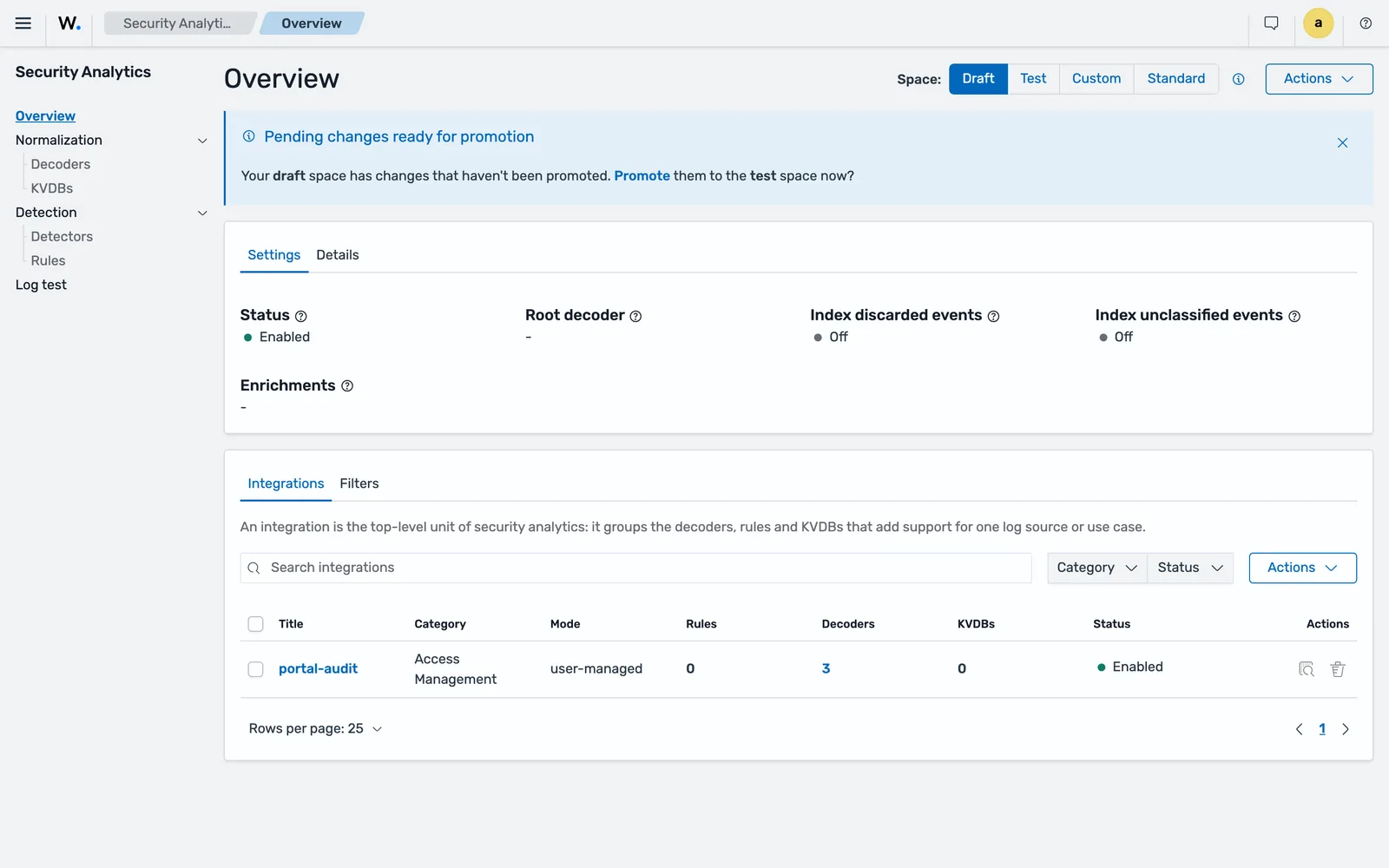
portal-audit integration in the Draft space after the script ran: three decoders, no rules, and Root decoder still showing a dash. Nothing decodes until that slot is filled.Attach a root decoder
The documented root decoder parses the raw event as JSON into a temporary field that child decoders read:
name: "decoder/core-wazuh-message/0"
enabled: true
metadata:
  author: "Wazuh, Inc."
  title: "Wazuh message decoder"
  description: "Base decoder to process Wazuh message format, parses location part and enriches the events that comes from a Wazuh agent with the host information."
normalize:
- map:
  - _tmp_json: "parse_json($event.original)"
Create it in the draft space under Security Analytics > Normalization > Decoders > Actions > Create, selecting your integration. Through the API, the envelope is the integration id plus the decoder under resource:
curl -sk -u admin:admin -X POST \
  "https://localhost:9200/_plugins/_content_manager/decoders" \
  -H 'Content-Type: application/json' \
  -d '{"integration":"7c4e27b3-b704-444e-b6ff-26cab08e5059","resource":{ ... }}'
On the beta5 lab stack each decoder create returns the new asset’s identifier:
{"message":"854e952a-6519-4d55-b7cc-68f6ffdc70c2","status":201}{"message":"08de56c6-20ef-43fc-8901-01c46037ae4b","status":201}Posting the YAML file instead of JSON
You can send the decoder as Content-Type: application/yaml, which is nicer when the asset lives in a file, but two things bite.
First, the file has to be stripped before it is nested under resource:. A decoder file that opens with a comment header and a --- document marker fails, because the marker starts a second YAML document halfway through your request body. Posting the companion decoder-core-wazuh-message.yml unmodified on the beta5 lab returned:
{"message":"Invalid request body.mapping values are not allowed here\n in 'reader', line 16, column 7:\n name: \"decoder/core-wazuh-message/0\"\n ^\n\n at [Source: (StringReader); line: 16, column: 7]","status":400}Drop the --- line and the comment lines, indent the rest by two spaces, and it builds. The companion create-content.sh does exactly that with sed -e '/^---$/d' -e '/^#/d' -e 's/^/ /'.
Second, one request carries one Content-Type. If a helper function already sets application/json and the YAML call adds its own, the indexer rejects the request before it looks at the body:
{"error":{"root_cause":[{"type":"content_type_header_exception","reason":"java.lang.IllegalArgumentException: only one Content-Type header should be provided"}],"type":"content_type_header_exception","reason":"java.lang.IllegalArgumentException: only one Content-Type header should be provided","caused_by":{"type":"illegal_argument_exception","reason":"only one Content-Type header should be provided"}},"status":400}That is why the script has two separate curl wrappers, one per body type, rather than one wrapper with an extra header appended.
Attaching the root decoder
Creating the decoder is not attaching it. Go back to Security Analytics > Overview > Actions > Edit and assign decoder/core-wazuh-message/0 as the integration’s root decoder. Until you do that last step, nothing downstream runs.
The obvious shortcut does not work on beta5. PUT /_plugins/_content_manager/integrations/{id} wants the full resource back, including enabled, and it refuses to touch the decoder list at all:
{"message":"Content of 'decoders' cannot be added or removed via update. Please use the specific resource endpoints.","status":400}GET on the same path is a 405 as well, with allowed: [DELETE, PUT], so there is no read-modify-write either. Attach the root decoder in the dashboard, and treat that as a manual step in an otherwise scripted flow until the release documentation says otherwise.
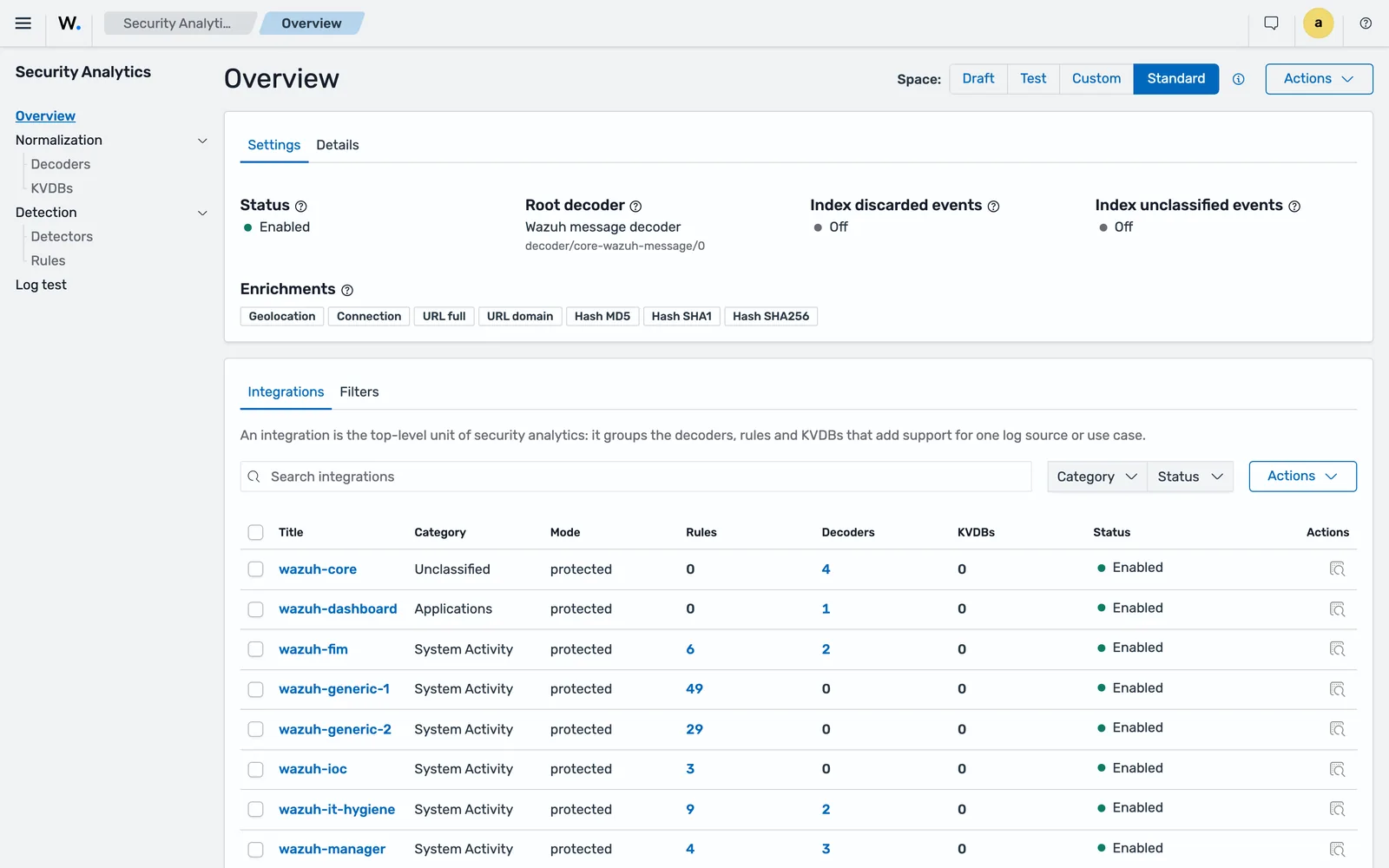
decoder/core-wazuh-message/0 in the Root decoder slot, the shipped enrichments (Geolocation, Connection, URL full, URL domain, Hash MD5, SHA1, SHA256), and both index toggles off.Fields whose names begin with an underscore are temporary variables. They live on the event for the whole tree traversal, so any later decoder can read them, and they are stripped in a mandatory cleanup step before enrichment. Only Common Schema fields survive to the indexer.
Write the check stage
check decides whether this decoder claims the event. It never extracts anything. It takes either a condition list or a condition expression:
check: "$_tmp_json.app == portal-audit AND exists($_tmp_json.event)"The expression form supports AND, OR, NOT, parentheses, the comparison operators ==, !=, <, <=, >, >=, and helper calls written as helper_name($field, args). The exists helper can also be written as the bare field name.
Two notes from writing a lot of these. Make the check as specific as the log allows, because a loose check steals events from sibling decoders that would have parsed them properly. And be careful with types: in a condition list, event.id: 1234 and event.id: "1234" are different comparisons, a number against a string.
Normalise into the Common Schema
normalize is an ordered array of blocks. Each block can hold check, parse|<field> and map, in any combination. A block whose check fails is skipped, and the decoder carries on: only the top-level stages can reject an event.
The first block sets everything that is true for every line of this format:
normalize:
- map:
  - event.kind: "event"
  - event.dataset: "portal-audit"
  - event.category: "array_append(authentication)"
  - event.start: "parse_date($_tmp_json.ts, ISO8601Z)"
  - user.name: "$_tmp_json.user"
  - user.roles: "array_append($_tmp_json.role)"
  - source.ip: "$_tmp_json.src_ip"
  - source.port: "$_tmp_json.src_port"
  - http.request.method: "$_tmp_json.method"
  - http.response.status_code: "$_tmp_json.status"
  - url.path: "$_tmp_json.path"
  - related.ip: "array_append($source.ip)"
  - related.user: "array_append($user.name)"
Three kinds of right-hand side appear there: a literal ("event"), a reference ($_tmp_json.user), and a helper call (array_append(...), parse_date(...)). Values are type checked against the schema. A bad literal fails the build immediately, with an error naming the field. A bad dynamic value fails at runtime and the field is left unmapped rather than corrupting the document.
Fill related.ip and related.user. They cost one line each and they are what makes pivoting from a finding to everything else that touched the same address or account a single query instead of six.
Then one block per event variant:
- check: "$_tmp_json.event == login.failed"
  map:
  - event.action: "authentication-failure"
  - event.outcome: "failure"
  - event.type: "array_append(info)"
  - event.reason: "$_tmp_json.reason"
- check: "$_tmp_json.event == login.success"
  map:
  - event.action: "logged-in"
  - event.category: "array_append(session)"
  - event.outcome: "success"
  - event.type: "array_append(start)"
The values you invent for event.action are the contract your rules depend on. Write them down somewhere, keep them stable across integrations, and prefer the vocabulary the standard content already uses (authentication-failure, logged-in, logged-out) so a rule written for one source keeps working when you onboard the next.
Other input formats
parse_json is one of several transformation helpers. The documented alternatives cover the formats you actually meet: parse_key_value for k=v fragments, parse_csv and parse_dsv for delimited lines, and regex_extract when you genuinely need a capture. Lookup tables belong in a key-value database, queried with kvdb_get, kvdb_get_merge or kvdb_match, which is the same mechanism covered in the threat intelligence lesson.
Parse plain text with logpar
Most applications are not so kind as to log JSON. The same portal used to write this:
2026-09-18T09:20:55.004Z portal-audit login.failed user=r.navarro role=admin src=198.51.100.23:44120 method=POST path=/session status=401 reason=bad_passwordA sibling decoder handles it with a parse|event.original stage:
check: "contains($event.original, portal-audit)"
parse|event.original:
- "<_ts> portal-audit <_evt> user=<user.name> role=<_role> src=<source.ip>:<source.port> method=<http.request.method> path=<url.path> status=<http.response.status_code> reason=<event.reason>"
- "<_ts> portal-audit <_evt> user=<user.name> role=<_role> src=<source.ip>:<source.port> method=<http.request.method> path=<url.path> status=<http.response.status_code>"
Logpar is not regex. Each <field> is a named placeholder, and the parser is chosen from that field’s schema type: <source.ip> gets the IP parser, <source.port> and <http.response.status_code> get the numeric parser, <user.name> gets the text parser. A custom field defaults to text unless you force a type with a suffix such as <value/long>. A bare <~> matches and discards. <?field> makes a field optional, (?...) makes a whole subexpression optional, and <a>?<b> is a choice between two field expressions.
The rule that catches everyone is end tokens. The text parser reads until it finds the literal that follows the placeholder, so two placeholders cannot sit next to each other unless the first one uses a parser that does not need an end token. <value/long><~> is valid. <text><~> is not, and the asset will fail to build.
Several expressions can live under one parse|, tried in order, first match wins. That is how you handle a format that grew an optional field over three releases, and it is also why the plain-text decoder does not need to exclude JSON lines explicitly: a JSON line fails every expression, the stage fails, the decoder rejects the event, and the engine moves to the next sibling.
I use a temporary variable for the timestamp and convert it in a map with parse_date, rather than putting a date format into the logpar expression. Date formats in logpar take a parameter, and getting that parameter wrong fails silently in a way that is tedious to diagnose.
Test it: Log test, not wazuh-logtest
wazuh-logtest does not exist in 5.0, and the manager API lost its /logtest endpoint. Validation happens in the test space.
Promote first. There is no way around it: on the beta5 lab, a Log test body naming the draft space came back with
{"message":"Logtest is only supported for the 'test', 'custom' and 'standard' spaces. Received space: 'draft'.","status":400}and a body naming test before anything had been promoted came back with
{"message":"The 'test' environment does not exist.","status":400}The second message is the one that wastes an afternoon. It reads like a broken install. It means only that nothing has ever been promoted into that space, so the engine has no test policy to build.
In the dashboard with the space selector on Draft, go to Security Analytics > Overview > Actions > Promote and confirm. The integration moves to Test with its decoders. Then open Security Analytics > Log test and paste your sample line.
Promoting through the API needs a changes object naming what to move; an empty body is rejected:
{"message":"Changes object is required","status":400}From the command line, the normalisation-only endpoint on the indexer gives you the same thing in a form you can put in CI:
curl -sk -u admin:admin -X POST \
  "https://localhost:9200/_plugins/_content_manager/logtest/normalization" \
  -H 'Content-Type: application/json' -d @logtest-normalization.json
The request body requires space, queue, event and trace_level, with location alongside them; space must be test, standard or custom, and trace_level is NONE, ASSET_ONLY or ALL. The response carries normalization.output with the decoded document, asset_traces, and a validation object. Read wazuh.integration.decoders in the output: it lists every decoder that touched the event, in order. If it contains only the root decoder, your child decoder did not match, and asset_traces at trace_level: "ALL" tells you which stage rejected it.
Those field paths in normalization.output are the authoritative answer to “what do I write in my rule”. Do not guess them from the schema; copy them from the response.
When it decodes correctly, promote from Test to Custom the same way. The custom space is what the engine uses on live traffic.
Common errors
Missing [<field_name>] field.
The Content Manager rejected the request body. On a decoder create, the envelope needs both integration and resource; on a rule create, the same. The field named in the message is the one missing.
Invalid 'id' format.
The id you supplied is not accepted. It must be non-empty, at most 256 characters and free of control characters, and it is compared byte for byte, so two identifiers differing only in case are different assets. Omit the field and let the Content Manager generate a UUIDv4.
Integration with ID '<uuid>' is not in draft space.
You are editing content that has already been promoted. Only the draft space is writable. Change it in draft and promote again, or, if the integration is Wazuh core content with mode: protected, you cannot modify it in any space.
Cannot remove decoder [<uuid>] as it is set as root decoder.
Detach the decoder from the integration’s root-decoder slot first, then delete it.
only one Content-Type header should be provided
Your client sent two. It arrives wrapped in a content_type_header_exception. The usual cause is a shared curl wrapper that already sets application/json while the call adds application/yaml. Use one wrapper per body type.
Invalid request body.mapping values are not allowed here
A YAML body that still contains the file’s --- document marker, so the parser sees a second document where it expects the rest of resource:. Strip --- and the comment lines, indent the remainder under resource:, and resend.
Content of 'decoders' cannot be added or removed via update. Please use the specific resource endpoints.
You tried to attach or detach a decoder with PUT /_plugins/_content_manager/integrations/{id}. On beta5 that update path refuses to change the decoder list, and GET on the same path returns 405 with allowed: [DELETE, PUT]. Set the root decoder from Security Analytics > Overview > Actions > Edit.
Logtest is only supported for the 'test', 'custom' and 'standard' spaces.
You pointed Log test at the draft space. Promote first, then test.
The 'test' environment does not exist.
Nothing has been promoted into the test space yet, so there is no policy to run the event through. It is not a broken install. Promote the integration and retry.
Changes object is required
A promote call with no changes object. The API will not infer what to move: name the assets in the request body.
Engine validation failed on create
A 400 Bad Request on decoder creation with a nested engine error usually means one of three things: a target field that is not in the Common Schema, a literal whose type does not match the schema type of the field, or a logpar expression with two adjacent placeholders and no literal between them. The error names the offending operation. Check the field against the Common Schema reference before you suspect the syntax.
The decoder builds but Log test shows only the root decoder
Three causes, in the order they occur. The integration has no root decoder attached. The parents entry names a decoder that is not in the same policy. Or a sibling decoder listed earlier in the integration accepted the event first: check the full wazuh.integration.decoders array, because it names the decoder that took it.
Events reach the indexer with no decoded fields
They landed in wazuh-events-v5-unclassified-* with only event.original populated. An event is unclassified when its wazuh.integration.category is unclassified, which happens when no integration’s decoder claimed it. If the events are missing entirely, unclassified indexing is switched off for that policy and the engine dropped them rather than indexing them.
Where to go next
The exact stage grammar, the full helper catalogue and the parser list are in the engine reference in the Wazuh repository, which is more precise than the user manual on syntax. The dashboard walkthrough, including the promote flow and a second worked example, is the official detection workflow guide.
The decoder is only half the job. Fields nobody queries are storage. The migration runbook covers what to do with a 4.x decoder library, and the terms used here are defined in the glossary.
Next: Write Custom Wazuh Detection Rules (Sigma YAML).
Files for this lesson
Every file this lesson refers to, exactly as used. Open a file to read it in the browser, or download the set as a zip. Download wazuh-custom-decoder.zip. The full set for all lessons is at wazuh-tutorial-files.zip.
README.md4.4 KBcreate-content.sh3.6 KBdecoder-core-wazuh-message.yml1.1 KBdecoder-portal-audit-json.yml3.3 KBdecoder-portal-audit-text.yml2.9 KBlogtest-normalization.json405 Bsample-events.log1.2 KB
Frequently asked questions
Is there a converter from Wazuh XML decoders to YAML?
No. The official migration guide states that decoders must be rewritten by hand. The mapping is mechanical for most decoders: parent becomes parents, prematch becomes check, regex plus order becomes a parse expression on a named field, and everything static moves into map blocks inside normalize. Plugin decoders, fts, accumulate and use_own_name have no equivalent at all.
Where do I put a custom decoder in Wazuh 5.0?
Nowhere on disk. Decoders are documents in the Wazuh indexer, created through Security Analytics in the dashboard or the Content Manager API, and pulled down to the manager by the CMSync module. You create them in the draft space, promote to test, validate, then promote to custom.
What replaced wazuh-logtest in Wazuh 5.0?
The Log test page under Security Analytics in the dashboard, and the indexer API endpoints POST /_plugins/_content_manager/logtest, /logtest/normalization and /logtest/detection. The manager API endpoint /logtest is gone along with the command-line tool. On the beta5 lab, Log test refused a draft-space body outright with "Logtest is only supported for the 'test', 'custom' and 'standard' spaces.", so you promote before you can test.
Why does my decoder never run?
The usual cause is that the integration has no root decoder attached, so the tree has no entry point and no child decoder is reachable. The next most common cause is a parents entry naming a decoder that is not in the same policy. Check both before you touch the parse expression.
Can a Wazuh 5.0 decoder use regular expressions?
Only through specific helpers such as regex_match and regex_extract. The parse stage uses logpar, a structured field-extraction language, not a regex engine. The 4.x choice between POSIX ERE and PCRE2 has no meaning in 5.0 because the parser is not pattern matching in that sense.