A default Wazuh 5.0 install is not hostile, but it is trusting. The dashboard accepts admin and admin. The indexer ships a set of reserved and demo accounts whose password hashes are printed in the public documentation. The manager API binds to every interface. The certificate authority is one the installer generated for you and nothing outside the deployment trusts it. None of that is a vulnerability in Wazuh; all of it is a deployment you would flag in an hour. This lesson walks the platform the way an attacker would and ends with a checklist.
What you need
- Root on the central components, and a maintenance window. Several of these changes restart services.
- The credentials the installer produced, before you rotate them.
- An inventory of who currently reaches each port. Closing a port you have not inventoried is how you disconnect a site.
- A decision on your identity provider. The access work is much easier once Wazuh SSO and RBAC is in place.
- If you have been building detection content, note that the change-control story in Sigma rules and ATT&CK coverage is part of this picture too: who can change a detector is an access question.
What a default install exposes
Walk the listeners first. Do not take the reference’s word for the binds, because the shipped configuration does not always agree with it. On a 5.0.0-beta5 manager:
ss -ltnp | awk '{print $4}' | sed 's/.*://' | sort -un | tr '\n' ' '1514 1515 1516 1517 38423 55000Five service ports on a stock install, plus one ephemeral. Nothing was enabled to get there.
| Port | Service | Bind on a stock beta5 manager | Notes |
|---|---|---|---|
| 443/TCP | Dashboard | server.host set during install, 0.0.0.0 accepts every interface |
The web console |
| 9200/TCP | Indexer | network.host set during install |
Full data access, and the Content Manager and Security APIs |
| 55000/TCP | Manager API | 0.0.0.0 |
JWT auth, HTTPS on, drop_privileges true |
| 1517/TCP | Agent HTTPS | 0.0.0.0 |
TLS 1.3 only, max_body_size 20MB, path prefix /wazuh-manager/ |
| 1516/TCP | Manager cluster | The node’s own name in the shipped config, 127.0.0.1 in the reference |
Shared 32-character key |
| 1515/TCP | Legacy enrolment | Present in the default <auth> block |
Listening on a stock install |
| 1514/TCP | Legacy agent listener | <legacy><local_ip>0.0.0.0 in the shipped config |
<enabled>yes</enabled> by default |
Three of those deserve a second look. The manager API binds every interface: the documented node configuration shows host: 0.0.0.0 and port: 55000, yet on a single-box install nothing needs to reach it except the dashboard on the same host. The agent listener binds 0.0.0.0 too, whatever the reference page says about 127.0.0.1, so do not rely on the default to keep it local.
And the legacy listeners are not opt-in on beta5. The shipped wazuh-manager.conf contains <remote><legacy><enabled>yes</enabled> on port 1514 and <auth><port>1515</port>, so a manager nobody has touched is accepting legacy agent connections and legacy enrolment. The absence of a <legacy> block is equivalent to enabled set to no; if every agent is 5.0, remove the block and set legacy_enrollment to no, which retires port 1515’s listener while keeping the HTTPS POST /enroll path. Disabling remote_enrollment turns off both, and the local socket used by the API is unaffected either way.
The only ports you cannot avoid publishing are 443, 1517 and, if agents enrol over the network, whichever enrolment path you keep. Everything else belongs behind a firewall or on a management network.
The credentials a pentester looks for first
The Wazuh indexer security documentation publishes the contents of the default internal_users.yml, including bcrypt hashes, and warns that they are for demonstration and must be changed before production use. Those hashes are a public artefact.
They are not theoretical either. On the beta5 lab stack, admin with the password admin authenticated to both the dashboard and the indexer API, and the manager API accepted wazuh with the password wazuh, on a deployment straight out of the box.
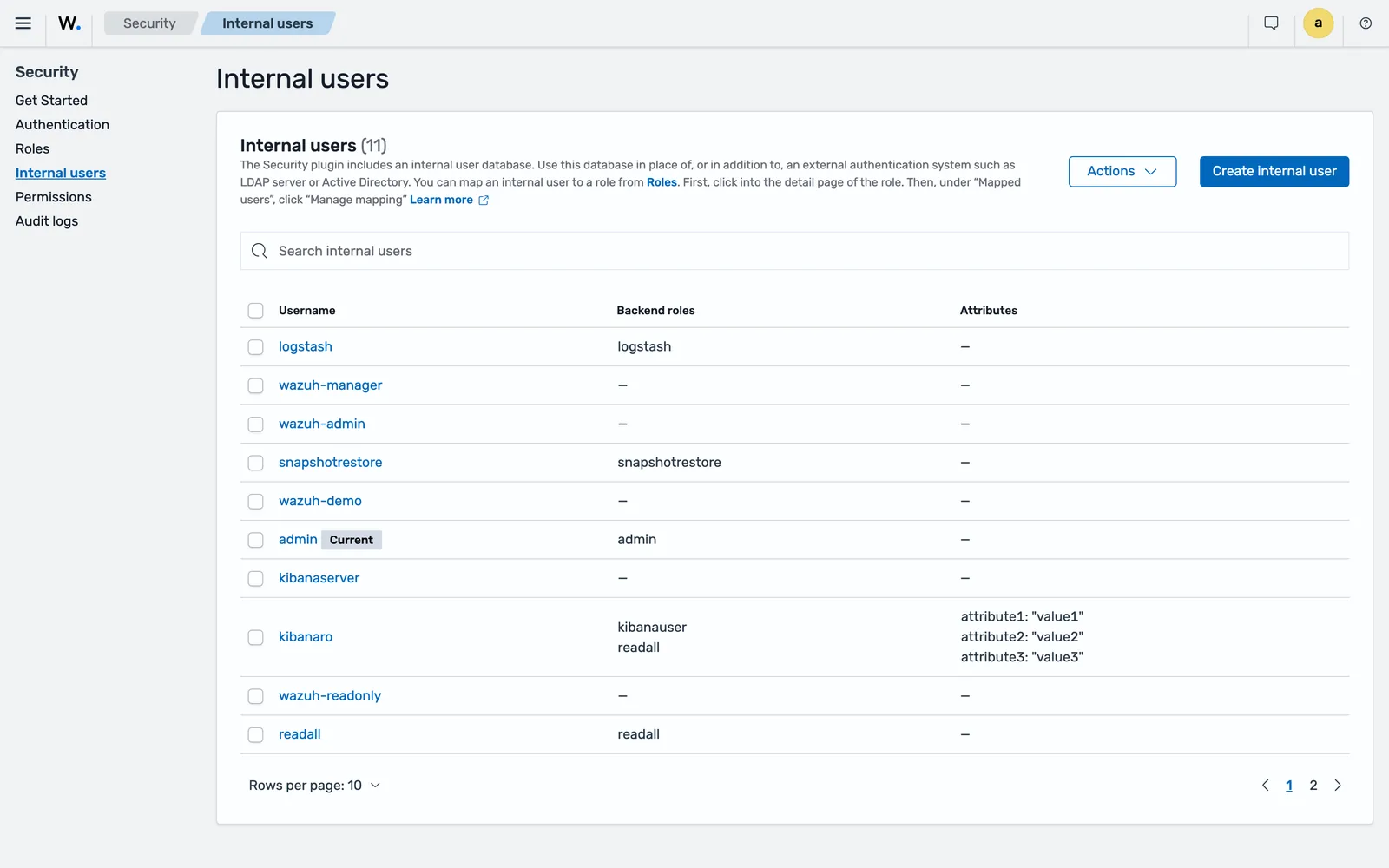
The names on beta5 do not all match the reference page, so count what your own install has rather than what a table says. The lab showed admin, kibanaserver, kibanaro, logstash, readall, snapshotrestore, wazuh-admin, wazuh-manager, wazuh-readonly and wazuh-demo on the first page, eleven in total.
The accounts that exist after an install:
| Account | Where | Purpose |
|---|---|---|
admin |
Indexer | Full cluster administrator, and the dashboard login |
kibanaserver |
Indexer | Dashboard to indexer service account |
wazuh-server |
Indexer | Manager to indexer, read/write on stateful, write-only on stateless |
wazuh-dashboard |
Indexer | Dashboard to indexer, read plus metrics write |
anomalyadmin, kibanaro, logstash, readall, snapshotrestore |
Indexer | OpenSearch demo accounts |
wazuh |
Manager API | API administrator |
wazuh-wui |
Manager API | Dashboard to manager API |
The documentation states plainly that the wazuh-server hash is the hash of the password wazuh-server, and likewise for wazuh-dashboard. The installation page tells you to log in with admin and admin.
The demo accounts are the ones people forget, because nothing in normal operation touches them. readall with a published hash, on an indexer reachable from a user network, is a complete read of every finding, event and state index.
Rotate the defaults properly
The Wazuh passwords tool lives at /usr/share/wazuh-indexer/plugins/opensearch-security/tools/wazuh-passwords-tool.sh. Passwords must be 8 to 64 characters with at least one uppercase letter, one lowercase letter, a number and one of .*+?-.
For an indexer user, run on any indexer node:
bash wazuh-passwords-tool.sh -u <USER> -p <PASSWORD>For a manager API user, run on the manager master node:
bash wazuh-passwords-tool.sh -A -au <API_ADMIN_USERNAME> -ap <API_ADMIN_PASSWORD> -u <USER> -p <PASSWORD>Omitting -p makes the tool generate a random password, which is the better habit. It backs up the internal users to /etc/wazuh-indexer/internalusers-backup first.
In an all-in-one deployment the tool updates the dependent components for you. In a distributed one it does not, and two follow-ups are yours. After changing kibanaserver, update the dashboard keystore:
echo <KIBANASERVER_PASSWORD> | /usr/share/wazuh-dashboard/bin/opensearch-dashboards-keystore --allow-root add -f --stdin opensearch.passwordAfter changing wazuh-wui, update the wazuh_core.hosts block in /etc/wazuh-dashboard/opensearch_dashboards.yml and restart the dashboard. That file holds a password in plain text, so its permissions are part of your baseline.
On the manager, keep indexer credentials out of wazuh-manager.conf and in the keystore instead:
wazuh-manager-keystore -f indexer -k password -v <PASSWORD>Certificates: what the assistant gives you, and what it does not
The certificate tool generates a private CA and a certificate per node from a config.yml listing every indexer, manager and dashboard node by name and address. It produces root-ca.pem, a key pair per node, and admin.pem with admin-key.pem for administrative operations against the indexer.
Three things follow from that, and only one of them is obvious.
The CA is yours and nothing trusts it. The browser warns on first access, and the documented remedy is to import root-ca.pem into the browser’s certificate manager. That is fine for a lab. In production, front the dashboard with a certificate from a CA your users already trust and keep the internal CA for component-to-component traffic, where a private chain is appropriate.
admin.pem is a superuser credential in the shape of a file. It authenticates administrative operations against the indexer. Treat it as a break-glass credential: off the node, in a vault, retrieved for the operation and removed afterwards. The install instructions set chmod 500 on the certificate directory and chmod 400 on its contents, owned by the component’s service user. Verify that, because an operator who copied certificates by hand often did not.
Node identity is pinned by distinguished name. plugins.security.nodes_dn in /etc/wazuh-indexer/opensearch.yml lists the DNs permitted to join the cluster, and nodes_dn.yml in the security configuration holds the same trust list. That pinning is what stops a machine holding a certificate from your CA joining as a data node. Keep it accurate when you add nodes.
The installation instructions also tell you to delete wazuh-certificates.tar from each node once deployed. That archive contains every private key in the deployment.
Close the agent-facing surface
Two defaults on the manager are worth understanding before you decide whether they are acceptable.
The manager does not verify agent certificates. On the HTTPS listener, verification_mode defaults to none, meaning the client certificate is not verified. On the enrolment service, ssl_agent_ca defaults to none, which disables agent certificate verification, and ssl_verify_host defaults to no. Agent authenticity therefore rests on the enrolment password and the resulting key, not on a certificate. Mutual TLS is available: set ssl_agent_ca to your CA bundle, and set verification_mode to certificate or to full, where full additionally requires the peer’s address to appear as an IP entry in the certificate’s Subject Alternative Name.
Agents can be made to verify the manager. In 5.0 that is <agent><ssl><certificate_authorities> pointing at your CA, and in 4.x it was <enrollment><server_ca_path>. The manager identity verification page walks the flow, and warns that without also setting ssl_manager_cert and ssl_manager_key in <auth>, the manager keeps using its default etc/certs/remoted.pem and never loads the certificate you issued.
On enrolment itself, use_password defaults to no in the reference but the installer sets it to yes. The password lives at /var/wazuh-manager/etc/authd.pass, is generated randomly when the file is missing, and is distributed from the master to workers. Rotate it by deleting the file on the master and restarting wazuh-manager-authd. Two further defaults deserve a conscious decision: force/enabled is yes, so a new enrolment can overwrite an existing agent entry, and purge is no, so removed agents leave a !-prefixed placeholder in client.keys. Wazuh agent enrolment explained covers the mechanics.
The cluster key is the other shared secret: 32 characters, generated at install, and the documentation is explicit that it should be kept out of scripts, source control, documentation examples and command history.
Manager API token hygiene
Authenticate with basic auth to POST /security/user/authenticate and you get a JWT valid for 900 seconds. Change that with PUT /security/config and auth_token_exp_timeout, and know that any change to the security configuration revokes every token already issued, which is a useful emergency control.
The documented API access defaults are worth reading as a set: max_login_attempts 50, block_time 300, max_request_per_minute 300, max_unauthenticated_request_per_minute 10, max_upload_size 10485760, CORS disabled. Fifty login attempts before a five-minute block is generous for an API with two default accounts; lower it.
Three habits for automation. Give each integration its own API user with an RBAC role scoped to the endpoints it calls, and never reuse wazuh. Hold tokens in memory, because a token written to a file outlives its 900 seconds as a file. And where the caller has its own identity, prefer run_as with an authorization context over a shared account; that context body is capped at a fixed 8192 bytes which max_upload_size does not lift.
There is one place the documentation itself puts a credential on an endpoint: the anti-tampering uninstall flow writes either a token or a username and password into /var/ossec/etc/uninstall_validation.env, and the documented example sets VALIDATION_SSL_VERIFY="false". Prefer the temporary token form, scope the API user, remove the file after the uninstall, and do not leave that file in a golden image.
Indexer and dashboard access
The security configuration lives in /etc/wazuh-indexer/opensearch-security/: config.yml, internal_users.yml, roles.yml, roles_mapping.yml, action_groups.yml, tenants.yml, nodes_dn.yml and allowlist.yml. Manage them through the dashboard Security application for routine work and edit the files only for installation, migration and recovery. Default roles and users cannot be modified: duplicate them and modify the duplicate.
Three backend-role filters all default to false and all restrict resources to the requester’s backend roles when enabled: plugins.alerting.filter_by_backend_roles, plugins.security_analytics.filter_by_backend_roles and opensearch.notifications.general.filter_by_backend_roles. With them off, any user who can see alerting can see and edit every monitor and every notification channel, including the credentials in channel headers. Turn them on in any deployment with more than one team.
That last point has a sharper edge. The Notifications module makes outbound HTTP requests to URLs a user supplies, so a user who can create a channel can make the indexer request any address it can reach: a server-side request forgery primitive against your internal network. The documented control is opensearch.notifications.core.http.host_deny_list, a list of hosts and ranges the module refuses to contact, and it defaults to empty. Populate it with your internal ranges minus the automation endpoints you actually use, and pair it with backend-role filtering. SOAR with Wazuh covers the legitimate side of the same feature.
Document-level security is still not documented for Wazuh 5.0 as of September 2026, but it does work: on the beta5 lab a role with a term query on wazuh.agent.groups restricted a user to one group’s documents across the events, findings and state indices, and returned 403 on an index the role did not name. Treat it as usable and unsupported, which means testing it against your own data and re-testing after upgrades. Multi-tenant Wazuh for MSSPs has the verified pattern.
For the dashboard itself: identity-aware proxy or VPN, SSO for interactive users, and exactly one break-glass local administrator with a long unique password held offline.
Agent-side hardening
Anti-tampering makes the endpoint validate an uninstall request with the manager before the package manager removes the agent. It is Linux only. Enable it for a group through the shared configuration at /var/wazuh-manager/etc/shared/<AGENT_GROUP_NAME>/agent.conf:
<agent_config os="linux">
  <anti_tampering>
    <package_uninstallation>yes</package_uninstallation>
  </anti_tampering>
</agent_config>
The manager distributes that to every Linux agent in the group, so anything enrolled later inherits it. It raises the cost of removal; it is not a defence against root, and there is no Windows or macOS equivalent, so plan a separate control there.
Common errors
ERROR: Validation host not provided. Uninstallation cannot be continued.
Cause: anti-tampering is enabled and /var/ossec/etc/uninstall_validation.env is missing or incomplete, so the uninstaller has nowhere to validate against. The preceding log line is INFO: Uninstall configuration file not found, using environment variables.
Fix: create the file with VALIDATION_HOST and either VALIDATION_TOKEN or VALIDATION_LOGIN before removing the package.
ERROR: Uninstallation not authorized, aborting...
Cause: the manager rejected the request. The agent log shows wazuh-agentd: ERROR: (5362): Unexpected status code in Wazuh agent package uninstallation request: 401, which is invalid or expired API credentials.
Fix: regenerate the token or correct the credentials in the environment file. Tokens expire on the API’s own schedule, so a token generated for a batch of uninstalls can go stale mid-batch.
wazuh-manager-authd will not start after touching the password file
Cause: documented behaviour. If authd.pass exists but is empty or invalid, the daemon does not start. A missing file is fine, because it generates a new random password.
Fix: delete the file rather than blanking it, then restart the service so a fresh password is generated and distributed.
Workers reject enrolment after a password rotation
Cause: the enrolment password is maintained on the master and distributed to workers, and a worker rejects enrolment until it receives the file.
Fix: wait for distribution and confirm cluster synchronisation before repointing agents.
The hardening checklist
The full version, with space to record who signed off and when, is in the companion files for this lesson as hardening-checklist.md. The short form:
Credentials. Rotate admin, kibanaserver, wazuh-server, wazuh-dashboard, wazuh and wazuh-wui. Remove unused OpenSearch demo accounts. Update the dashboard keystore and opensearch_dashboards.yml after rotating the service accounts. Move indexer credentials into the manager keystore. Treat the cluster key as a credential.
Exposure. Check what is actually listening before you assume: a stock beta5 manager answers on 1514, 1515, 1516, 1517 and 55000. Firewall 9200, 55000 and 1516 to known hosts. Publish only 443 and 1517. Remove the <legacy> block and set legacy_enrollment to no once every agent is 5.0. Put the dashboard behind an identity-aware proxy or VPN.
Certificates. Delete wazuh-certificates.tar from every node. Confirm chmod 500 on each certificate directory and chmod 400 on its contents with the right owner. Move admin.pem and admin-key.pem off the node into a vault. Record expiry dates and rehearse renewal.
Agents. Decide on mutual TLS through ssl_agent_ca and verification_mode. Configure agents to verify the manager. Rotate authd.pass on a schedule. Decide deliberately on force/enabled and purge. Enable anti-tampering per Linux group.
API and RBAC. Lower auth_token_exp_timeout and max_login_attempts. Give each integration a scoped user. Enable the three backend-role filters. Populate the notifications host deny list. Keep one documented break-glass account.
Monitoring. Watch /var/wazuh-manager/logs/wazuh-manager.log and /var/log/wazuh-indexer/wazuh-indexer.log, and alert on authentication failures against the platform itself. A SIEM that does not monitor its own console is the one blind spot nobody assigns.
Next: AI-Assisted Triage for Wazuh Findings.
Files for this lesson
Every file this lesson refers to, exactly as used. Open a file to read it in the browser, or download the set as a zip. Download wazuh-security-hardening.zip. The full set for all lessons is at wazuh-tutorial-files.zip.
README.md2.9 KBhardening-checklist.md11 KB
Frequently asked questions
What are the default Wazuh credentials?
The Wazuh dashboard logs in with admin and admin after a fresh install. The indexer also ships reserved accounts wazuh-server and wazuh-dashboard whose default passwords equal their usernames, plus OpenSearch demo users including kibanaserver, kibanaro, logstash, readall, snapshotrestore and anomalyadmin. The manager API has wazuh and wazuh-wui. Every one of these is published documentation, so rotate them before the host is reachable.
Which ports does a Wazuh 5.0 install listen on?
443 for the dashboard, 9200 for the indexer, 55000 for the manager API, 1517 for the HTTPS agent protocol, 1516 between manager cluster nodes, and 1514 and 1515 for the legacy listener and legacy enrolment. On a 5.0.0-beta5 manager all five manager ports were listening on a stock install, 1514 1515 1516 1517 and 55000, because the shipped configuration enables the legacy block. The agent HTTPS listener binds 0.0.0.0 by default.
How do you change the Wazuh admin password?
Run the Wazuh passwords tool at /usr/share/wazuh-indexer/plugins/opensearch-security/tools/wazuh-passwords-tool.sh with -u admin and -p followed by the new password. Passwords must be 8 to 64 characters with at least one uppercase letter, one lowercase letter, a number and one of the symbols .*+?- . For manager API users add -A with the API administrator credentials.
Does the Wazuh manager verify agent certificates by default?
No. The HTTPS listener's verification_mode defaults to none, which means the client certificate is not verified, and the enrolment service's ssl_agent_ca defaults to none, which disables agent certificate verification entirely. Mutual TLS is available through those two settings but it is opt-in, so a default install authenticates agents by enrolment password and key rather than by certificate.
How long do Wazuh API tokens last?
900 seconds by default. Change it with a PUT to /security/config setting auth_token_exp_timeout, and note that any change to the security configuration revokes every token already issued. Keep tokens in memory in scripts rather than on disk, and give automation its own RBAC-scoped user instead of reusing the administrator.