Wazuh 5.0 has two permission systems, not one, and single sign-on only solves half the problem. The indexer’s OpenSearch Security plugin decides which indices and dashboard objects an identity can touch. The manager API has a separate role and policy model that decides which agents and groups it can touch. A SAML login authenticates once; a backend role then has to be mapped in both places, and the manager side needs run_as to be true or the mapping does nothing.
What you need
- Administrative access to the dashboard, root on the indexer node, and administrator access to the identity provider.
- A backup of the indexer security configuration before you touch it. Every documented procedure starts with one.
- A tested break-glass path, before you change the authentication chain, not after.
/usr/share/wazuh-indexer/bin/indexer-security-init.sh --options "-backup /etc/wazuh-indexer/opensearch-security -icl -nhnv"The two permission systems
| Wazuh indexer RBAC | Wazuh manager API RBAC | |
|---|---|---|
| Provided by | OpenSearch Security plugin | The manager’s own apid |
| Governs | Indices, data streams, cluster operations, dashboard tenants | Agents, groups, cluster, MITRE data, security objects |
| Configured in | /etc/wazuh-indexer/opensearch-security/*.yml and Indexer management > Security |
/security/* endpoints and Server management > Security |
| Identity comes from | Internal users, or backend roles asserted by SAML, LDAP or OIDC | A Wazuh role mapping keyed on the same user or backend role |
| Model | Roles with cluster, index and tenant permissions | Policies of actions plus resources plus an effect, attached to roles |
The configuration files behind the first column are worth knowing by name, because the SAML and LDAP procedures edit them directly:
| File | Purpose |
|---|---|
config.yml |
Authentication domains and backends, including the SAML and LDAP blocks |
internal_users.yml |
Local accounts, password hashes, backend roles, attributes |
roles.yml |
Roles and their cluster, index and tenant permissions |
roles_mapping.yml |
Which users and backend roles receive which roles |
action_groups.yml |
Reusable permission groups |
tenants.yml |
Tenants isolating dashboards and saved objects |
nodes_dn.yml |
Distinguished names of trusted node certificates |
allowlist.yml |
REST endpoints permitted to bypass specific security checks |
For routine administration Wazuh recommends the dashboard Security application over editing these files. Direct edits are for installation, migration, backup and restore. SAML and LDAP are the exception: both documented procedures edit config.yml and then load it.
Default users and roles cannot be modified. Duplicate them and edit the duplicate.
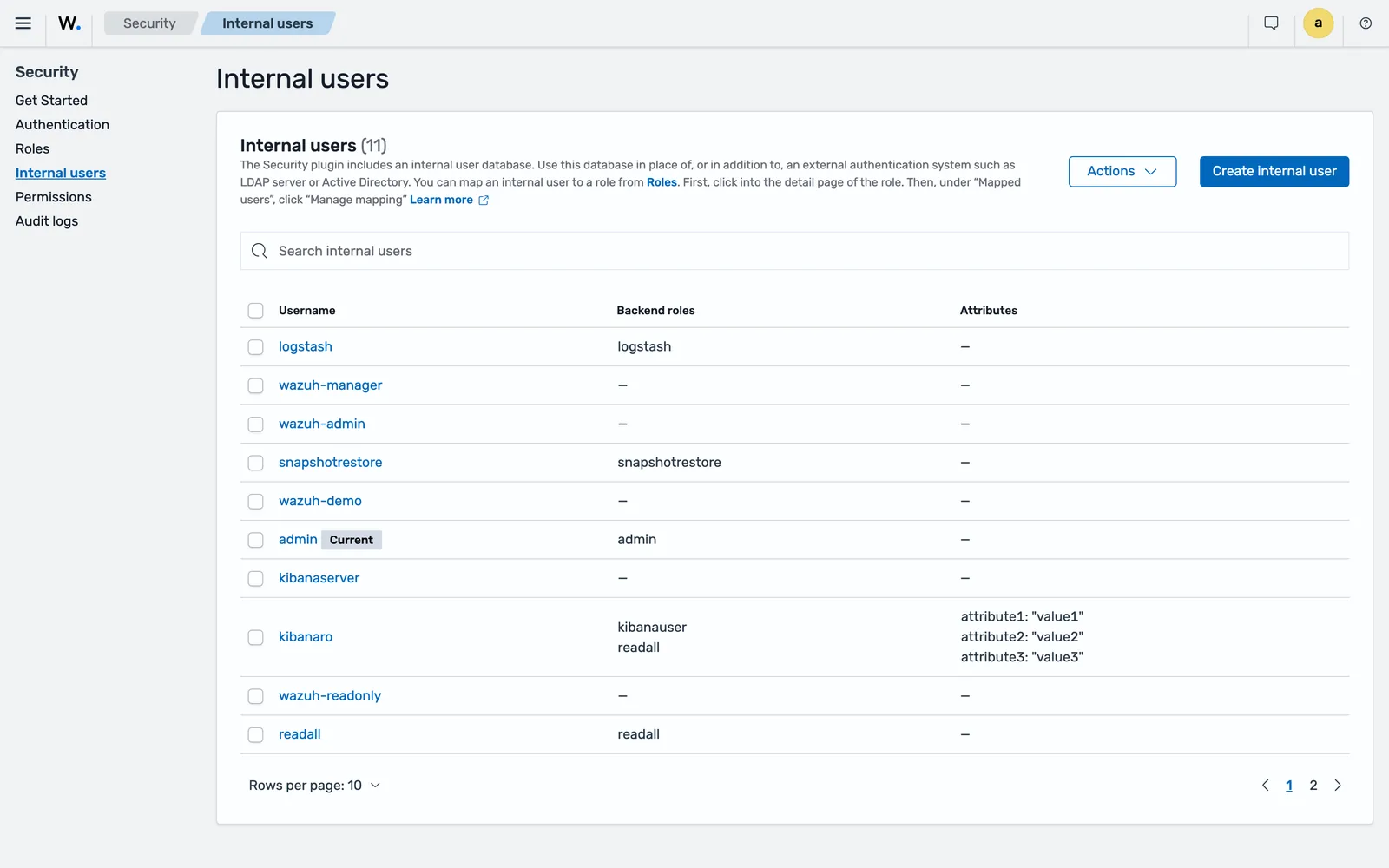
That list is the starting inventory on a fresh install, and it is longer than most people expect: admin, kibanaserver, kibanaro, logstash, readall, snapshotrestore, wazuh-admin, wazuh-manager, wazuh-demo and wazuh-readonly were all present on the beta5 lab, eleven accounts in total. Work out which of them your deployment actually uses before you put an identity provider in front of the login page, because every one of them is a password login that bypasses it.
Set up SAML with Microsoft Entra ID
Seven parameters drive every SAML integration, whichever provider you use: idp.metadata_url or idp.metadata_file, idp.entity_id, sp.entity_id, kibana_url, roles_key and exchange_key.
On the identity provider side
Create an enterprise application, in the documented example named wazuh-sso. Under App registrations > App roles, create an app role whose Value becomes the backend role Wazuh maps on, for example Wazuh_role for administrators. Assign users or groups to that role.
Then configure SAML on the application:
| Field | Value |
|---|---|
| Identifier (Entity ID) | wazuh-saml |
| Reply URL | https://<WAZUH_DASHBOARD_URL>/_opendistro/_security/saml/acs |
| Sign on URL | https://<WAZUH_DASHBOARD_URL> |
| Claim name | Roles, with source attribute user.assignedroles |
Two values come back out: the App Federation Metadata Url becomes idp.metadata_url, and the Microsoft Entra ID Identifier becomes idp.entity_id.
On the indexer
Generate the signing key first. It must be at least 64 characters:
openssl rand -hex 32Then edit /etc/wazuh-indexer/opensearch-security/config.yml. Set the internal basic domain to order 0 with challenge: false, and add the SAML domain after it:
authc:
  basic_internal_auth_domain:
    description: "Authenticate via HTTP Basic against internal users database"
    http_enabled: true
    transport_enabled: true
    order: 0
    http_authenticator:
      type: "basic"
      challenge: false
    authentication_backend:
      type: "intern"
  saml_auth_domain:
    http_enabled: true
    transport_enabled: false
    order: 1
    http_authenticator:
      type: saml
      challenge: true
      config:
        idp:
          metadata_url: https://login.microsoftonline.com/...
          entity_id: https://sts.windows.net/...
        sp:
          entity_id: wazuh-saml
        kibana_url: https://<WAZUH_DASHBOARD_URL>
        roles_key: Roles
        exchange_key: 'b1d6dd32753374557dcf92e241.......'
    authentication_backend:
      type: noop
Keeping the basic domain at order 0 with challenge: false is what leaves a working password login behind the single sign-on button. Do not remove it.
Load the change:
export JAVA_HOME=/usr/share/wazuh-indexer/jdk/ && bash /usr/share/wazuh-indexer/plugins/opensearch-security/tools/securityadmin.sh -f /etc/wazuh-indexer/opensearch-security/config.yml -icl -key /etc/wazuh-indexer/certs/admin-key.pem -cert /etc/wazuh-indexer/certs/admin.pem -cacert /etc/wazuh-indexer/certs/root-ca.pem -h localhost -nhnvA successful run reports the OpenSearch version, the cluster name and state, then SUCC: Configuration for 'config' created or updated and Done with success.
Map the backend role to an indexer role in roles_mapping.yml, then load that file the same way:
all_access:
  hosts: []
  users: []
  reserved: false
  hidden: false
  backend_roles:
  - "Wazuh_role"
  and_backend_roles: []
  description: "Maps admin to all_access"
On the dashboard
Confirm run_as and the manager API connection in /etc/wazuh-dashboard/opensearch_dashboards.yml:
wazuh_core.hosts:
  default:
    url: https://127.0.0.1
    port: 55000
    username: wazuh-wui
    password: "<WAZUH_WUI_PASSWORD>"
    run_as: true
Enable SAML in the same file:
opensearch_security.auth.multiple_auth_enabled: true
opensearch_security.auth.type: ["basicauth","saml"]
server.xsrf.allowlist: ["/_opendistro/_security/saml/acs", "/_opendistro/_security/saml/logout", "/_opendistro/_security/saml/acs/idpinitiated"]
Then create the Wazuh-side role mapping under Server management > Security > Roles mapping: a name, the Wazuh role (administrator or readonly), and a custom rule with user field backend_roles, search operation FIND, and the value from the identity provider.
systemctl restart wazuh-dashboardClear browser cache and cookies before testing. The documented procedures say so repeatedly, and it is the reason a correct configuration appears broken on the first attempt.
What differs for Okta and Keycloak
The indexer and dashboard halves are identical. Only the provider configuration changes.
Okta. Create a group whose name becomes the backend role, for example wazuh-admins, and assign users to it. Create a SAML 2.0 app integration with single sign-on URL https://<WAZUH_DASHBOARD_URL>/_opendistro/_security/saml/acs and audience URI wazuh-saml. Under advanced settings, add https://<WAZUH_DASHBOARD_URL>/_opendistro/_security/saml/acs/idpinitiated as another requestable SSO URL. In Group Attribute Statements, set the name to Roles and the filter to Matches regex with .*. The IdP metadata URL from the signing certificate becomes idp.metadata_url, and the Identity Provider Issuer URL becomes idp.entity_id.
Keycloak. Create a realm, then a client with client type SAML and client ID wazuh-saml. Set valid redirect URIs to https://<WAZUH_DASHBOARD_URL>/*, the IdP-initiated SSO URL name to wazuh-dashboard, name ID format to username, and turn on force POST binding, include AuthnStatement, sign documents and sign assertions, with signature algorithm RSA_SHA256.
The other documented providers are PingOne, Google Workspace, JumpCloud, OneLogin and authentik, all following the same shape.
Active Directory and LDAP
LDAP is configured differently from SAML: authentication goes in the authc section and authorisation in authz, and both can point at the same directory.
authc:
  ldap:
    description: "Authenticate via LDAP or Active Directory"
    http_enabled: true
    transport_enabled: false
    order: 1
    http_authenticator:
      type: basic
      challenge: false
    authentication_backend:
      type: ldap
      config:
        enable_ssl: true
        pemtrustedcas_filepath: /etc/wazuh-indexer/opensearch-security/ldapcacert.pem
        enable_start_tls: false
        enable_ssl_client_auth: false
        verify_hostnames: true
        hosts:
          - <FQDN_LDAP_SERVER>:636
        bind_dn: cn=ldap,ou=people,dc=example,dc=org
        password: <PASSWORD>
        userbase: 'ou=people,dc=example,dc=org'
        usersearch: (sAMAccountName={0})
        username_attribute: cn
The authz block adds rolebase, rolesearch ((member={0}) against Active Directory), userrolename: memberof, rolename: cn, resolve_nested_roles: true and a skip_users list. That last one matters:
        skip_users:
          - admin
          - kibanaserver
Skipping admin and kibanaserver keeps the two accounts that hold the platform together out of directory lookups. Without it, a directory outage takes the dashboard’s own service account with it.
Port 389 is LDAP and 636 is LDAPS. With enable_ssl: true, pemtrustedcas_filepath is required. If you do not have the CA file, the documented way to capture it is:
echo -n | openssl s_client -connect <FQDN_LDAP_SERVER>:636 | sed -ne '/-BEGIN CERTIFICATE-/,/-END CERTIFICATE-/p' > ldapcacert.pemPlace it under /etc/wazuh-indexer/opensearch-security/ and set ownership to wazuh-indexer. Groups then map to indexer roles exactly as SAML backend roles do.
Design the roles before you map anything
Mapping identities to all_access is how most deployments start and none should stay. Three role shapes cover most teams.
Read-only viewer. The documented recipe: cluster permission cluster_composite_ops_ro, index *, index permission read, mapped on the Wazuh side to the readonly role. Suitable for auditors, service desks and anyone who should never restart an agent.
Analyst. Read on data plus the ability to acknowledge alerts, comment on findings and run reports, but no security configuration and no content promotion. Build it from the shipped roles as a reference: stateless-read grants read on wazuh-events-v5* and wazuh-findings-v5*, stateful-read grants read on wazuh-states-*, and the indexer’s plugin reference describes a wazuh_readonly role holding read-only alerting, notifications, reporting and index management alongside read-only ruleset management. Copy the shape, do not edit the originals.
Tenant administrator. Read fenced to their own agents, plus the manager API actions that can be scoped to a group. The manager API’s resource model supports agent:group:<name> and group:id:<name>, so agent:read, agent:restart and agent:upgrade can all be limited to one tenant. agent:create, group:create and the enrolment token actions cannot: they take the resourceless *:*:* resource. Keep those in your onboarding automation. The full design is in multi-tenant Wazuh.
One action to withhold from every role you create: agent:read_secrets reads the agents’ pre-shared keys from client.keys in clear.
Keep a break-glass account
Single sign-on adds a dependency that can fail at the worst moment. Three layers, in order of how far they get you:
- The internal basic domain. Left at order 0 with
challenge: false, as every SAML guide instructs, a local password login still works when the identity provider does not. - A rotated internal administrator. Change the default passwords immediately after installation. The bundled password hashes for the demo users are documented as being for demo purposes only, and the indexer plugin reference notes that the defaults decode to the username and that nothing rotates them during installation. That is not a theoretical warning: on the 5.0.0-beta5 lab stack the shipped
adminaccount authenticated to both the dashboard and the indexer with the passwordadmin, and the manager API acceptedwazuhwith the passwordwazuh, on a deployment that had been through no post-install steps at all. Use the passwords tool:
bash wazuh-passwords-tool.sh -u admin -p <NEW_PASSWORD>The password must be 8 to 64 characters with at least one uppercase letter, one lowercase letter, one number and one of .*+?-. In a distributed deployment, run it on any indexer node for indexer users and on the manager master node for manager API users, using -A -au <ADMIN_USER> -ap <ADMIN_PASSWORD>.
- The admin certificate.
securityadmin.shauthenticates withadmin.pemandadmin-key.pemrather than a password, which is the path that still works when the security index itself is wrong. Store those files as you would a root credential, and know where they are before you need them.
Rehearse the whole sequence once on a lab cluster. The time to discover that nobody knows the internal administrator password is not during an identity provider outage.
Common errors
Invalid username or password after enabling SAML
Cause: basic_internal_auth_domain was removed or its challenge left at true, so the internal login path no longer behaves as the SAML guides assume. Fix: restore the domain at order 0 with challenge: false and reload config.yml with securityadmin.sh.
SSO succeeds but the user has no permissions
Cause, in order: the backend role from the assertion does not match the value in roles_mapping.yml, including its case; or the Wazuh-side role mapping under Server management > Security was never created; or run_as is not true. Fix: check the assertion value against the mapping character for character, create the Wazuh role mapping, set run_as: true, restart the dashboard and clear cookies.
The Wazuh role mapping saves but has no effect
Cause: run_as is false in /etc/wazuh-dashboard/opensearch_dashboards.yml, so every manager API call runs as the dashboard’s own account. Fix: set it to true and restart wazuh-dashboard.
A user has administrator rights they should not
Cause: an identity provider group reused across two mappings, which the documentation says is not supported, or a user mapped to a second role. Fix: one group per role, and audit roles_mapping.yml for users appearing more than once.
securityadmin.sh cannot connect
Cause: the wrong -h host, or certificate paths that do not exist. The documented invocation uses localhost and the certificate set under /etc/wazuh-indexer/certs/. Fix: pass the indexer address explicitly and confirm admin.pem, admin-key.pem and root-ca.pem are readable.
LDAP authentication stops when the directory does
Cause: skip_users does not include the platform’s own accounts, so admin and kibanaserver are looked up in the directory too. Fix: add both to skip_users in the authz block and reload.
Where to go next
The provider-by-provider procedures are on the official Wazuh single sign-on documentation, and the internal user and role-mapping walkthrough is on the Wazuh RBAC page.
If these roles are going to carry customer separation, read multi-tenant Wazuh before creating them, because the document-level security query belongs in the role from the start. The wider exposure question, including what listens where and which defaults to rotate, is in hardening Wazuh itself, and the node layout these files live on is in Wazuh cluster and distributed architecture.
Next: Cutting Wazuh False Positives Without Going Blind.
Files for this lesson
Every file this lesson refers to, exactly as used. Open a file to read it in the browser, or download the set as a zip. Download wazuh-sso-rbac.zip. The full set for all lessons is at wazuh-tutorial-files.zip.
README.md3.8 KBconfig.ldap.yml3.0 KBconfig.saml.yml3.2 KBrole-analyst.json2.5 KBrole-readonly.json1.2 KBroles_mapping.fragment.yml2.3 KB
Frequently asked questions
Does Wazuh support SAML single sign-on?
Yes. Wazuh supports SAML for single sign-on alongside the internal user database, configured in the indexer security configuration and the dashboard configuration. The 5.0 documentation covers Okta, Microsoft Entra ID, PingOne, Google Workspace, JumpCloud, OneLogin, Keycloak and authentik, plus LDAP and Active Directory separately.
Why are there two permission systems in Wazuh?
The Wazuh indexer has its own role-based access control from the OpenSearch Security plugin, which governs indices and dashboard objects. The Wazuh manager API has a separate one, which governs agents, groups and cluster operations. A dashboard role mapping connects an identity to a manager API role, and it only works when run_as is true.
What is run_as in Wazuh and why does role mapping fail without it?
run_as lets the dashboard make manager API calls on behalf of the logged-in user instead of as its own service account. It is set under wazuh_core.hosts in /etc/wazuh-dashboard/opensearch_dashboards.yml and is enabled by default. With it false, every manager API call runs as the dashboard service user, so Wazuh role mappings have no effect.
Can one identity provider group grant two different Wazuh roles?
No. The documentation is explicit that each group generated in the identity provider can only be used as one backend role. If you need administrator and read-only access, create a separate group for each and map each group to its own role.
How do I keep a break-glass login when SSO breaks?
Keep the internal basic authentication domain enabled with order 0 and challenge set to false, which is what the SAML guides instruct. Keep one internal administrator account with a rotated password, and keep the admin certificate and securityadmin.sh available, because that path works even when the security index itself is misconfigured.