Security Configuration Assessment is the Wazuh module that checks an endpoint’s configuration against a policy and reports each check as passed, failed or not applicable. In Wazuh 5.0 it runs entirely agent-side, driven by YAML policy files, and the results land in the wazuh-states-sca index on the indexer rather than in the manager database. The manager API endpoint for SCA is gone. This lesson enables a CIS policy, walks a failed check to a fix, and builds a custom policy you can distribute through an agent group.
What you need
- A working Wazuh 5.0 deployment and at least one enrolled Linux agent. If you are not there yet, start with installing Wazuh on Ubuntu and installing the Linux agent.
- Root on the manager and on one test endpoint.
- Familiarity with reading findings in the dashboard.
- The companion files for this lesson: a custom policy and a shared group configuration fragment.
The previous lesson, on collecting Sysmon telemetry from Windows, covered detecting what an attacker does. This one covers the configuration state that made it cheap.
Where SCA runs and where the results go
The module is enabled on the agent by default and needs no manager-side configuration at all, which is the first thing that trips people arriving with 4.x habits.
Each scan works through the policy files the agent has loaded: by default every .yaml or .yml file in its SCA ruleset directory.
| Platform | Ruleset directory |
|---|---|
| Linux and Unix | /var/ossec/ruleset/sca |
| Windows | C:\Program Files (x86)\ossec-agent\ruleset\sca |
| macOS | /Library/Ossec/ruleset/sca |
After a scan the agent synchronises results with the manager, the manager pushes the state to the indexer, and the dashboard reads it back. The agent tracks each check and sends only what changed; when nothing changed it sends a scan summary instead. A stable estate therefore produces almost no SCA traffic between scans.
Results appear in the dashboard under Endpoint security > Configuration assessment. The Inventory tab shows the current state of every policy and check per endpoint. The Findings tab shows only the checks whose result changed between scans, which is the view worth putting in front of an operations team. A check that has been failing for six months is inventory, not news.
Enable a CIS policy on a Linux agent
The agent installs only the policy that matches its operating system, so an Ubuntu 24.04 endpoint already has the CIS Ubuntu 24.04 policy loaded and scanning. There is nothing to switch on.
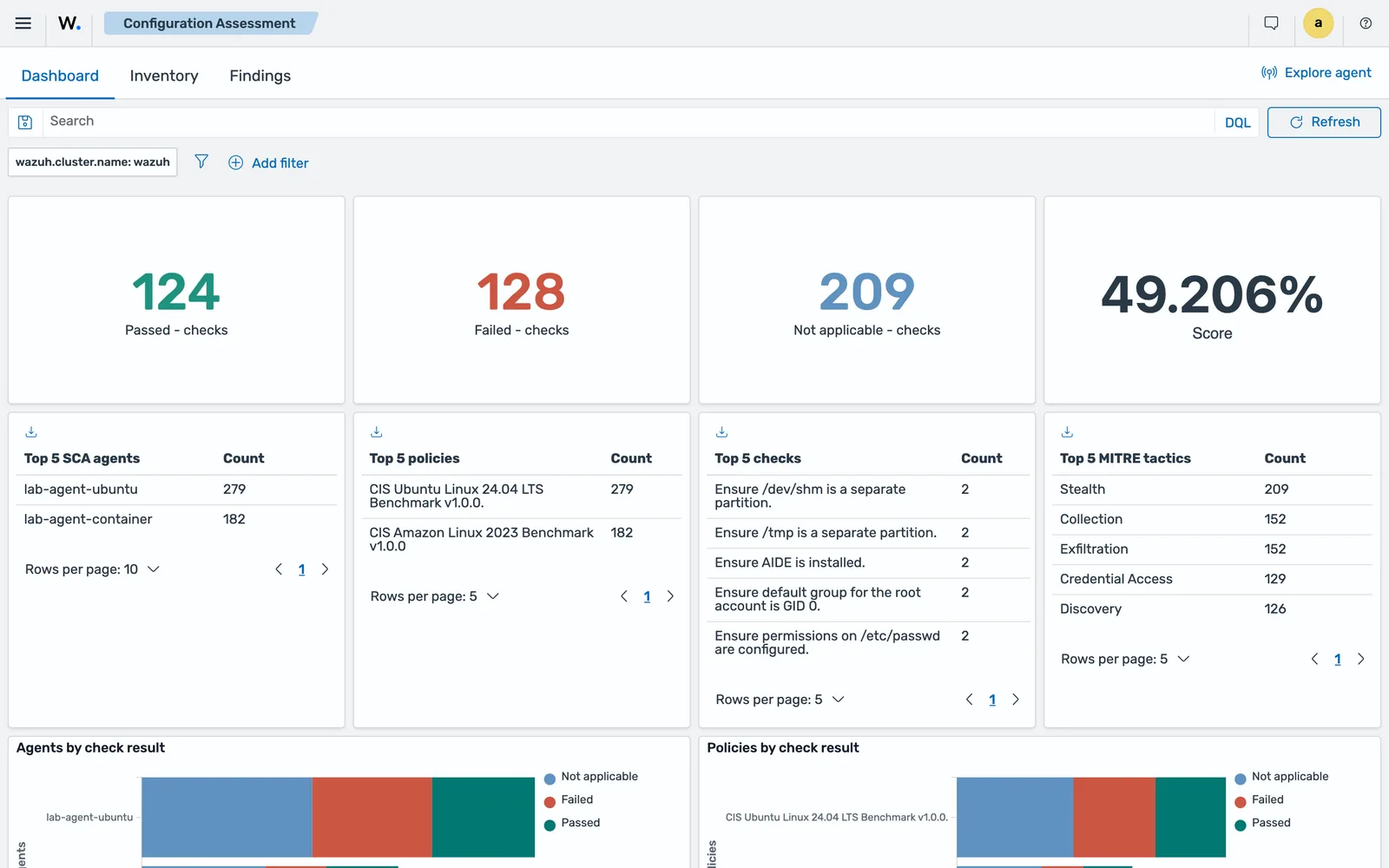
That is worth taking literally. On the 5.0.0-beta5 lab, two agents were enrolled and left alone, one Ubuntu 24.04 and one Amazon Linux 2023, and both had assessed themselves before anyone opened the dashboard: 124 checks passed, 128 failed, 209 not applicable, under the policies CIS Ubuntu Linux 24.04 LTS Benchmark v1.0.0. and CIS Amazon Linux 2023 Benchmark v1.0.0. Half of a default cloud image failing a benchmark on day one is the normal result, not a sign that something is wrong.
You control the module through the <sca> block in the agent configuration file, which lives at /var/ossec/etc/ossec.conf on Linux and Unix, C:\Program Files (x86)\ossec-agent\ossec.conf on Windows, and /Library/Ossec/etc/ossec.conf on macOS. The documented options:
<sca>
  <enabled>yes</enabled>
  <scan_on_start>yes</scan_on_start>
  <interval>12h</interval>
  <max_eps>100</max_eps>
  <policies>
    <policy>/var/ossec/etc/shared/cis_debian10.yml</policy>
    <policy enabled="no">/custom/policies/disabled_policy.yml</policy>
  </policies>
  <synchronization>
    <enabled>yes</enabled>
    <interval>5m</interval>
    <integrity_interval>1h</integrity_interval>
    <max_eps>75</max_eps>
  </synchronization>
</sca>
interval defaults to 12 hours. Resist the urge to shorten it. SCA checks are largely command executions and file reads, and a one-hour interval on a few hundred endpoints buys you nothing except CPU on the hosts you are meant to be protecting.
To disable a bundled policy, either rename the file so it no longer ends in .yaml or .yml, or list it with enabled="no". Both are documented, and the rename survives nothing: the ruleset directory is replaced on upgrade. Put anything you care about elsewhere.
The CIS policies are comprehensive, and comprehensive means noisy. If nobody is going to implement the AppArmor section this quarter, disable that policy in that group and record why, rather than leave a permanently red dashboard that everyone learns to ignore. Narrower scope that gets acted on beats complete scope that gets skipped.
Read a failed check and fix it
Open a failed check in the Inventory tab and expand it. Every check carries a description, a rationale and a remediation string straight from the policy YAML, plus the rules that were evaluated and, on the CIS policies, a compliance block mapping the check to frameworks.
The documented example is the IPv6 firewall default-deny check on an Ubuntu endpoint, check 28588 in cis_ubuntu22-04.yml. Its rules are:
condition: all
rules:
  - "c:ip6tables -L -> r:^Chain INPUT && r:policy DROP"
  - "c:ip6tables -L -> r:^Chain FORWARD && r:policy DROP"
  - "c:ip6tables -L -> r:^Chain OUTPUT && r:policy DROP"
condition: all means every rule must be satisfied. The check failed because the output of ip6tables -L did not show a DROP policy on all three chains. The documented remediation applies the policy, saves it, and restarts the agent so a fresh scan runs:
sudo ip6tables -P INPUT DROPsudo ip6tables-save > /etc/ip6tables.confsudo systemctl restart wazuh-agentThe result for that check then changes to Passed.
One more behaviour matters. When the hash of a policy file changes, the manager flushes its stored data for that policy and the agent sends a fresh full set of results. The documentation notes that this deliberately triggers findings for every check in the policy, to avoid false negatives. Edit a policy on a large group and expect a burst. Plan it for a quiet window.
Query SCA results without the API
With /sca/{agent_id} gone, automation goes to the indexer. SCA state lives in the wazuh-states-sca index, and the documents carry the check, the policy, the result and the agent under wazuh.agent, including wazuh.agent.groups.
A count of failed checks per agent:
curl -sk -u "<USER>:<PASSWORD>" -X POST \
  "https://<INDEXER>:9200/wazuh-states-sca/_search?size=0" \
  -H "Content-Type: application/json" \
  -d '{"query":{"term":{"check.result":"Failed"}},"aggs":{"by_agent":{"terms":{"field":"wazuh.agent.id","size":100}}}}'
Check the mapping before you trust a term query on a string field. Run GET wazuh-states-sca/_mapping and switch to match_phrase if a field turns out to be analysed text. check.result and wazuh.agent.id both behaved as keywords on the beta5 lab, where the same index aggregated by result and by policy returned:
by_result: [('Failed', 128)]
by_policy: [('CIS Ubuntu Linux 24.04 LTS Benchmark v1.0.0.', 85), ('CIS Amazon Linux 2023 Benchmark v1.0.0', 43)]
A single failed check, trimmed, looks like this:
{
 "wazuh": {
  "cluster": {
   "name": "wazuh"
  },
  "agent": {
   "host": {
    "hostname": "7fe59511a9a9",
    "os": {
     "name": "Amazon Linux",
     "type": "linux",
     "version": "2023",
     "platform": "amzn"
    },
    "architecture": "aarch64"
   },
   "name": "lab-agent-container",
   "groups": [
    "default"
   ],
   "id": "001",
   "version": "v5.0.0"
  }
 },
 "check": {
  "result": "Failed",
  "remediation": "Run the following command to install AIDE: # dnf install aide Configure AIDE as appropriate for your environment. Consult the AIDE documentation for options. Initialize AIDE: Run the following commands: # aide --init # mv /var/lib/aide/aide.db.new.gz /var/lib/aide/aide.db.gz.",
  "condition": "all",
...
  "compliance": {
   "iso_27001": [
    "A.8.2.3",
...
   ],
   "pci_dss": [
    "10.2",
    "11.5"
   ],
...
   "nist_800_53": [
    "AC-6"
   ],
   "cmmc": [
    "AC.L2-3.1.7"
   ],
...
  },
  "name": "Ensure AIDE is installed.",
...
Three things to take from it. The remediation text is carried on the document, so a report can be generated without going back to the policy file. wazuh.agent.groups is on every check, which is what makes per-tenant and per-role assessment reporting a filter rather than a join. And the compliance block is fully populated: iso_27001, hipaa, pci_dss, tsc, nis2, nist_800_171, fedramp, nist_800_53, cmmc and gdpr all appeared on this one check, verified on the 5.0.0-beta5 lab. A per-framework view is an aggregation away. That is the subject of the compliance lesson.
Write a custom SCA policy
Custom policies are where SCA earns its place. The bundled benchmarks cover the operating system. Nobody ships a policy for your internal build standard or the three settings your last incident review said must never drift again.
A policy file has four sections. policy and checks are required; requirements and variables are optional.
The policy and requirements sections
policy:
  id: "ssh_baseline"
  file: "sca_ssh_baseline.yml"
  name: "Internal SSH baseline"
  description: "Checks the OpenSSH server configuration against an internal hardening baseline."
  references:
    - https://www.ssh.com/academy/ssh/sshd_config
  regex_type: "osregex"

requirements:
  title: "Check that an OpenSSH server is present on the endpoint"
  description: "The policy is skipped entirely if the endpoint does not run an SSH server."
  condition: any
  rules:
- 'f:$sshd_file'id, file, name and description are mandatory in the policy section. regex_type accepts osregex, the default, or pcre2.
Requirements are a gate. If they are not satisfied, the policy does not run at all, and you get no results rather than a wall of not-applicable checks. Use them to bind a policy to the software it is about.
Rules: five types, three operators
Every rule starts with a location type and a target, then optionally an arrow and a content test.
| Type | Character | Notes |
|---|---|---|
| File | f |
Existence or content |
| Directory | d |
Existence, contained files, or content of a contained file |
| Process | p |
Existence only |
| Command | c |
Content of the output only |
| Registry | r |
Windows only |
Content operators are literal by omission, r: for a regular expression, and n: for a numeric comparison with a capture group. Negate a rule with not at the start, or a content operator with !. Chain content tests with &&. The spaces around ->, && and compare are mandatory, and the context of a content check is a single line.
- id: 90002
  title: "Ensure SSH MaxAuthTries is 4 or lower"
  description: "MaxAuthTries caps the number of authentication attempts per connection."
  rationale: "A low limit slows online guessing and makes the failures visible in the logs."
  remediation: "Set MaxAuthTries 4 in /etc/ssh/sshd_config and reload the sshd service."
  condition: all
  rules:
- 'f:$sshd_file -> n:^\s*MaxAuthTries\s*\t*(\d+) compare <= 4'Conditions decide the result
condition aggregates the rule results: all passes only when every rule is satisfied, any passes as soon as one is, and none passes only when no rule is satisfied. Not applicable propagates: under all, if any rule is not applicable and none failed, the check is not applicable. A content rule whose target does not exist is not applicable rather than failed, which is exactly the behaviour you want for a policy that spans mixed builds.
Check IDs must be unique across every policy file the agent has loaded. The bundled CIS policies use IDs in the tens of thousands, so the companion policy starts at 90000.
Push a custom policy to an agent group
Copying files to endpoints by hand does not scale past a demo. Use agent groups. Place the policy file in the group directory on the manager and fix ownership:
sudo cp sca_ssh_baseline.yml /var/wazuh-manager/etc/shared/linux-servers/sudo chown wazuh-manager:wazuh-manager /var/wazuh-manager/etc/shared/linux-servers/sca_ssh_baseline.ymlThen reference it from that group’s agent.conf. Agents store every file received from the manager under <WAZUH_HOME>/etc/shared/, regardless of which group it came from, so use a path relative to the agent installation directory:
<agent_config os="Linux">
  <sca>
    <policies>
      <policy>etc/shared/sca_ssh_baseline.yml</policy>
    </policies>
  </sca>
</agent_config>
The pushed <sca> block merges with the agent’s local one rather than replacing it, so the bundled CIS policy keeps running alongside yours.
The remote_commands gate
A policy distributed by the manager is allowed to run c: command rules only if the agent opts in:
echo "sca.remote_commands=1" | sudo tee -a /var/ossec/etc/local_internal_options.confThis is off by default for a good reason: turning it on means a compromised manager can execute commands on every endpoint in the group. The documented alternative is to place the policy file on the endpoint directly, through configuration management or an image build, and skip the flag.
SCA is not vulnerability detection
| Security Configuration Assessment | Vulnerability detection | |
|---|---|---|
| Question answered | Is this configured as our standard requires? | Does this host run software with known CVEs? |
| Input | YAML policy files on the agent | Software inventory plus the Wazuh CTI feed |
| Runs | On the agent, on a schedule | On the manager, driven by inventory changes |
| Results index | wazuh-states-sca |
wazuh-states-vulnerabilities |
| You fix it by | Changing a setting | Patching or removing a package |
Run both. They fail in opposite directions. Details on the second are in the vulnerability detection lesson.
Common errors
A custom policy produces no results at all
Cause: the requirements section is not satisfied, so the scan for that file never starts. The documentation is explicit that a policy whose requirements fail is skipped silently.
Fix: test each requirement rule by hand on the endpoint. f:$sshd_file means the file must exist at the resolved path. Loosen the requirement or correct the path, then restart the agent to force a scan.
Every check in a policy is Not applicable
Cause: the rule targets do not exist on the endpoint. A content check against a missing file is not applicable, by design.
Fix: confirm the paths for that platform. Policies written against Debian paths rarely survive contact with Red Hat. Use variables for anything path-shaped and set them per policy file.
A command rule never matches in a pushed policy
Cause: sca.remote_commands is not enabled on the agent, so command rules in manager-distributed policies do not execute.
Fix: either add sca.remote_commands=1 to the agent’s local_internal_options.conf, accepting what that allows, or deploy the policy file to the endpoint outside Wazuh.
The whole policy stops loading after an edit
Cause: duplicate check IDs, or invalid YAML. The id field under policy and under checks must be unique across all policy files on that agent.
Fix: renumber into a range no bundled policy uses, and lint the file before shipping it. Keep custom checks in one numbering block per policy so collisions are obvious.
A custom policy vanishes after an agent upgrade
Cause: the bundled ruleset directories are not preserved across installations and updates. A custom policy placed in /var/ossec/ruleset/sca is deleted.
Fix: keep custom policies elsewhere, or distribute them through a group so the manager restores them.
What to verify at GA
The <sca> reference page still documents skip_nfs and the day, wday and time scheduling options, while the configuration page documents synchronization and max_eps and never mentions skip_nfs. The two pages drifted during the beta. Before depending on any of those five options, check them against the release documentation and confirm the agent accepts the configuration rather than logging a parse error.
Official documentation for this topic: Security Configuration Assessment configuration.
Next: Wazuh Agent Groups and Centralised Configuration.
Files for this lesson
Every file this lesson refers to, exactly as used. Open a file to read it in the browser, or download the set as a zip. Download wazuh-sca-cis-benchmark.zip. The full set for all lessons is at wazuh-tutorial-files.zip.
README.md2.1 KBagent.conf1.4 KBsca_ssh_baseline.yml3.6 KB
Frequently asked questions
Where are Wazuh SCA results stored in 5.0?
SCA results are written to the wazuh-states-sca stateful index on the Wazuh indexer. The agent keeps its own copy of each check result and sends only the differences, so the index holds the current state rather than a log of every scan. The dashboard reads that index under Endpoint security, Configuration assessment.
Why was the /sca API endpoint removed in Wazuh 5.0?
The manager no longer holds SCA results as a queryable resource. Assessment state lives in the indexer, so the manager API dropped the endpoint and you query the wazuh-states-sca index on port 9200 instead. Automation that called GET /sca/{agent_id} on 4.x has to be rewritten against the indexer.
Which CIS benchmarks ship with the Wazuh agent?
The agent installs only the policy matching the endpoint operating system. The catalogue covers Windows 10, 11 and Server 2012 R2 through 2025, Red Hat, CentOS, Alma, Rocky, Oracle, Debian, Ubuntu, SUSE, Amazon Linux and a range of macOS releases. The full list is on the available SCA policies page in the documentation.
Can I run a Wazuh SCA scan on demand?
There is no on-demand scan command in the 5.0 beta documentation. Restarting the agent triggers a scan because the module scans on start, and the interval option controls the scheduled cadence. Changing a policy file also invalidates the stored results for that policy and forces a fresh scan.
What is the difference between SCA and vulnerability detection in Wazuh?
SCA assesses configuration against a policy: is root login disabled, is the firewall default deny. Vulnerability detection compares the software inventory against known CVEs. A host can pass every CIS check and still be riddled with unpatched packages, and the reverse is equally common.