Compliance mapping is a first-class field on a Wazuh 5.0 rule. Where 4.x carried requirement identifiers inside rule.groups as free text, a 5.0 Sigma rule has a structured compliance: block with one key per framework, and every finding the rule produces carries that mapping under wazuh.rule.compliance. That single change is what makes framework filtering, per-control aggregation and evidence export work without string parsing. What has not changed is the honest limit: Wazuh evidences technical controls, and an audit is mostly not about technical controls.
What you need
- A 5.0 deployment producing findings, and familiarity with the rule format from writing custom Wazuh detection rules.
- The scope document for whichever framework you are actually being assessed against. Mapping without a scope produces a dashboard nobody reads.
- SCA enabled on the endpoints in scope, from Wazuh SCA and CIS benchmarks.
- A retention decision made before the audit period starts. The default retention will not survive an audit, and the reason is below.
- If evidence has to leave Wazuh on a schedule, the intake patterns in SOAR with Wazuh apply to compliance exports as much as to alerts.
The compliance block on a 5.0 rule
The Wazuh rules reference defines compliance as an optional top-level object. Each key is a normalised framework identifier and each value is an array of requirement identifier strings.
compliance:
  pci_dss:
    - "2.2.1"
    - "6.3.3"
  iso_27001:
    - A.8.16
    - A.9.4.2
  nist_800_53:
    - AC-3
    - AU-2
The documented framework keys are gdpr, pci_dss, cmmc, nist_800_53, nist_800_171, hipaa, iso_27001, nis2, tsc and fedramp. Identifiers that start with a digit need quoting, which is why PCI DSS requirements appear as "2.2.1" rather than bare.
Two properties of this block are worth knowing before you plan an evidence pipeline.
It is interpolated. Wazuh extends Sigma with dynamic event field referencing, and compliance.* is one of the fields that supports it, alongside title, tags and mitre.*. A {{ field.path }} placeholder inside a compliance array resolves against the triggering event before the finding is written. A missing or null field resolves to an empty string rather than failing, and a value that is entirely an empty placeholder is dropped from the output. That last behaviour is the one to watch: a mapping can silently disappear from a finding.
It lands on the finding. The enriched finding carries the mapping at wazuh.rule.compliance.<framework>, as an array of strings. That is not reserved for rules you write: a finding produced by the shipped file integrity content on the beta5 lab carried all ten framework keys at once. Trimmed to four of them:
{
 "rule": {
  "sigma_id": "b7ab7d97-c94a-57ab-af87-f33213ecdf4d",
  "level": "medium",
  "compliance": {
   "iso_27001": [
    "A.12.4.1",
    "A.12.6.1",
    "A.16.1.2"
   ],
   "pci_dss": [
    "10.3.2",
    "10.3",
    "11.5.2",
    "11.5"
   ],
   "nis2": [
    "21.2.a",
    "21.2.e",
    "23"
   ],
...
   "cmmc": [
    "AU.L2-3.3.1",
    "CM.L2-3.4.1",
    "SI.L2-3.14.1"
   ],
...
Everything downstream, filters, aggregations, saved searches and reports, works off that path.
Configuration assessment results carry the same block, in the same shape, under check.compliance in the wazuh-states-sca index. A failed CIS check from the lab, trimmed:
 "check": {
  "result": "Failed",
  "remediation": "Run the following command to install AIDE: # dnf install aide ...",
  "compliance": {
   "iso_27001": [
    "A.8.2.3",
    "A.8.3.1",
...
   ],
   "pci_dss": [
    "10.2",
    "11.5"
   ],
...
  },
  "name": "Ensure AIDE is installed.",
That is worth noticing before you design an evidence pipeline: the same framework identifier reaches you from two different places, a finding on a data stream and a check result in a state index, and an auditor’s sample usually needs both.
Which frameworks actually have dashboards
All ten, which is more than the documentation implies. The regulatory compliance documentation describes the default ruleset as supporting PCI DSS, HIPAA, NIST 800-53, TSC and GDPR, and carries dedicated guidance sections for only four. The shipped interface is ahead of it. On a 5.0.0-beta5 install, Security operations > Regulatory Compliance opens with a tab per framework: PCI DSS, CMMC, FedRAMP, GDPR, HIPAA, ISO 27001, NIS2, NIST 800-53, NIST 800-171 and TSC.
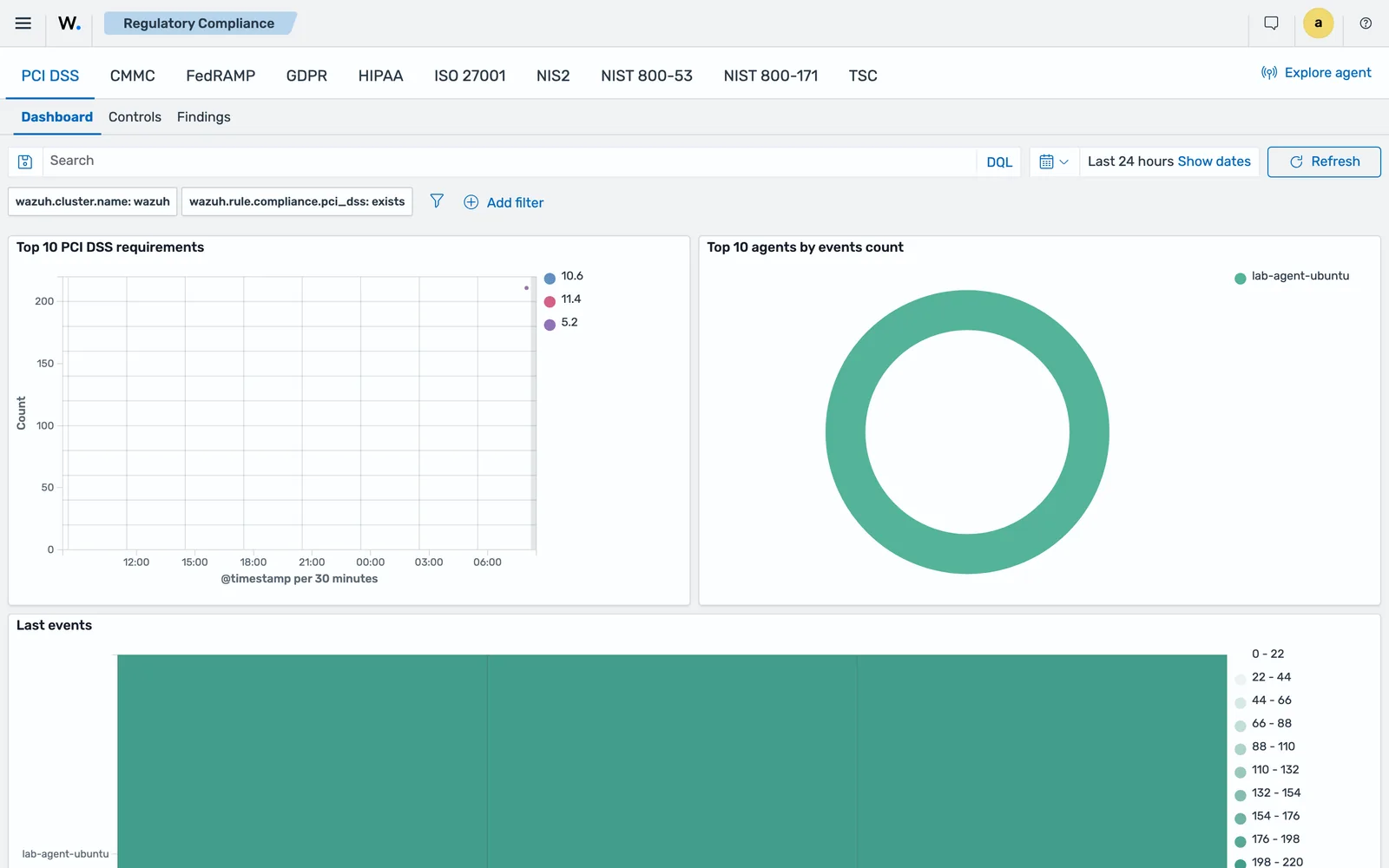
wazuh.rule.compliance.<framework>: exists.Each framework has the same three tabs. Dashboard gives the overview, including top agents and requirements over time. Controls gives the requirement breakdown. Findings lists the findings mapped to that framework regardless of log source. The filter bar shows how the view is built, which is worth knowing because it is also how you would build your own: wazuh.cluster.name plus wazuh.rule.compliance.pci_dss: exists.
| Framework | Rule compliance key |
Tab on beta5 | Practical position |
|---|---|---|---|
| PCI DSS | pci_dss |
Yes | Best supported; default ruleset maps to requirements out of the box |
| HIPAA | hipaa |
Yes | Section-level mappings such as 164.312.b |
| GDPR | gdpr |
Yes | Article-level mappings such as IV_32.1.a |
| SOC 2 (TSC) | tsc |
Yes | Common Criteria CC1 to CC9 |
| NIST 800-53 | nist_800_53 |
Yes | Control identifiers such as AU-6 |
| NIST 800-171 | nist_800_171 |
Yes | Requirement numbers such as 3.3.1 |
| ISO 27001 | iso_27001 |
Yes | Annex A controls such as A.12.4.1 |
| CMMC | cmmc |
Yes | Practice identifiers such as AU.L2-3.3.1 |
| NIS2 | nis2 |
Yes | Article references such as 21.2.a |
| FedRAMP | fedramp |
Yes | Control identifiers such as SI-4 |
A tab existing is not the same as a control being evidenced, so do not read that table as coverage. It means the view is there and the tagging reaches it. What each framework’s findings actually prove is the subject of the gap table further down, and that has not changed.
Build a control-level view the packaged dashboard does not give you
The framework tabs answer “how are we doing against PCI DSS”. They do not answer “show me the evidence for control A.9.4.2 between these two dates”, which is the question an assessor actually asks. For that, and for any framework outside the ten keys, the pattern is the same three artefacts.
A saved search on wazuh-findings-v5-* filtered to documents that carry the key:
wazuh.rule.compliance.iso_27001: *A visualisation aggregating on the requirement identifier, with a second aggregation on wazuh.agent.name so you can answer “which endpoints evidence this control” rather than only “how many events”.
A saved search per control for the controls the auditor will sample, filtered to the specific identifier:
wazuh.rule.compliance.iso_27001: "A.9.4.2"Name them so an auditor can read the list without you in the room. ISO27001-A.9.4.2-privileged-access-2026Q3 beats iso-dash-v2.
The same shape works against wazuh-states-sca with check.compliance.iso_27001, which is where the configuration half of most controls lives.
Export evidence with the Reporting module
The Reporting module generates reports from dashboards, visualisations and saved searches. Save the object first, then create the report definition under Explore > Reporting.
A report definition takes a name, the report source (dashboard, visualisation or saved search), the source object, the time range, the output format, the trigger and optional notification settings. Dashboards and visualisations produce PDF or PNG; saved searches produce CSV or XLSX. The trigger is either On demand or Schedule, and only on-demand definitions expose a Generate report button, because scheduled ones generate themselves.
You can also export a CSV or XLSX straight from a saved search in Explore > Discover without a report definition, provided an index pattern exists. For ad-hoc evidence requests during an assessment, that is usually faster.
Reporting access is governed by indexer RBAC, with three predefined roles: reports_read_access, reports_instances_read_access and reports_full_access. Give the auditor’s read-only account reports_instances_read_access so they can list and download generated reports without being able to create or change definitions. That separation is itself an access-control control, and it is easier to demonstrate than to explain.
Retention is the control that fails audits
This is the single most important paragraph in the lesson, and the one most likely to be discovered late.
The default retention on Wazuh 5.0 data streams, read off the Index State Management policies on a 5.0.0-beta5 install:
| Data stream | Default retention |
|---|---|
wazuh-events-raw-v5 |
10 minutes |
wazuh-events-v5-* |
1 hour |
wazuh-findings-v5-* |
90 days |
wazuh-active-responses |
3 days |
wazuh-metrics-* |
30 days |
Rollover happens at 20 GB primary shard size or 200 million documents, and retention is enforced by Index State Management policies created by the Setup plugin. The 200 million figure is in the shipped policies as min_doc_count: 200000000.
Note what is not in that table: the state indices. The six policies shipped on beta5 cover raw events, events, findings, active responses, metrics and AI assistant sessions, and nothing else. wazuh-states-sca, wazuh-states-fim-files and wazuh-states-vulnerabilities are current-state indices outside that set, so they hold today’s picture and no history at all. For an audit that means a snapshot on a schedule, because the index itself cannot tell you what the configuration looked like in March.
Read those numbers against what your framework asks for. Audit log retention requirements are commonly written in months, with a shorter window that must be immediately searchable. Check the exact figure in your own standard, then compare it with the table. An assessor asking for a sample from eight months ago against a default install gets nothing, because 90 days of findings and one hour of events is what exists.
Three ways out, in order of how well they hold up:
- Change the ISM retention on
wazuh-findings-v5-*to cover the audit period, and size the indexer for it. Findings are far smaller than events, so this is usually affordable. - Snapshot to object storage and document the restore procedure. Snapshots satisfy retention; they do not satisfy “immediately accessible”, so pair them with a shorter online window.
- Ship a copy of the events you must retain to cheaper storage outside the indexer. Note that 5.0 indexes every event, not only alerts, so the raw volume is much higher than a 4.x deployment of the same size and you do not want all of it.
Whichever you pick, Wazuh upgrade, backup and index retention has the ISM and snapshot mechanics, and decide it before the audit period starts. Retention cannot be applied retrospectively.
Map configuration assessment to controls
Findings evidence detection. SCA evidences configuration, which is what most framework controls are actually written about.
SCA scans endpoints against YAML policy files, mostly derived from CIS benchmarks, and results land in the wazuh-states-sca index rather than in findings. That index is a current-state index, continuously updated, not a time series, which changes how you use it as evidence: it answers “is this control in place now”, and a snapshot of it answers “was it in place on this date”.
For a control like “disable unnecessary services” or “enforce password complexity”, an SCA check result is stronger evidence than any log. For a control like “detect and respond to malicious software”, a finding is. Use both and be clear which is which.
The manager API endpoint GET /sca/{agent_id} was removed in 5.0. Query wazuh-states-sca on the indexer instead, which is also where you build the saved search that becomes the evidence export.
What Wazuh cannot evidence
Be direct about this with auditors and with your own management. It buys credibility and it prevents a scramble.
| Control area | Wazuh evidence | Gap |
|---|---|---|
| Audit logging and monitoring | Strong: findings, events, retention policy | Completeness of log sources is your claim, not Wazuh’s |
| Logical access monitoring | Strong: authentication findings, access-management category | Access reviews, joiner-mover-leaver process |
| File integrity | Strong: wazuh-states-fim-files, FIM findings |
What “authorised change” means is your change process |
| Vulnerability management | Good: wazuh-states-vulnerabilities, CTI feed |
Remediation SLAs, exception approvals, risk acceptance |
| Configuration hardening | Good: SCA against CIS policies | Baseline approval, deviation sign-off |
| Malware protection | Partial: detection findings, rootkit checks | Coverage proof, prevention, quarantine records |
| Incident response | Partial: case status, comments, tags on findings | Plan, roles, tabletop exercises, post-incident reviews |
| Encryption and key management | None | Entirely outside Wazuh |
| Vendor and third-party risk | None | Entirely outside Wazuh |
| Governance, policy, training, HR | None | Entirely outside Wazuh |
A framework like CMMC or ISO 27001 is mostly rows in the bottom half of that table. Wazuh is a strong answer to a minority of the controls and no answer at all to the majority. Positioning it as a compliance platform rather than a monitoring platform is how organisations end up with a false sense of readiness.
What auditors actually ask for
Five things, consistently, across frameworks.
Population completeness. Not “show me an alert”, but “show me that every in-scope system is reporting”. Answer with an agent inventory filtered to the scope, plus the disconnected-agent view. An assessor who finds one unmonitored in-scope host discounts everything else you showed them.
A sample with timestamps they chose. Which is the retention problem above, again.
Evidence that someone looked. This is where 5.0 is genuinely better than 4.x. Security Analytics case management writes wazuh.case.status, wazuh.case.comment, wazuh.case.tags, wazuh.case.created_at, wazuh.case.updated_at and wazuh.case.user.name onto findings. A saved search over findings with wazuh.case.status of ACKNOWLEDGED or COMPLETED, showing the analyst and the timestamp, is the reviewed-and-actioned evidence auditors ask for and rarely get cleanly.
Who can change the detection. Answer with indexer RBAC roles and the Draft to Test to Custom promotion chain: content is created in Draft, validated in Test, and only promoted content is active. That is a documented change-control path for detection logic, which is exactly the shape a change-management control wants. Wazuh SSO and RBAC covers the role design.
The gaps, from you, before they find them. An honest gap list with owners and dates is treated as maturity. A gap they discover is treated as a finding.
Common errors
A rule’s compliance mapping is missing from the finding
Cause: the mapping used dynamic event field referencing and the referenced field was absent on the event. Documented behaviour is that a missing, null or object-valued field resolves to an empty string, and a value that is entirely an empty placeholder is dropped from the output entirely.
Fix: use static requirement identifiers in compliance: blocks. Reserve interpolation for title and tags, where a blank is cosmetic rather than a lost control mapping.
A PCI DSS requirement number will not save in the rule
Cause: unquoted YAML. 6.5.1 parses as a number and 2.2.1 is not valid YAML as a bare scalar in the way you expect.
Fix: quote every numeric requirement identifier, as the documentation’s own examples do: - "6.5.1".
The Regulatory Compliance dashboard is empty
Cause: usually no findings carry that framework key yet, because the detectors covering the relevant integrations are not running, or the findings that exist fall outside the selected time range.
Fix: check that detectors exist and are scheduled, then widen the time picker beyond the findings retention window to confirm whether the data ever existed. If the window is the problem, the retention section above is your real fix.
Evidence from the audit period no longer exists
Cause: default retention. Events are gone in an hour and findings in 90 days.
Fix: nothing retrospective. Change the ISM policies and start taking snapshots now, and tell the assessor the truth about the period you cannot cover.
Next: Wazuh Threat Intelligence: CTI, MISP and KVDB Lists.
Frequently asked questions
Which compliance frameworks does Wazuh 5.0 support?
Ten: pci_dss, gdpr, hipaa, nist_800_53, nist_800_171, iso_27001, cmmc, nis2, tsc and fedramp. On a 5.0.0-beta5 lab the Regulatory Compliance application carried a tab for every one of them, each with Dashboard, Controls and Findings views, and shipped findings carried all ten keys in their compliance block.
Does Wazuh give you SOC 2 evidence?
Partly, through the TSC framework key and the TSC dashboard. TSC is the AICPA Trust Services Criteria used in SOC 2 engagements, organised as nine Common Criteria categories from CC1 to CC9. Wazuh evidences the technical monitoring and logical access criteria well. It evidences nothing about governance, vendor management or HR controls.
How long does Wazuh keep compliance evidence by default?
Not long enough. The documented default retention is 10 minutes for wazuh-events-raw-v5, one hour for wazuh-events-v5-*, 90 days for wazuh-findings-v5-* and three days for wazuh-active-responses. Any framework asking for twelve months of audit history needs the ISM policies changed, snapshots taken, or both, before the audit period starts.
How do you map a custom Wazuh rule to a compliance requirement?
Add the framework key to the compliance block of the Sigma rule and list the requirement identifiers as strings. For example, a pci_dss list containing "2.2.1" and "6.3.3". The mapping is copied onto every finding the rule produces, under wazuh.rule.compliance, so it is filterable and exportable.
Can Wazuh produce a scheduled compliance report?
Yes. The Reporting module creates report definitions from a dashboard, visualisation or saved search, with an on-demand or scheduled trigger. Dashboards and visualisations export as PDF or PNG, saved searches as CSV or XLSX. The per-module PDF reports from Wazuh 4.x are gone.