Sysmon gives Windows the process, network and image-load telemetry the built-in event log does not, and Wazuh collects it as an ordinary event channel: one <localfile> block pointing at Microsoft-Windows-Sysmon/Operational. The work is in the Sysmon configuration, which decides your event volume and your detection ceiling, and in knowing which Wazuh Common Schema fields the standard content actually produces before you write a rule against them. This lesson lists that field set as a beta5 lab endpoint produced it.
What you need
- A Windows endpoint with an enrolled Wazuh agent. See installing the agent on Windows.
- Administrator rights on the endpoint, and a way to distribute software to the rest of the fleet.
- A reviewed Sysmon configuration. Not a default one.
- The log collection lesson if event channels and
<agent_config>are new.
The PowerShell installer, the <localfile> block, a group agent.conf and the detection rule are in the companion files for this lesson (listed at the end of the page).
Install Sysmon with a configuration you have read
Sysmon ships with a minimal default that logs almost nothing useful and, run without a configuration file, will happily log almost everything. Neither is what you want. Take a maintained baseline from a primary source:
- Sysmon itself, from Microsoft Sysinternals
- SwiftOnSecurity
sysmon-config, a single heavily commented file built around exclusions - Olaf Hartong
sysmon-modular, per-technique modules you compose into one config, with ATT&CK annotations
The Wazuh 5.0-beta documentation walks the same installation using a configuration hosted by Wazuh, in the log collection use cases.
Whichever you start from, read it, edit it for your estate, and commit your copy to your own configuration repository. A Sysmon config is a detection artefact with a lifecycle, not a file you drop once. Someone will ask in six months why a technique is invisible, and the answer will be a line in that file.
Get the right binary
Sysmon is distributed as one zip holding every architecture. Download it from Sysinternals and expand it:
Invoke-WebRequest -Uri "https://download.sysinternals.com/files/Sysmon.zip" -OutFile "$env:TEMP\Sysmon.zip"
Expand-Archive -Path "$env:TEMP\Sysmon.zip" -DestinationPath "$env:TEMP\Sysmon" -Force
On the beta5 lab endpoint the expanded zip held four files:
Name           Length
----           ------
Eula.txt         7490
Sysmon.exe    6162240
Sysmon64.exe  3203368
Sysmon64a.exe 3138824
Sysmon64.exe is the x64 build, Sysmon64a.exe the ARM64 one, Sysmon.exe the 32-bit one. The per-file links under live.sysinternals.com do not cover every build: https://live.sysinternals.com/Sysmon64a.exe returns 404, and the zip is the only route to the ARM64 binary. Script the zip, not the direct file.
Install from an elevated PowerShell session, in the folder holding the executable:
.\Sysmon64.exe -accepteula -i sysmonconfig.xmlOn ARM64 run .\Sysmon64a.exe with the same arguments. On the lab endpoint, with SwiftOnSecurity’s sysmonconfig-export.xml, that returns:
System Monitor v15.22 - System activity monitor
By Mark Russinovich and Thomas Garnier
Copyright (C) 2014-2026 Microsoft Corporation
Using libxml2. libxml2 is Copyright (C) 1998-2012 Daniel Veillard. All Rights Reserved.
Sysinternals - www.sysinternals.com
...
Loading configuration file with schema version 4.50
Sysmon schema version: 4.91
Configuration file validated.
Sysmon64a installed.
SysmonDrv installed.
Starting SysmonDrv.
SysmonDrv started.
Starting Sysmon64a..
Sysmon64a started.
Two things in that output matter later. The service takes the name of the binary you ran, so on ARM64 it is Sysmon64a and not Sysmon64, which breaks any check hard-coded to the x64 name. And a configuration written to schema 4.50 loaded cleanly into a 4.91 binary, so a community config lagging the current Sysmon release is normally fine to apply as is.
To change the configuration on a host that already has Sysmon, swap it in place rather than reinstalling:
.\Sysmon64.exe -c sysmonconfig.xmlRecord the SHA-256 of the configuration you applied. It is the only cheap way to answer “is this endpoint running what we shipped” later:
Get-FileHash -Algorithm SHA256 .\sysmonconfig.xmlConfirm the service and the channel before you touch the Wazuh agent:
Get-Service Sysmon* | Select-Object Name, StatusName Status
---- ------
Sysmon64a RunningGet-WinEvent -ListLog 'Microsoft-Windows-Sysmon/Operational'Collect the channel
One block, inside the <ossec_config> element of C:\Program Files (x86)\ossec-agent\ossec.conf:
<localfile>
  <location>Microsoft-Windows-Sysmon/Operational</location>
  <log_format>eventchannel</log_format>
</localfile> </localfile>
</ossec_config>
<!-- END of Default Configuration. -->Restart the agent. The Windows service is named WazuhSvc, with display name Wazuh:
Restart-Service WazuhSvcThen read C:\Program Files (x86)\ossec-agent\ossec.log. The agent lists every channel it opens, and the new one appears alongside the three the installer configured:
2026/09/23 13:43:39 wazuh-agent: INFO: (1951): Analyzing event log: 'Application'.
2026/09/23 13:43:39 wazuh-agent: INFO: (1951): Analyzing event log: 'Security'.
2026/09/23 13:43:39 wazuh-agent: INFO: (1951): Analyzing event log: 'System'.
2026/09/23 13:43:39 wazuh-agent: INFO: (1951): Analyzing event log: 'Microsoft-Windows-Sysmon/Operational'.
No line for Sysmon means the agent never parsed your block. Message 1951 is the one to grep for in a rollout check.
The counters in wazuh-logcollector.state, in the same folder, tell you what the channel is actually producing. One minute after the restart on the lab endpoint:
location                             events  bytes
--------                             ------  -----
Microsoft-Windows-Sysmon/Operational    274 363928
active-response\active-responses.log      0      0
System                                    0      0
Security                                 11  12017
Application                               0      0
274 events and roughly 356 KB in the first minute, against 11 security events, on an idle Windows 11 endpoint doing nothing but sitting there. That ratio is the whole sizing conversation for a Sysmon rollout, and it is measurable per host before you ship anything.
For more than one endpoint, put it in the Windows group’s shared configuration at /var/wazuh-manager/etc/shared/windows/agent.conf instead, wrapped in <agent_config os="Windows">. Validate with verify-agent-conf before renaming the file into place. The reasoning is in agent groups and centralised configuration.
The documented way to confirm the pipeline end to end is to generate an event and go and find it. Run something harmless:
C:\Windows\System32\whoami.exeThen open Explore > Discover on the wazuh-events-v5* index pattern and scope it to the endpoint:
wazuh.agent.name:WIN11-LAB and event.dataset:sysmonAdd event.code, event.action, process.name, process.parent.name and process.command_line as columns. Rows appearing tell you Sysmon is running, the channel is being collected, and the standard content is decoding it.
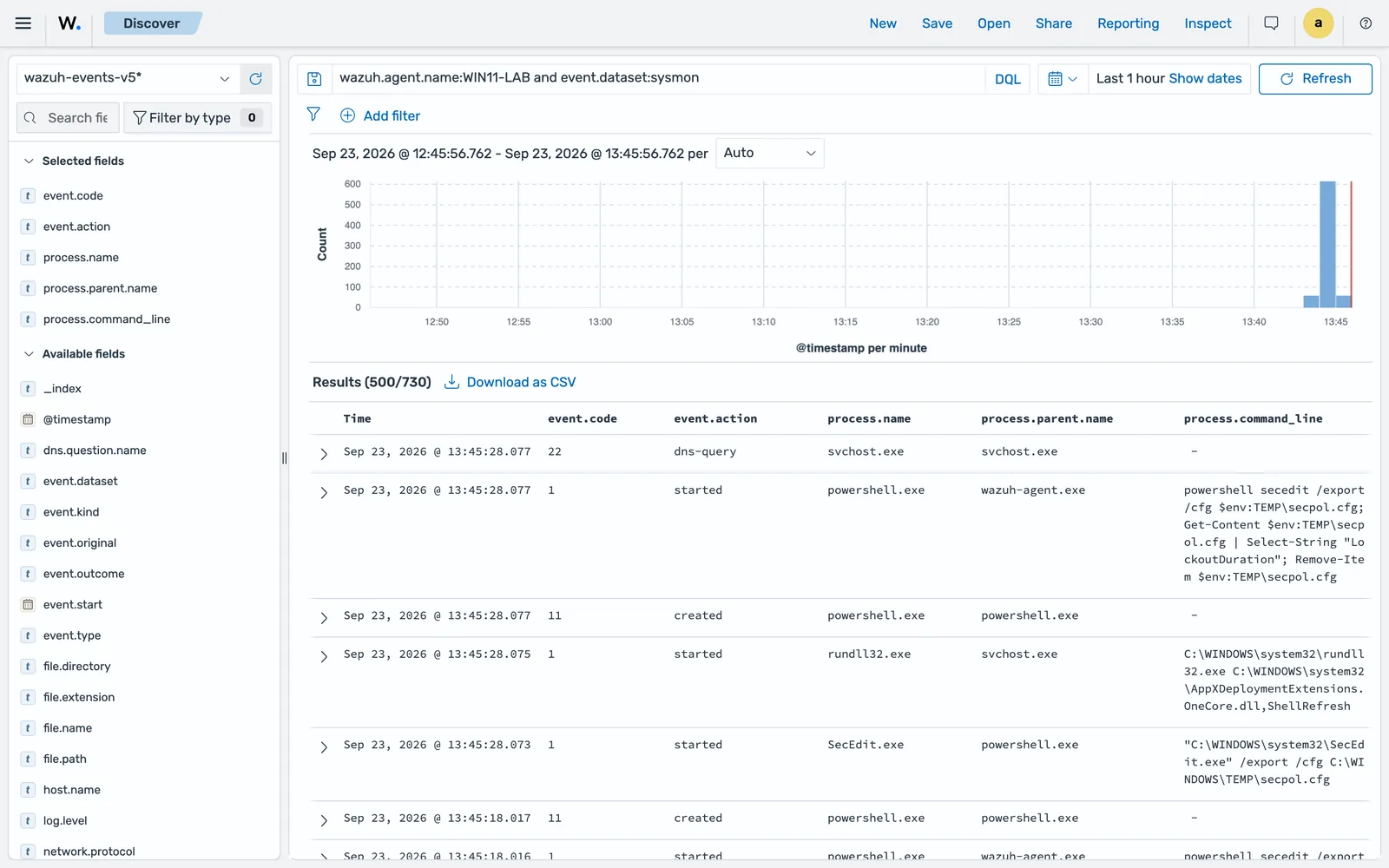
That last point is worth keeping. The agent’s own configuration assessment runs powershell secedit /export with wazuh-agent.exe as the parent, so your monitoring tool is itself one of the first process-creation patterns you will see. Learn your own tooling’s noise before you write exclusions, or you will tune out something you needed.
Filter in the config, not downstream
ignore and restrict do not apply to eventchannel. The only agent-side filter is an XPath <query>:
<localfile>
  <location>Microsoft-Windows-Sysmon/Operational</location>
  <log_format>eventchannel</log_format>
  <query>Event/System[EventID = 1 or EventID = 3 or EventID = 11 or EventID = 22]</query>
  <reconnect_time>10s</reconnect_time>
</localfile>
Treat that as a second line of defence, for an endpoint whose Sysmon configuration you do not control. Exclusions in the Sysmon configuration are better in every dimension: the event is never written, so it costs nothing on the endpoint, nothing on the wire, nothing in the manager and nothing in the indexer. An XPath query only saves the last three.
Which event IDs are worth the volume
Sysmon’s value is concentrated, and so is its cost.
| Event ID | What it records | Why it earns its place |
|---|---|---|
| 1 | Process creation, with command line, hashes and parent | The single highest-value Windows event. Almost every behavioural detection starts here. |
| 3 | Network connection, with the initiating process | Ties an outbound connection to the binary that made it, which the firewall log cannot. |
| 7 | Image loaded | Finds DLL side-loading and unsigned modules. Extremely noisy unless scoped tightly. |
| 8 | CreateRemoteThread | Classic injection signal, low volume, high value. |
| 10 | Process access | Catches credential dumping against LSASS. Very noisy without careful source and target filters. |
| 11 | File created | Drops, staging directories, downloaded payloads. |
| 12, 13, 14 | Registry object added or deleted, value set, key renamed | Persistence and defence evasion. Scope to the keys you care about. |
| 22 | DNS query, with the requesting process | Domain-based hunting and process attribution in one event. |
| 23, 25 | File delete, process tampering | Anti-forensics and process hollowing signals. |
Start with 1, 3, 11, 22 and the registry events, and add 7 and 10 deliberately once you have measured what they produce on a representative host. Those two are where a Sysmon deployment usually goes wrong: enabled globally, they can outproduce everything else combined, and the detections they enable need tight scoping to be worth it.
What that mix looks like in practice
Counting the indexed events for the lab endpoint after an hour, by integration, by dataset, and then the Sysmon events by event code:
WIN11-LAB events total: 2100
by_integration [('windows', 1483), ('wazuh-it-hygiene', 609), ('wazuh-rootcheck', 8)]
by_dataset [('sysmon', 730), ('security', 386), ('system', 269), ('application', 98), ('wazuh.rootcheck', 8)]
sysmon events: 730 [('11', 712), ('1', 15), ('22', 2), ('3', 1)]
Sysmon alone outweighed the three built-in Windows channels combined, and 712 of its 730 events were event ID 11, file creation. That is the SwiftOnSecurity config doing what it is written to do: image load and process access are filtered hard, file creation is not, and a freshly installed Windows box writes files constantly while it updates itself and builds profiles. Fifteen process creations against 712 file creations is not a tuning failure, it is what a new endpoint looks like.
The practical consequence is that your first exclusion pass on a fresh fleet is usually event 11 by path, not events 7 and 10. Measure per host image, because a build machine and a domain controller produce nothing like this shape.
Which fields the decoder writes for a process creation
A Sigma rule can only select on fields the decoder actually sets, so this is the list to write against rather than a guess from the Sysmon XML. On the beta5 lab the Sysmon channel is handled by the standard windows integration: event.dataset is sysmon, wazuh.integration.category is system-activity, the events land in wazuh-events-v5-system-activity, and wazuh.integration.decoders reads decoder/core-wazuh-message/0, decoder/windows-event/0, decoder/windows-sysmon/0.
This is one real event ID 1, trimmed to the fields worth selecting on:
log.level = "information"
host.name = "WIN11-LAB"
process.executable = "C:\\Windows\\SysWOW64\\WindowsPowerShell\\v1.0\\powershell.exe"
process.pe.original_file_name = "PowerShell.EXE"
process.pe.description = "Windows PowerShell"
process.pe.company = "Microsoft Corporation"
process.pe.imphash = "9F91C97560360686D37B0E311BB8BD64"
process.parent.executable = "C:\\Program Files (x86)\\ossec-agent\\wazuh-agent.exe"
process.parent.command_line = "\"C:\\Program Files (x86)\\ossec-agent\\wazuh-agent.exe\""
process.parent.pid = 9716
process.parent.entity_id = "{47e90bbb-8a2b-6ab3-a805-000000000300}"
process.parent.name = "wazuh-agent.exe"
process.command_line = "powershell secedit /export /cfg $env:TEMP\\secpol.cfg; Get-Content $env:TEMP\\secpol.cfg | Select-String \"LockoutDuration\"; Remove-Item $env:TEMP\\secpol.cfg
process.working_directory = "C:\\Program Files (x86)\\ossec-agent\\"
process.entity_id = "{47e90bbb-8a9c-6ab3-ce05-000000000300}"
process.pid = 7528
process.name = "powershell.exe"
process.hash.md5 = "0CB6529404FAEF431547CFF590744553"
process.hash.sha256 = "3BFEDAAA40D9E19E45A3EE10C0F14B1750B01619EBB9F39BE3865BCFDACDD2E5"
user.name = "SYSTEM"
user.id = "S-1-5-18"
user.domain = "NT AUTHORITY"
related.hash = ["MD5=0CB6529404FAEF431547CFF590744553", "SHA256=3BFEDAAA40D9E19E45A3EE10C0F14B1750B01619EBB9F39BE3865BCFDACDD2E5", "IMPHASH=9F91C97560360686D37B0E311BB8BD64"]
related.user = ["SYSTEM"]
event.code = "1"
event.start = "2026-09-23T08:15:24.6648265Z"
event.dataset = "sysmon"
event.kind = "event"
event.outcome = "success"
event.action = "started"
...
wazuh.protocol.location = "EventChannel"
wazuh.integration.name = "windows"
wazuh.integration.decoders = ["decoder/core-wazuh-message/0", "decoder/windows-event/0", "decoder/windows-sysmon/0"]
The event also carries process.args and process.parent.args as arrays, and file.directory, file.name and file.extension describing the parent image.
Four things follow from that list. event.code is a string, so a rule selects "1" and not 1. Hashes arrive both as process.hash.md5 and process.hash.sha256 and again in the related.hash array, which is the field to match a threat intelligence list against because it holds every hash type in one place. Identity is in user.name, user.id and user.domain, with no winlog.* anywhere. And the signed-binary metadata from the PE header, process.pe.original_file_name in particular, survives normalisation, which is what catches a renamed binary that process.name alone would miss.
Write a rule against it
The standard 5.0 content decodes the Sysmon channel already, so the events arrive normalised. It does not, on beta5, detect much with them: those 730 Sysmon events produced zero findings. That is the honest state of the shipped content at this point in the beta. Decoding is solid, Sigma coverage for Sysmon in the standard space is thin, and every one of those events was benign, so read it as “no detections shipped for this yet” rather than “nothing was wrong”. Either way, on beta5 a Sysmon detection is one you write.
What you add is your own detection, and there is a structural rule to respect first.
The standard space is read-only and a custom rule cannot be attached to a standard integration. So the rule goes in an integration you create, in the custom space, and the detector runs it against the data stream where the Windows events land. Because logsource takes no part in matching, this works cleanly: your rule’s logsource.product names your integration, and the detection block selects the events the standard Windows decoders produced. The documented command-monitoring walkthrough does exactly this, with a custom integration whose detector watches wazuh-events-v5-system-activity.
So: create an integration named sysmon-custom with category System Activity, in the Draft space. Then the rule:
id: "a532ee04-5fbf-42ec-b040-3c744be9b52d"
enabled: true
status: "experimental"
level: "high"
logsource:
  product: "sysmon-custom"
  category: "process_creation"
  service: "sysmon"
detection:
  condition: "selection_parent and selection_child and not filter_signed_updaters"
  selection_parent:
    event.dataset: "sysmon"
    event.code: "1"
    process.parent.name:
      - "winword.exe"
      - "excel.exe"
      - "outlook.exe"
      - "mshta.exe"
      - "chrome.exe"
      - "msedge.exe"
  selection_child:
    process.name:
      - "cmd.exe"
      - "powershell.exe"
      - "wscript.exe"
      - "cscript.exe"
      - "rundll32.exe"
      - "regsvr32.exe"
      - "certutil.exe"
  filter_signed_updaters:
    process.command_line|contains:
      - "\\Microsoft\\EdgeUpdate\\"
      - "\\Google\\Update\\"
metadata:
  title: "Office or browser process started {{ process.name }} on {{ wazuh.agent.host.name }}"
  author: "Security engineering"
  description: >-
    A document application or a browser created a command interpreter or a
    living-off-the-land binary.
mitre:
  tactic:
    - "TA0001"
    - "TA0002"
  technique:
    - "T1566"
    - "T1059"
  subtechnique:
    - "T1566.001"
    - "T1059.001"
A list under one field is ORed, several fields inside one selection are ANDed, and selection and not filter is the exclusion idiom. {{ process.name }} and {{ wazuh.agent.host.name }} are Wazuh’s Sigma extension: they resolve against the triggering event when the finding is written, so the title in the findings table names the binary and the host without a rule per combination. The full syntax is in writing custom detection rules.
Confirm with Log test, using a real event
wazuh-logtest does not exist in 5.0. Promote the integration from Draft to Test, then use Security Analytics > Log test, or the indexer API:
curl -sk -u admin:admin -X POST \
  "https://localhost:9200/_plugins/_content_manager/logtest" \
  -H 'Content-Type: application/json' -d @logtest-sysmon.json
Get the event from the endpoint rather than writing one. In Event Viewer, open Applications and Services Logs > Microsoft > Windows > Sysmon > Operational, pick a process-creation record, go to the Details tab, choose XML View, and copy it. A hand-written sample decodes differently from the real thing and will send you chasing a rule that works only in the test space.
Log test only runs in the test, custom and standard spaces on beta5, so a Draft integration has to be promoted before you can test anything in it. The lab pass behind this lesson verified the collection path and the field set rather than this rule’s promotion, so treat the Log test step as the check you run, not one whose output is reproduced here.
Read normalization.output in the response and correct the selections to the field paths it shows. Then read the detection section, which reports rules_evaluated, rules_matched and a matches array with matched_conditions. When it matches, promote Test to Custom and create a detector over wazuh-events-v5-system-activity with a 2-minute schedule. A detector can carry at most 100 rules and cannot mix standard and custom rules in one detector.
Common errors
Get-WinEvent : There is not an event log on the localhost computer that matches "Microsoft-Windows-Sysmon/Operational".
Sysmon is not installed, or the install failed. Check for the service with Get-Service Sysmon* rather than a fixed name: it is Sysmon64 on x64 and Sysmon64a on ARM64. Then reinstall with -accepteula -i.
FullyQualifiedErrorId : NativeCommandError when the installer runs
Sysmon writes its banner to standard error, so PowerShell raises a non-terminating error even on a successful install. In a script with $ErrorActionPreference = 'Stop' the call looks like this and stops the run, while Sysmon carries on and installs correctly:
Sysmon64a.exe :
    + CategoryInfo          : NotSpecified: (:String) [], RemoteException
    + FullyQualifiedErrorId : NativeCommandError
Set $ErrorActionPreference = 'Continue' around the call, or pipe it through 2>&1 | Out-String, and decide success from the service state instead of the exit path.
The localfile block was added but the channel is never read
Check where it landed. The Windows agent’s default ossec.conf ends with a comment after the closing tag, so appending at end of file, or anchoring a script on </ossec_config> as the last line, puts your block outside the configuration or nowhere at all. The block must sit before the last </ossec_config>. Confirm from the log: no (1951): Analyzing event log: 'Microsoft-Windows-Sysmon/Operational'. line after a restart means the agent never saw it.
The Sysmon channel exists but no events reach Wazuh
Work down the chain. Is the Sysmon service running? Is the channel filling, checked with Get-WinEvent -ListLog and its RecordCount? Did the agent restart after the configuration change, with Restart-Service WazuhSvc rather than the wazuh service name the docs use? Is the channel name spelled exactly Microsoft-Windows-Sysmon/Operational? A typo in <location> produces no error, just silence. wazuh-logcollector.state settles agent side against pipeline side in one look: a counter above zero for the channel means the agent is reading it.
Events arrive but the rule never produces a finding
Almost always a field path the decoder does not set, or a value in the wrong form. Run a real event through Log test and compare normalization.output against every field in your selections. Then check that the detector includes the rule, is in the Custom space, watches the right index, and has had a full interval to run.
Events stop after a reboot or a Sysmon upgrade
Reinstalling Sysmon can reset the channel. Confirm the channel still exists and the agent is still reading it, and check that the configuration was reapplied with -c rather than left at the installer default.
Sysmon volume swamps the indexer after a fleet rollout
Event IDs 7 and 10 are the usual cause where they are enabled. Where they are already filtered, as in the SwiftOnSecurity baseline, event 11 takes over: it was 97 per cent of the Sysmon events on the lab endpoint. Count by event.code before you guess, then narrow the winner in the Sysmon configuration rather than at the rule, because the cost is already paid by the time a rule sees the event. The measurement approach is in performance tuning.
A Sysmon config change did not take effect
-i installs and -c reconfigures. Running -i on a host that already has Sysmon does not silently update the configuration. Use -c, then re-record the hash.
Where to go next
Sysmon telemetry is the raw material for most Windows detection engineering, and the community Sigma corpus is written largely against it. Bringing those rules in, mapping their fields to the Wazuh Common Schema and measuring what you cover is detection engineering with Sigma and ATT&CK. If the new volume changes the answer to a question you already asked, revisit system requirements and sizing.
Next: Wazuh SCA: CIS Benchmarks and Custom Policies.
Files for this lesson
Every file this lesson refers to, exactly as used. Open a file to read it in the browser, or download the set as a zip. Download wazuh-sysmon.zip. The full set for all lessons is at wazuh-tutorial-files.zip.
README.md4.2 KBagent.conf990 Binstall-sysmon.ps13.6 KBlocalfile-sysmon.xml1.4 KBlogtest-sysmon.json831 Brule-sysmon-office-spawns-shell.yml4.3 KB
Frequently asked questions
Which Sysmon config should I use with Wazuh?
Start from a maintained community baseline rather than the shipped default, read it, and commit your edited copy to your own repository. SwiftOnSecurity's sysmon-config is the usual starting point for a single tuned file, and Olaf Hartong's sysmon-modular builds one from per-technique modules and maps them to ATT&CK. The Wazuh 5.0-beta documentation walks the installation using a configuration hosted by Wazuh.
Which Sysmon event IDs matter most?
For most teams: 1 for process creation, 3 for network connections, 7 for image loads, 8 for remote thread creation, 10 for process access, 11 for file creation, 12, 13 and 14 for registry activity, 22 for DNS queries, and 23 and 25 for file deletion and process tampering. Event ID 1 alone carries more detection value than the rest combined, and events 7 and 10 are the most expensive if you leave them wide open.
Can a custom rule use the standard Wazuh Sysmon content?
It can match events the standard decoders produced, but it cannot live inside a standard integration, because the standard space is read-only. Create your own integration, put the rule in it, and point the detector at the data stream where the Windows events land, normally wazuh-events-v5-system-activity. logsource does not affect matching, so the detection block is what ties your rule to those events.
Does Wazuh 5.0 need a Sysmon agent on every Windows endpoint?
Sysmon is a separate Microsoft Sysinternals driver and service. The Wazuh agent does not install it or bundle it. You deploy Sysmon with your normal software distribution tooling, then add one localfile block so the agent collects the Microsoft-Windows-Sysmon/Operational channel.
How do I stop Sysmon from flooding the Wazuh indexer?
Filter in the Sysmon configuration, not downstream. Every event Sysmon writes is collected, sent, normalised and indexed, so exclusions in the config are the only ones that save resources at every stage. Count by event.code first: on a lab Windows 11 endpoint running the SwiftOnSecurity baseline, 712 of 730 Sysmon events were event ID 11 file creation, not the image load and process access events usually blamed. An XPath query on the localfile block is a second line of defence for an endpoint whose config you do not control.